5 SaaS Framework: Advanced Programming Abstractions for SaaS
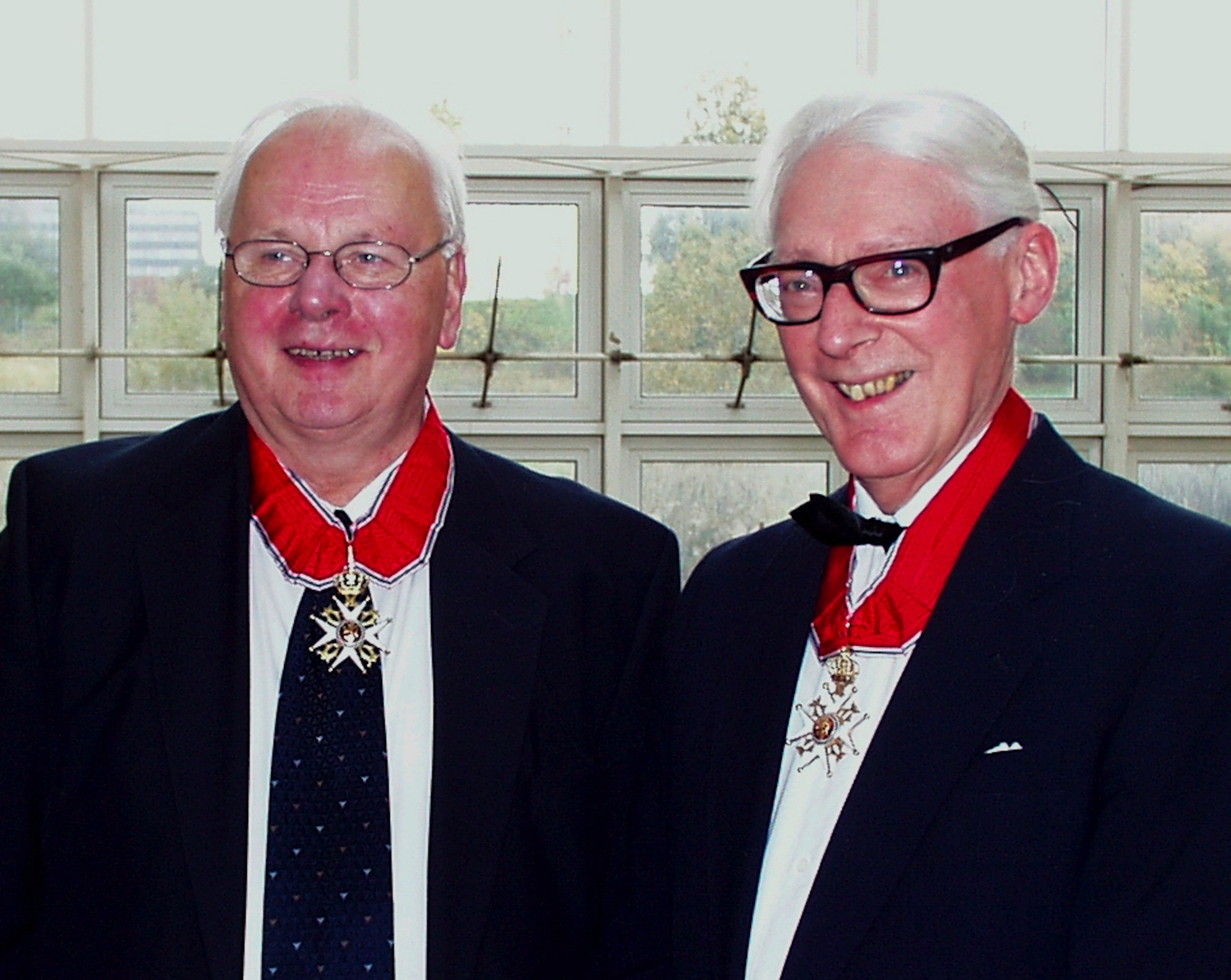
Kristen Nygaard (left, 1926–2002) and Ole-Johan Dahl (right, 1931–2002) shared the 2001 Turing Award for inventing fundamental OO concepts including objects, classes, and inheritance, and demonstrating them in Simula, the ancestor of every object-oriented language.
Programming is understanding.
— Kristen Nygaard
This chapter covers advanced features of Rails that you can use to make your code more DRY and concise, including how to reuse entire external services such as Twitter to integrate with your apps.
Prerequisites
You should be familiar as a Web user with the “Log in using…” single sign-on flow supported by many apps, such as “Log in with Google” or “Log in with GitHub.”
You should have a basic understanding of join operations in relational databases, and in particular on how tables are joined using foreign keys. We review this material only briefly before showing how Rails uses it to provide flexible mechanisms for expressing associations among ActiveRecord models in a SaaS app. To brush up on this material, complete the “Relational queries in SQL” section of the Khan Academy SQL tutorial.
Concepts
Rails mechanisms such as controller filters, model lifecycle hooks, and model validations provide a limited form of aspect-oriented programming, which allows code about crosscutting concerns to be centralized in a single place and automatically called when needed.
Single sign-on (SSO), such as “Log in using your GitHub account,” lets a user identify themselves to service B by their credentials on service A, without revealing those credentials to service B. Using SSO relieves your app of having to manage passwords and provides some convenience to the user, though at the expense of sacrificing some privacy.
ActiveRecord associations use metaprogramming and reflection to map relationships among resources in your app, such as “belongs to” or “has many”, to queries that mirror those relationships in the app’s database. From ActiveRecord all the way through the routing system, Rails provides comprehensive facilities for managing such relationships.
ActiveRecord scopes are composable “filters” you can define on your model data, enabling DRY reuse of model logic.
Some important pieces of code in your app don’t really belong in a model, view, or controller. We introduce some other kinds of code that play important roles and suggest where to put it and how to structure it.
5.1 DRYing Out MVC: Partials, Validations and Filters
 One of the core tenets of Rails is DRY—Don’t Repeat Yourself. In this section we introduce three mechanisms Rails provides to help you DRY out your code: model validations, view partials, and controller filters.
We start with views. A partial is Rails’ name for a reusable chunk of a view. When similar content must appear in different views, putting that content in a partial and “including” it in the separate files helps DRY out repetition.
As Section 6.5 explains, the partial is also the basic unit of view updating for JavaScript-enabled pages.
Our simple app already presents one opportunity: the Index (list all movies) view includes a chunk of HTML that is repeated for each movie in the list. We can factor out that code into a partial, and include it by reference, as Figure 5.1 shows.
ch_advanced_rails/code/index_using_partial.html.erb
ch_advanced_rails/code/partial_index.html.erb
_movie.html.erb: Rails uses the filename (without the underscore) to set a local variable (movie) to each item of the @movies collection in turn.
 Partials rely heavily on convention over configuration. Their names must begin with an underscore (we used
 _movie.html.erb) which is absent from the code that references the partial. A partial may be in a different directory than the view that uses it, in which case a path such as ’layouts/footer’ would cause Rails to look for app/views/layouts/_footer.html.erb. A partial can access all the same instance variables as the view that includes it, but partials that may be used from different views usually do not reference controller instance variables, since those may be set differently (or not at all) by different controller actions. A particularly nice use of a partial is to render a table or other collection in which all elements are the same, as Figure 5.1 demonstrates.
Partials are simple and straightforward, but the mechanisms provided by Rails for DRYing out models and controllers are more subtle and sophisticated. It’s common in SaaS apps to want to enforce certain validity constraints on a given type of model object or constraints on when certain actions can be performed. For example, when a new movie is added to RottenPotatoes, we may want to check that the title isn’t blank, that the release year is a valid date, and that the rating is one of the allowed ratings. (You may think there’s no way for the user to specify an invalid rating if they’re choosing it from a dropdown menu, but the request might be constructed by a malicious user or a bot.) With SaaS, you can’t trust anyone: the server must always check its inputs rather than trust them, or risk attack by methods we’ll see in Chapter 12.
As another example, perhaps we want to allow any user to add new movies, but only allow special “admin” users to delete movies. Both examples involve specifying constraints on entities or actions, and although there might be many places in an app where such constraints should be considered, the DRY philosophy urges us to centralize them in one place. Rails provides two analogous facilities for doing this: validations for models and filters for controllers.
ch_advanced_rails/code/validation_example.rb
class Movie < ActiveRecord::Base
  def self.all_ratings ; %w[G PG PG-13 R NC-17] ; end #  shortcut: array of strings
  validates :title, :presence => true
  validates :release_date, :presence => true
  validate :released_1930_or_later # uses custom validator below
  validates :rating, :inclusion => {:in => Movie.all_ratings},
    :unless => :grandfathered?
  def released_1930_or_later
    errors.add(:release_date, 'must be 1930 or later') if
      release_date && release_date < Date.parse('1 Jan 1930')
  end
  @@grandfathered_date = Date.parse('1 Nov 1968')
  def grandfathered?
    release_date && release_date < @@grandfathered_date
  end
end
# try in console:
m = Movie.new(:title => '', :rating => 'RG', :release_date => '1929-01-01')
# force validation checks to be performed:
m.valid?  # => false
m.errors[:title] # => ["can't be blank"]
m.errors[:rating] # => [] - validation skipped for grandfathered movies
m.errors[:release_date] # => ["must be 1930 or later"]
m.errors.full_messages # => ["Title can't be blank", "Release date
must be 1930 or later"]release_date, otherwise the comparisons in lines 10 and 14 could fail if release_date is nil.
Model validations, like migrations, are expressed in a mini-DSL embedded in Ruby, as Figure 5.2 shows. Validation checks are triggered when you call the instance method valid? or when you try to save the model to the database (which calls valid? before doing so). Any validation errors are recorded in the ActiveModel::Errors object associated with each model; this object is returned by the instance method errors.
Validations store error messages but do not actually raise an error; this is another example of command-query separation, explained at the end of Section 3.5.
As line 7 shows, validations can be conditional: the movie’s rating is validated unless the movie was released before the ratings system went into effect (in the USA, 1 November 1968).
We can now understand lines 10–12 and 23–25 from Figure 4.9 in the last chapter. When creating or updating a movie fails (as indicated by a falsy return value from create or update_attributes), we set flash[:alert] to an error message informed by the contents of the movie errors object. We then render (not redirect to) the form that brought us here, with @movie still holding the values the user entered the first time, so the form will be prepopulated with those values. A redirect would start an entirely new request cycle, and @movie would not be preserved.
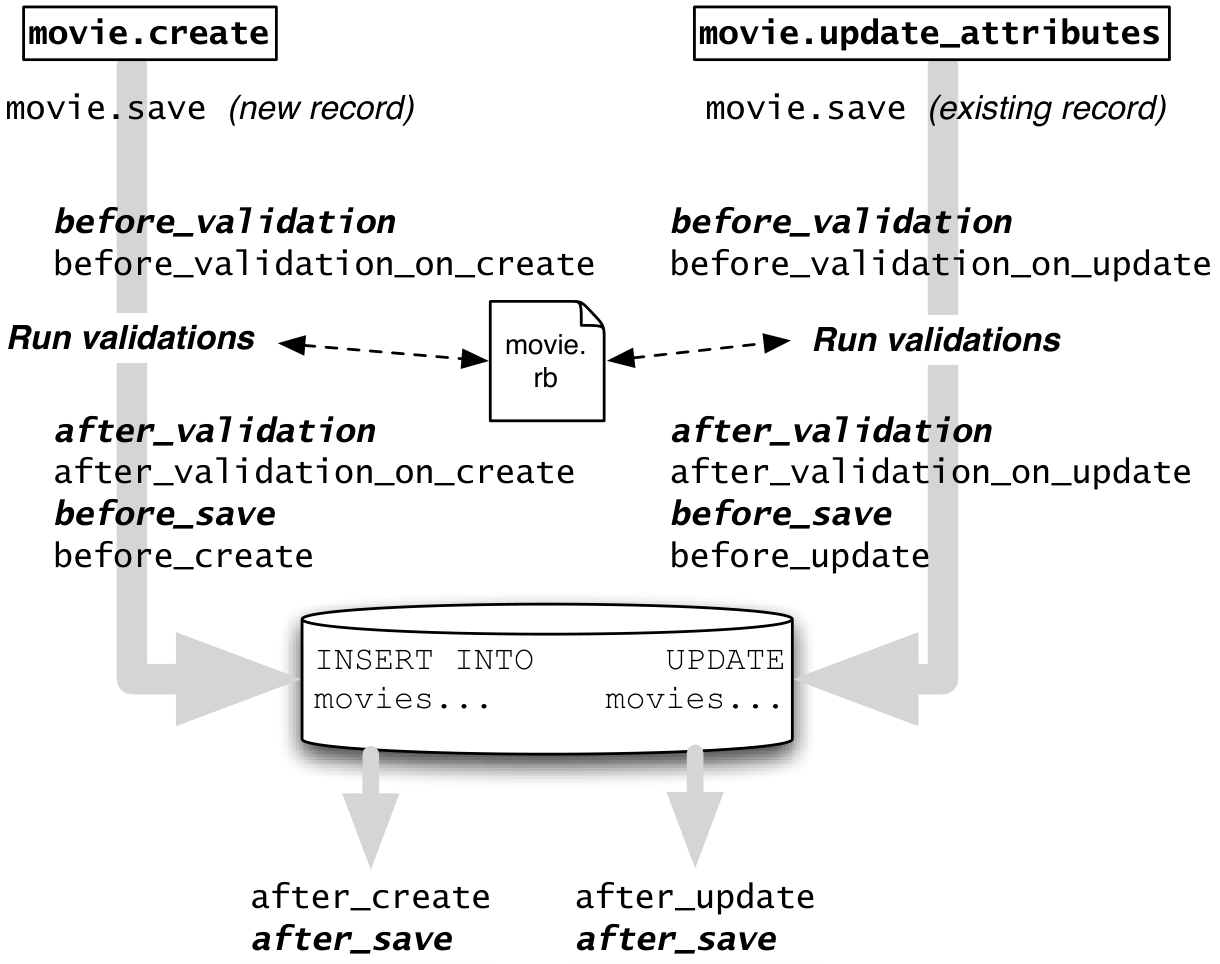
update, create, and so on) all eventually call save, so a before_save callback can intercept every change to the database. See this Rails Guide for additional details and examples.
ch_advanced_rails/code/model/before_save_example.rb
class Movie < ActiveRecord::Base
  before_save :capitalize_title
  def capitalize_title
    self.title = self.title.split(/\s+/).map(&:downcase).
      map(&:capitalize).join(' ')
  end
end
# now try in console:
m = Movie.create!(:title => 'STAR  wars', :release_date => '27-5-1977', :rating => 'PG')
m.title # => "Star Wars"before_save hook capitalizes each word of a movie title, downcases the rest of the word, and compresses multiple spaces between words to a single space, turning STAR wars into Star Wars. Coincidentally, Rails’ ActiveSupport::Inflector#titleize provides this functionality.
In fact, validations are just a special case of a more general mechanism, Active Record lifecycle callbacks, which allow you to provide methods that “intercept” a model object at various relevant points in its lifecycle. Figure 5.3 shows what callbacks are available; Figure 5.4 illustrates how to use this mechanism to “canonicalize” (standardize the format of) certain model fields before the model is saved. We will see another use of lifecycle callbacks when we discuss the Observer design pattern in Section 11.7 and caching in Section 12.6.
Analogous to a validation is a controller filter—a method that checks whether certain conditions are true before an action is run, or sets up common conditions that many actions rely on. If the conditions are not fulfilled, the filter can choose to “stop the show” by rendering a view template or redirecting to another action. If the filter allows the action to proceed, it will be the action’s responsibility to provide a response, as usual.
As an example, an extremely common use of filters is to enforce the requirement that a user be logged in before certain actions can be performed. Assume for the moment that we have verified the identity of some user and stored her primary key (ID) in session[:user_id] to remember the fact that she has logged in. Figure 5.5 shows a filter that enforces that a valid user is logged in. In Section 5.2 we will show how to combine this filter with the other “moving parts” involved in dealing with logged-in users.
ch_advanced_rails/code/application_controller.rb
class ApplicationController < ActionController::Base
  before_filter :set_current_user
  protected # prevents method from being invoked by a route
  def set_current_user
    # we exploit the fact that the below query may return nil
    @current_user ||= Moviegoer.where(:id => session[:user_id])
    redirect_to login_path and return unless @current_user
  end
end@current_user will be available to the action and views. Otherwise, a redirect will occur to login_path, which is assumed to correspond to a route that takes the user to a login page, as Section 5.2 explains. (and is just like && but has lower precedence, thus it parses as ((redirect_to login_path) and (return)) unless…)
Filters normally apply to all actions in the controller, but as the documentation on filters states, :only or :except can be used to restrict a filter to guarding only certain actions. You can define multiple filters: they are run in the order in which they are declared. You can also define after-filters, which run after certain actions are completed, and around-filters, which contain code to run before and after, as you might do for auditing or timing.
Summary of DRYing out MVC in Rails:
Partials allow you to reuse chunks of views across different templates, collecting common view elements in a single place.
Validations let you collect constraints on a model in a single place. Validations are checked anytime the database is about to be modified; failing validation is one of the ways that non-dangerous
saveandupdate_attributescan fail.The
errorsfield of a model, anActiveRecord::Errorsobject, records errors that occurred during validation, but it is up to you to take action ifmodel.errors.empty?is not true.Controller filters let you collect conditions affecting many controller actions in a single place, or set up instance variables used by many actions in a single place, by defining a method that runs before those actions.
Aspect-oriented programming (AOP) is a programming methodology for DRYing out code by separating crosscutting concerns such as model validations and controller filters from the main code of the actions to which the concerns apply. In our case, we specify model validations declaratively in one place, rather than invoking them explicitly at each join point in the code where we’d want to perform a validity check. A set of join points is collectively called a pointcut, and the code to be inserted at each join point (such as a validation in our example) is called advice. Rather than supporting fully general AOP, which would allow you to specify arbitrary pointcuts along with what advice applies to each, Rails defines pointcuts for model validations and controller filters.
A critique of AOP is that the source code can no longer be read in linear order. For example, when a before-filter prevents a controller action from proceeding, the problem can be hard to track down, especially for someone unfamiliar with Rails who doesn’t realize the filter method isn’t even being called explicitly but is an advice method triggered by a particular join point. A response to the critique is that if AOP is applied sparingly and tastefully, and all developers understand and agree on the pointcuts, it can improve DRYness and modularity. Validations and filters are the Rails designers’ attempt to identify this beneficial middle ground.
Why didn’t the Rails designers choose to trigger validation when you first instantiate a movie using Movie.new, rather than waiting until you try to persist the object?
As you’re filling in the attributes of the new object, it might be in a temporarily invalid state, so triggering validation at that time might make it difficult to manipulate the object. Persisting the object tells Rails “I believe this object is ready to be saved.”
In line 5 of Figure 5.2, why can’t we write validate released_1930_or_later, that is, why must the argument to validate be either a symbol or a string?
If the argument is just the “bare” name of the method, Ruby will try to evaluate it at the moment it executes validate, which isn’t what we want—we want released_1930_or_later to be called at the time any validation is to occur.
Describe the result and side effects (if any) of calling #valid?, #save, and #save! on an invalid ActiveRecord model instance.
Explain whose responsibility it is to complete the HTTP request (by rendering or redirecting) when a before-filter prevents a controller action from running.
5.2 Single Sign-On and Third-Party Authentication
One way to be more DRY and productive is to avoid implementing functionality that you can instead reuse from other services. One example of this today is authentication—the process by which an entity or principal proves that it is who it claims to be. In SaaS, end users and servers are two common types of principals that may need to authenticate themselves. Typically, a user proves their identity by supplying a username and password that (presumably) nobody else knows, and a server proves its identity with a server certificate (discussed in Chapter 12) whose integrity can be verified using cryptography.
Authorization refers to whether a principal is allowed to do something. Although separate from authentication, the two are often conflated because many standards handle both.
In the early days of SaaS, users had to establish separate usernames and passwords for each site. Today, an increasingly common scenario is single sign-on (SSO), in which the credentials established for one site (the provider) can be used to sign in to other sites that are administratively unrelated to it. Clearly, SSO is central to the usefulness of service-oriented architecture: It would be difficult for services to work together on your behalf if each had its own separate authentication scheme. Given the prevalence and increasing importance of SSO, our view is that new SaaS apps should use it rather than “rolling their own” authentication.
Facebook was an early example of SSO.

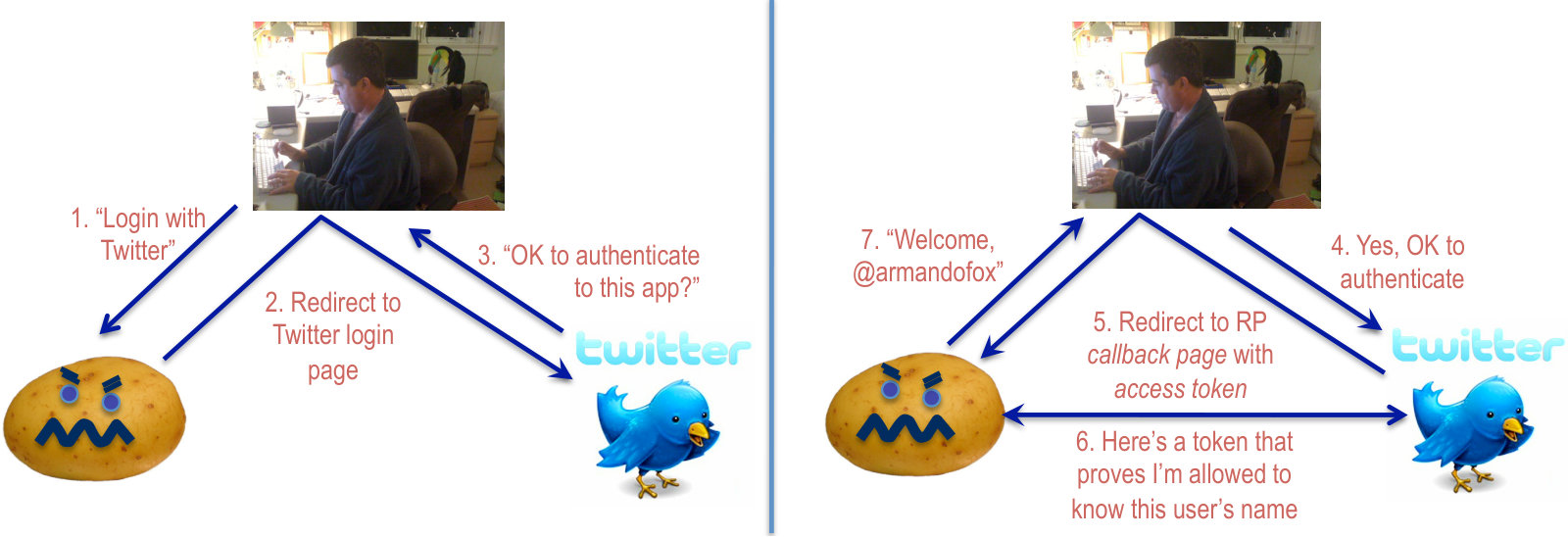
However, SSO presents the dilemma that while you may be happy to use your credentials on site A to login to site B, you usually don’t want to reveal those credentials to site B. (Imagine that site A is your financial institution and site B is a foreign company from whom you want to buy something.) Figure 5.6 shows how third-party authentication solves this problem using RottenPotatoes and Twitter as an example. First, the app requesting authentication (RottenPotatoes) creates a request to an authentication provider on which the user already has an account, in this case Twitter. The request often includes information about what privileges the app wants on the provider, for example, to be able to tweet as this user or learn who the user’s followers are.
A typical SSO process is illustrated by the OAuth2 protocol, which begins with a link or button the user must click. That link takes the user to a login page served securely by the provider. The user is then given the chance to login to the provider and decide what privileges to grant the requesting app. Critically, this interaction takes place entirely between the user and the provider: the requesting app has no access to any part of this interaction. Once authentication succeeds, the provider generates an HTTP POST to a particular route on the requesting app. This post request contains an access token—a string created using cryptographic techniques that can be passed back to the provider later, allowing the provider to verify that the token could only have been created as the result of a successful login process. At this point, the requesting app is able to do two things:
It can believe that the user has proven her identity to the provider, and optionally record the provider’s persistent user-ID (uid) for that user, usually provided as part of the access token. For example, Armando Fox’s uid on Twitter happens to be 318094297, though this information isn’t useful unless accompanied by an access token granting the right to obtain information about that uid.
It can use the token to request further information about the user from the provider, depending on what specific privileges were granted along with successful authentication. For example, a token from Facebook might indicate that the user gave permission for the app to learn who his friends are, but denied permission for the app to post on his Facebook wall.
Happily, adding third-party authentication to Rails apps is straightforward. Of course, before we can enable a user to log in, we need to be able to represent users! So before continuing, create a basic model and migration following the instructions in Figure 5.7.
ch_advanced_rails/code/model/create_migration.txt
ch_advanced_rails/code/model/moviegoer_auth.rb
moviegoers model and migration, and run rake db:migrate to apply the migration. Bottom (b): Then edit the generated app/models/moviegoer.rb file to match this code, which the text explains.
ch_advanced_rails/code/routes.rb
ch_advanced_rails/code/sessions_controller.rb
class SessionsController < ApplicationController
  # login & logout actions should not require user to be logged in
  skip_before_filter :set_current_user
  def create
    auth = request.env["omniauth.auth"]
    user =
      Moviegoer.where(provider: auth["provider"], uid: auth["uid"]) ||
      Moviegoer.create_with_omniauth(auth)
    session[:user_id] = user.id
    redirect_to movies_path
  end
  def destroy
    session.delete(:user_id)
    flash[:notice] = 'Logged out successfully.'
    redirect_to movies_path
  end
endch_advanced_rails/code/config_omniauth.rb
GET to the create action in SessionsController. Line 3 makes the route helper login_path route to GET auth/twitter, which OmniAuth will redirect to Twitter’s login page, so that line 7 in Figure 5.5 will work correctly. (b) Middle: Line 3 skips the before_filter that we added to ApplicationController in Figure 5.5. Upon successful login, the create action remembers the user’s ID in the session until the destroy action is called to forget it. (c) Bottom: Files in config/initializers are loaded before the app starts. This one, omniauth.rb, specifies the API keys to use for Twitter SSO.
 There are three aspects to managing third-party authentication in SaaS:
How to authenticate the user via a third party authentication provider (“auth provider”) such as Google or GitHub
How to remember that the user has logged in successfully
How to link the user’s ID in our own app with that provider’s ID, so that we can recognize this user in the future
By far the simplest way to accomplish the first task in Rails is to use the excellent OmniAuth gem, which provides a uniform API to many different SSO providers, abstracting away the entire process in Figure 5.6. No matter which provider is used, OmniAuth arranges to send the user to the provider’s login page, handles the providers’ callbacks for successful or failed authentication, and finally generates GET requests to well-known routes in your app to handle these cases. To use OmniAuth, you install both the OmniAuth gem and the necessary additional gems for each auth provider strategy.
Figure 5.8 shows the changes necessary to your routes, controllers, and configuration to use OmniAuth. Most auth providers require you to register any apps that will use their site for authentication, so in this example you would need to create a Twitter developer account, which will assign you an API key and an API secret that you specify in config/initializers/omniauth.rb, as Figure 5.8 shows. The second aspect of handling authentication is keeping track of whether the current user has been authenticated. You may have already guessed that this information can be stored in the session[]. However, we should keep session management separate from the other concerns of the app, since the session may not be relevant if our app is used in a service-oriented architecture setting. To that end, Figure 5.8 shows how we can “create” a session when a user successfully authenticates (lines 4–11) and “destroy” it when they log out (lines 12–16). The “scare quotes” are there because the only thing actually being created or destroyed is the value of session[:user_id], which is set to the primary key of the logged-in user during the session and nil at other times. Figure 5.5 shows how this check is abstracted by a before_filter in ApplicationController (which will be inherited by all controllers) that sets @current_user accordingly, so that controller methods or views can just look at @current_user without being coupled to the details of how the user was authenticated.
The third aspect is linking our own representation of a user’s identity—that is, her primary key in the moviegoers table—with the auth provider’s representation, such as the uid in the case of Twitter. Since we may want to expand which auth providers our customers can use in the future, the migration in Figure 5.7 that creates the Moviegoer model specifies both a uid field and a provider field. What happens the very first time Alice logs into RottenPotatoes with her Twitter ID? The query in line 7 of the sessions controller (Figure 5.8) will return nil, so Moviegoer.create_with_omniauth (Figure 5.7, lines 3–8) will be called to create a new record for this user. Note that “Alice as authenticated by Twitter” would therefore be a different user from our point of view than “Alice as authenticated by Facebook,” because we have no way of knowing that those represent the same person. That’s why some sites that support multiple third-party auth providers give users a way to “link” two accounts to indicate that they identify the same person.
This may seem like a lot of moving parts, but compared to accomplishing the same task without an abstraction such as OmniAuth, this is very clean code: we added fewer than two dozen lines, and by incorporating more OmniAuth strategies, we could support additional third-party auth providers with essentially no new work. Screencast shows the user experience associated with this code. 
This version of RottenPotatoes, modified to use the OmniAuth gem as described in the text, allows moviegoers to login using their existing Twitter IDs.
However, we must be careful to avoid creating a security vulnerability. What if a malicious attacker crafts a form submission that tries to modify params[:moviegoer][:uid] or params[:moviegoer][:provider]—fields that should only be modified by the authentication logic—by posting hidden form fields named moviegoer[uid] and so on? Section 4.4 explained how the “strong parameters” feature of Rails can be used to block assignment of model attributes that regular users shouldn’t be able to set. While it’s fine for the create_with_omniauth method to create a moviegoer with the appropriate uid, a regular moviegoer should not be able to set their own uid since it would allow them to impersonate being logged in! To ensure this can’t happen, we must make sure uid does not appear in any calls to params.permit or params.require in the Moviegoers controller.
Summary
Single sign-on refers to an end-user experience in which a single set of credentials (such as their Google or Facebook username and password) will sign them in to a variety of different services.
Third-party authentication using standards such as OAuth is one way to achieve single-sign on: the requesting app can verify the identity of the user via an authentication provider, without the user revealing her credentials to the requesting app.
The cleanest way to factor out authentication in Rails apps is to abstract the concept of a session. When a user successfully authenticates (perhaps using a framework such as OmniAuth), a session is created by storing the authenticated user’s
id(primary key) in thesession[]. When they sign out, the session is destroyed by deleting that information from thesession[].Use Rails’ strong parameters to ensure that model attributes that are “sensitive” and should be excluded from mass assignment do not appear in
params.requireorparams.permitcalls in your controllers.
In some cases, using SSO enables other features as well; for example, Facebook Connect enables sites to take advantage of Facebook’s social network, so that (for example) Marsalis can see which New York Times articles his friends have been reading once he authenticates himself to the New York Times using Facebook. While these appealing features further strengthen the case for using SSO rather than “rolling your own” authentication, they are separate from the basic concept of SSO, on which this discussion focuses.
Briefly describe how RottenPotatoes could let you log in with your Twitter ID without you having to reveal your Twitter password to RottenPotatoes.
RottenPotatoes redirects you to a page hosted by Twitter where you log in as usual. The redirect includes a URL to which Twitter posts back a message confirming that you’ve authenticated yourself and specifying what actions RottenPotatoes may take on your behalf as a Twitter user.
True or false: If you log in to RottenPotatoes using your Twitter ID, RottenPotatoes becomes capable of tweeting using your Twitter ID.
False: authentication is separate from permissions. Most third-party authentication providers, including Twitter, allow the requesting app to ask for permission to do specific things, and leave it up to the user to decide whether to allow it.
Describe the flow of steps and information involved in signing in to a SaaS app using a third-party provider for SSO.
Identify what conditions an app can believe to be true about a signed-in user after SSO is completed successfully.
5.3 CHIPS: Rails Intro
 https://github.com/saasbook/hw-rails-intro
Starting with RottenPotatoes, a Rails app we provide for keeping track of movie info and reviews, we will add some simple features to sort and filter the list of movies and to allow a moviegoer to establish an account and log in using single sign-on.
5.4 Associations and Foreign Keys
An association is a logical relationship between two types of entities in a software architecture. For example, the previous CHIPS added a Moviegoer class to RottenPotatoes; we could now add a Review class to allow a moviegoer to write reviews of their favorite movies. Because each review is about exactly one movie, but a single movie can have many reviews, we say that there is a one-to-many association from movies to reviews. Similarly, there is a one-to-many association from moviegoers to reviews. Figure 5.9 shows these associations using one type of Unified Modeling Language (UML) diagram. We will see more examples of UML in Chapter 11.

In Rails parlance, Figure 5.9 shows that:
A Moviegoer has many Reviews
A Movie has many Reviews
A Review belongs to one Moviegoer and to one Movie
In Rails, the “permanent home” for our model objects is the database, so we need a way to represent associations for objects stored there. Fortunately, associations are so common that relational databases provide a special mechanism to support them: foreign keys. A foreign key is a column in one table whose job is to reference the primary key of another table to establish an association between the objects represented by those tables. Recall that by default, Rails migrations create tables whose primary key column is called id. Figure 5.10 shows a Moviegoers table to keep track of different users and a Reviews table with foreign key columns moviegoer_id and movie_id, allowing each review to refer to the primary keys (ids) of the user who authored it and the movie it’s about.

movies and reviews tables are not shown.
For example, to find all reviews for Star Wars, we would first form the Cartesian product of all the rows of the movies and reviews tables by concatenating each row of the movies table with each possible row of the reviews table. This would give us a new table with 9 rows (since there are 3 movies and 3 reviews) and 7 columns (3 from the movies table and 4 from the reviews table). From this large table, we then select only those rows for which the id from the movies table equals the movie_id from the reviews table, that is, only those movie-review pairs in which the review is about that movie. Finally, we select only those rows for which the movie id (and therefore the review’s movie_id) are equal to 41, the primary key ID for Star Wars. This simple example (called a join in relational database parlance) illustrates how complex relationships can be represented and manipulated using a small set of operations (relational algebra) on a collection of tables with uniform data layout. In SQL, the Structured Query Language used by substantially all relational databases, the query would look something like this:
ch_advanced_rails/code/movies_reviews.sql
If we weren’t working with a database, though, we’d probably come up with a design in which each object of a class has “direct references” to its associated objects, rather than constructing the query plan above. A Moviegoer object would maintain an array of references to Reviews authored by that moviegoer; a Review object would maintain a reference to the Moviegoer who wrote it; and so on. Such a design would allow us to write code that looks like Figure 5.11.
ch_advanced_rails/code/model/association1.rb
# it would be nice if we could do this:
inception = Movie.where(:title => 'Inception')
alice,bob = Moviegoer.find(alice_id, bob_id)
# alice likes Inception, bob less so
alice_review = Review.new(:potatoes => 4)
bob_review   = Review.new(:potatoes => 3)
# a movie has many reviews:
inception.reviews = [alice_review, bob_review]
# a moviegoer has many reviews:
alice.reviews << alice_review
bob.reviews << bob_review
# can we find out who wrote each review?
inception.reviews.map { |r| r.moviegoer.name } # => ['alice','bob']Rails’ ActiveRecord::Associations module supports exactly this design, as we’ll learn by doing. Apply the code changes in Figure 5.12 as directed in the caption, and you should then be able to start rails console and successfully execute the examples in Figure 5.11.
ch_advanced_rails/code/associations_migration.rb
ch_advanced_rails/code/model/review.rb
ch_advanced_rails/code/model/movie_with_associations.rb
movies and moviegoers tables by convention over configuration. Middle (b): Put this new Review model in app/models/review.rb. Bottom (c): Make this one-line change to each of the existing files movie.rb and moviegoer.rb.
How does this work? Since everything in Ruby is a method call, we know that Line 8 in Figure 5.11 is really a call to the instance method reviews= on a Movie object. This instance method remembers its assigned value (an array of Alice’s and Bob’s reviews) in memory. Recall, though, that since a Review is on the “belongs to” side of the association (Review belongs to a Movie), to associate a review with a movie we must set the movie_id field for that review. We don’t actually have to modify the movies table. So in this simple example, the call to inception.reviews= isn’t actually updating the movie record for Inception at all: it’s setting the movie_id field of both Alice’s and Bob’s reviews to “link” them to Inception.
m.reviews |
Returns an Enumerable of all owned reviews. |
m.reviews=[r1,r2] |
Replaces the set of owned reviews with the set r1,r2, adding or deleting as appropriate, by setting the movie_id field of each of r1 and r2 to m.id (m’s primary key) in the database immediately. |
m.reviews<<r1 |
Adds r1 to the set of m’s reviews by setting r1’s movie_id field to m.id. The change is written to the database immediately (you don’t need to do a separate save). |
r = m.reviews.build(:potatoes=>5) |
Makes r a new, unsaved Review object whose movie_id is preset to indicate that it belongs to m. Arguments are the same as for Review.new. |
r = m.reviews.create(:potatoes=>5) |
Like build but saves the object immediately (analogous to the difference between new and save). |
Note: if the parent object m has never been saved, that is, m.new_record? is true, then the child objects aren’t saved until the parent is saved. |
|
m = r.movie |
Returns the Movie instance associated with this review. |
r.movie = m |
Sets m as the movie associated with review r. |
movie has_many :reviews and review belongs_to :movie, assuming m is an existing Movie object and r1,r2 are Review objects. Consult the ActiveRecord::Associations documentation for a full list. Method names of association methods follow convention over configuration based on the name of the associated model.
has_one is a close relative of has_many that singularizes the association method name and operates on a single owned object rather than a collection.
Figure 5.13 lists some of the most useful methods added to a movie object by virtue of declaring that it has_many reviews. Of particular interest is that since has_many implies a collection of the owned object (Reviews), the reviews method quacks like a collection. That is, you can use all the collection idioms of Figure 2.11 on it—iterate over its elements with each, use functional idioms like sort, map, and so on, as in lines 8, 10 and 13 of Figure 5.11.
What about the belongs_to method calls in review.rb? As you might guess, belongs_to :movie gives Review objects a movie instance method that looks up and returns the movie to which the review belongs. Since a review belongs to at most one movie, the method name is singular rather than plural, and returns a single object rather than an enumerable.
Summary:
Associations are one-to-one, one-to-many, or many-to-many relationships among application entities.
Relational databases (RDBMSs) use foreign keys to represent these relationships.
ActiveRecord’s Associations module uses Ruby metaprogramming to create new methods to “traverse” associations by constructing the appropriate database queries. You must still add the necessary foreign key fields yourself with a migration.
The use of foreign keys to represent associations relies on relational algebra. Rails’ implementation of ActiveRecord makes associations particularly convenient by providing methods for automatic traversal of associations by synthesizing and optimizing the appropriate foreign-key joins in SQL. But such traversal, if not handled carefully, can lead to performance bottlenecks, as we will see in Section 12.7. One response to such bottlenecks has been the deployment of “NoSQL” databases, such as Cassandra and MongoDB, which omit all but the simplest foreign key support in order to achieve horizontal scalability superior to most RDBMSs. An example of an alternative implementation choice for associations with such databases is Data Mapper (Figure 5.14). In this pattern, each model is associated with a corresponding Mapper class that defines how that model’s instances are stored, and provides its own code to represent and traverse model associations. Depending on the complexity of the associations, this code may find itself essentially reimplementing parts of a traditional RDBMS, but without the benefit of the millions of engineer-hours that have gone into optimizing the latter. Indeed, as Chapter 12 describes, “traditional” relational databases can scale impressively far when combined with careful development and operations techniques (dev/ops), so today’s SaaS developers can enjoy the expressiveness and advantages of traditional RDBMSs for a long time before the database becomes the bottleneck.
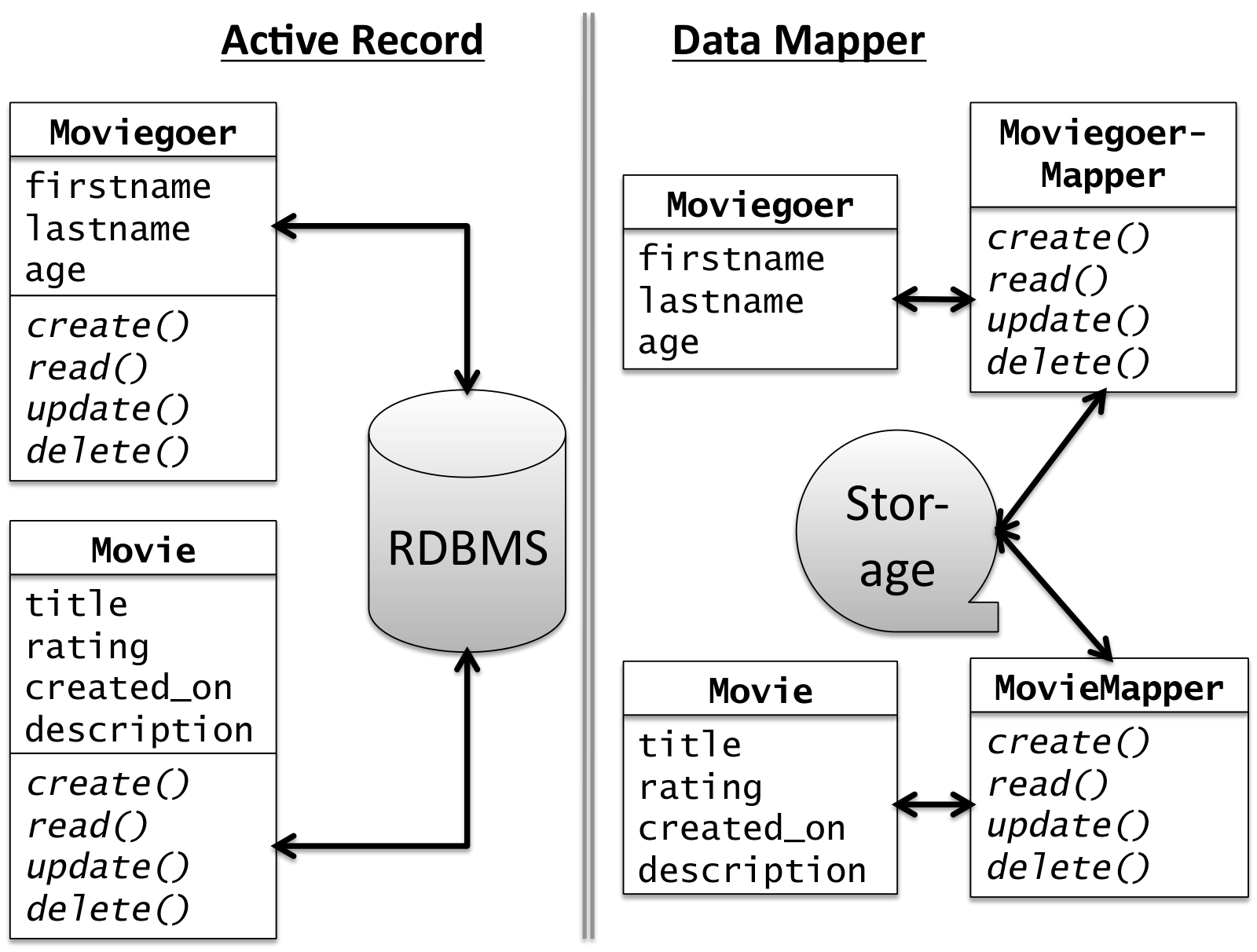
ActiveRecord module, the model object itself knows how it’s stored in the persistence tier, and how its relationship to other types of models is represented there. In the Data Mapper pattern (right), used by Google AppEngine, PHP and Sinatra, a separate class isolates model objects from the underlying storage layer. Each approach has pros and cons. This class diagram is one form of Unified Modeling Language (UML) diagram, which we’ll learn more about in Chapter 11.
In Figure 5.12, why did we add foreign keys (references) only to the reviews table and not to the moviegoers or movies tables?
Since we need to associate many reviews with a single movie or moviegoer, the foreign keys must be part of the model on the “owned” side of the association, in this case Reviews.
In Figure 5.13, are the association accessors and setters (such as m.reviews and r.movie) instance methods or class methods?
Instance methods, since a collection of reviews is associated with a particular movie, not with movies in general.
Given a has-many/belongs-to relationship between two models, identify which foreign key(s) must be added to which table(s) to model that relationship.
Given a has-many-through/belongs-to relationship among three models, identify which foreign key(s) must be added to which table(s) to model that relationship.
5.5 Through-Associations
Referring back to Figure 5.9, there are direct associations between Moviegoers and Reviews as well as between Movies and Reviews. But since any given Review is associated with both a Moviegoer and a Movie, we could say that there’s an indirect association between Moviegoers and Movies. For example, we might ask “What are all the movies Alice has reviewed?” or “Which moviegoers have reviewed Inception?” Indeed, line 13 in Figure 5.11 essentially answers the second question.
ch_advanced_rails/code/has_many_through_example.rb
# in moviegoer.rb:
class Moviegoer
  has_many :reviews
  has_many :movies, :through => :reviews
  # ...other moviegoer model code
end
alice = Moviegoer.where(:name => 'Alice')
alice_movies = alice.movies
# MAY work, but a bad idea - see caption:
alice.movies << Movie.where(:title => 'Inception') # Don't do this!alice.movies in line 8 quacks like a collection. Note, however, that since the association between a Movie and a Moviegoer occurs through a Review belonging to both, the syntax in line 10 will cause a Review object to be created to “link” the association, and by default all its attributes will be nil. This is almost certainly not what you want, and if you have validations on the Review object (for example, the number of potatoes must be an integer), the newly-created Review object will fail validation and cause the entire operation to abort.
This kind of indirect association is so common that Rails and other frameworks provide an abstraction to simplify its use. It’s sometimes called a through-association, since Moviegoers are related to Movies through their reviews and vice versa. Figure 5.15 shows how to use the :through option to Rails’ has_many to represent this indirect association. You can similarly add has_many :moviegoers, :through=>:reviews to the Movie model, and write movie.moviegoers to ask which moviegoers are associated with (wrote reviews for) a given movie.
How is a through-association “traversed” in the database? Referring again to Figure 5.10, finding all the movies reviewed by Alice first requires forming the Cartesian product of the three tables (movies, reviews, moviegoers), resulting in a table that conceptually has 27 rows and 9 columns in our example. From this table we then select those rows for which the movie’s ID matches the review’s movie_id and the moviegoer’s ID matches the review’s moviegoer_id. Extending the explanation of Section 5.4, the SQL query might look like this:
ch_advanced_rails/code/movies_reviews_moviegoers.sql
 For efficiency, the intermediate Cartesian product table is usually not materialized, that is, not explicitly constructed by the database. Indeed, Rails has a sophisticated relational algebra engine that constructs and performs optimized SQL join queries for traversing associations.
The point of this section and the previous one, though, is not only to explain how to use associations, but also to point out the elegant use of duck typing and metaprogramming that makes them possible. In Figure 5.12 you added has_many :reviews to the Movie class. The has_many method performs some metaprogramming to define the new instance method reviews= that we used in Figure 5.11. has_many is not a declaration, but a regular method call that does all of this work at runtime, adding several new instance methods to your model class to help manage the association. As you’ve no doubt guessed, convention over configuration determines the name of the new method, the table it will use in the database, and so on.
ch_advanced_rails/code/model/validating_associations.rb
Associations are one of the most feature-rich aspects of Rails, so take a good look at the full documentation for them. In particular:
Just like ActiveRecord lifecycle hooks, associations provide additional hooks that can be triggered when objects are added to or removed from an association (such as when new Reviews are added for a Movie), which are distinct from the lifecycle hooks of Movies or Reviews themselves.
Validations can be declared on associated models, as Figure 5.16 shows.
Because calling
saveorsave!on an object that uses associations also affects the associated objects, various caveats apply to what happens if any of the saves fails. For example, if you have just created a new Movie and two new Reviews to link to it, and you now try to save the Movie, any of the three saves could fail if the objects aren’t valid (among other reasons).Additional options to association methods control what happens to “owned” objects when an “owning” object is destroyed. For example,
has_many :reviews, dependent: destroyspecifies that the reviews belonging to a movie should be deleted from the database if the movie is destroyed.
Through-associations summary:
When two models A and B each have a has-one or has-many relationship to a common third model C, a many-to-many association between A and B can be established through C.
The
:throughoption tohas_manyallows you to manipulate either side of a through-association just as if it were a direct association. However, if you modify a through-association directly, the intermediate model object must be automatically created, which is probably not what you intended.
Given that has_many :through creates “many-to-many” associations between the two outer entities (Movies and Moviegoers in our running example), could we create such many-to-many relationships directly, without going through an “intermediate” table? ActiveRecord provides another association we don’t discuss here, has_and_belongs_to_many (HABTM), for pure many-to-many associations in which you don’t need to maintain any other information about the relationship besides the fact that it exists. For example, in a social media app, a given user might “like” many posts, and a given post might be “liked by” many users; thus “like” is a many-to-many relationship between users and posts. However, even in that simple example, to keep track of when someone liked or unliked a wall post, the concept of a “like” would then need its own model to track these extra attributes. In most cases, therefore, has_many :through is more appropriate because it allows the relationship itself (in our example, the movie review) to be represented as a separate model. In Rails, HABTM associations are represented by a join table that by convention has no primary key and is created with a special migration syntax.
Describe in English the steps required to determine all the moviegoers who have reviewed a movie with some given id (primary key).
Find all the reviews whose movie_id field contains the id of the movie of interest. For each review, find the moviegoer whose id matches the review’s moviegoer_id field.
5.6 RESTful Routes for Associations
How should we RESTfully refer to actions associated with movie reviews? In particular, at least when creating or updating a review, we need a way to link it to a moviegoer and a movie. Presumably the moviegoer will be the @current_user we set up in Figure 5.5 (Section 5.1). But what about the movie?
Chapter 7 discusses Behavior-Driven Design, which emphasizes that development should be driven by scenarios that describe actual user behaviors. According to this view, since it only makes sense to create a review when you have a movie in mind, most likely the “Create Review” functionality will be accessible from a button or link on the Show Movie Details page for a particular movie. Therefore, at the moment we display this form element, we know what movie the review is going to be associated with. The question is how to get this information to the new or create method in the ReviewsController.
One method we might use is that when the user visits a movie’s Show Movie Details page, we could use the session[], which persists across requests, to remember the ID of the movie whose details have just been rendered as the “current movie.” When ReviewsController#new is called, we’d retrieve that ID from the session[] and associate it with the review by populating a hidden form field in the review’s form, which in turn will be available to ReviewsController#create. However, this approach isn’t RESTful, since the movie ID—a critical piece of information for creating a review—is “hidden” in the session.
A more RESTful alternative, which makes the movie ID explicit, is to make the RESTful routes themselves reflect the logical “nesting” of Reviews inside Movies, as the top part of Figure 5.17 shows. Since Movie is the “owning” side of the association, it’s the outer resource. Just as the original resources :movies provided a set of RESTful URI helpers for CRUD actions on movies, this nested resource route specification provides a set of RESTful URI helpers for CRUD actions on reviews that are owned by a movie. The bottom part of Figure 5.17 summarizes the new routes, which are provided in addition to the basic RESTful routes on Movies that we’ve been using all along. Note that via convention over configuration, the URI wildcard :id will match the ID of the resource itself—that is, the ID of a review—and Rails chooses the “outer” resource name to make :movie_id capture the ID of the “owning” resource. The ID values will therefore be available in controller actions as params[:id] (the review) and params[:movie_id] (the movie with which the review will be associated).
ch_advanced_rails/code/nested_routes.rb
| Helper method | RESTful route and action | |
|---|---|---|
movie_reviews_path(m) |
GET /movies/:movie_id/reviews |
index |
movie_review_path(m) |
POST /movies/:movie_id/reviews |
create |
new_movie_review_path(m) |
GET /movies/:movie_id/reviews/new |
new |
edit_movie_review_path(m,r) |
GET /movies/:movie_id/reviews/:id/edit |
edit |
movie_review_path(m,r) |
GET /movies/:movie_id/reviews/:id |
show |
movie_review_path(m,r) |
PUT /movies/:movie_id/reviews/:id |
update |
movie_review_path(m,r) |
DELETE /movies/:movie_id/reviews/:id |
destroy |
routes.rb (top) also provides nested URI helpers (bottom), analogous to the simpler ones provided for regular resources.
ch_advanced_rails/code/reviews_controller.rb
class ReviewsController < ApplicationController
  before_filter :has_moviegoer_and_movie, :only => [:new, :create]
  protected
  def has_moviegoer_and_movie
    unless @current_user
      flash[:warning] = 'You must be logged in to create a review.'
      redirect_to login_path
    end
    unless (@movie = Movie.where(:id => params[:movie_id]))
      flash[:warning] = 'Review must be for an existing movie.'
      redirect_to movies_path
    end
  end
  public
  def new
    @review = @movie.reviews.build
  end
  def create
    # since moviegoer_id is a protected attribute that won't get
    # assigned by the mass-assignment from params[:review], we set it
    # by using the << method on the association.  We could also
    # set it manually with review.moviegoer = @current_user.
    @current_user.reviews << @movie.reviews.build(params[:review])
    redirect_to movie_path(@movie)
  end
endch_advanced_rails/code/new_review.html.erb
<h1> New Review for <%= @movie.title %> </h1>

<%= form_tag movie_review_path(@movie), class: 'form' do %>
  <label class="col-form-label"> How many potatoes:</label>
  <%= select_tag 'review[potatoes]', options_for_select(1..5), class: 'form-control' %>
  <%= submit_tag 'Create Review', :class => 'btn btn-success' %>
<% end %>app/views/reviews/new.html.erb.
Figure 5.18 shows a simplified example of using such nested routes to create the views and actions associated with a new review. Of particular note is the use of a before-filter in ReviewsController to ensure that before a review is created, two conditions are true:
@current_useris set (that is, someone is logged in and will “own” the new review).The movie captured from the route (Figure 5.17) as
params[:movie_id]exists in the database.
If either condition is not met, the user is redirected to an appropriate page with an error message explaining what happened. If both conditions are met, the controller instance variables @current_user and @movie become accessible to the controller action and view.
The view uses the @movie variable to create a submission path for the form using the movie_review_path helper (Figure 5.17 again). When that form is submitted, once again movie_id is parsed from the route and checked by the before-filter prior to calling the create action. Similarly, we could link to the page for creating a new review by calling link_to with the route helper new_movie_review_path(@movie) as its URI argument.
Summary: controller and view support for associations
The RESTful way to create routes for associations is to capture the IDs of both the resource itself and its associated item(s) in a “nested” route URI.
When manipulating “owned” resources that have a parent, such as Reviews that are “owned by” a Movie, before-filters can be used to capture and verify the validity of the IDs embedded in the RESTful nested route.
RESTful SOA design guidelines suggest that every request be self-contained, so that there is no concept of a session (nor any need for one). In our example, we used nested RESTful resource routes to keep the movie and review IDs together and relied on our authentication framework to set up @current_user as the moviegoer who owns the review. For a pure SOA API, we would need to capture the moviegoer ID and review ID along with the movie ID. Rails’ routing subsystem is flexible enough to allow defining routes with multiple wildcard components for this purpose. In general, this design problem arises whenever you need to create an object with multiple “owners” such as a Review. If not all the owning objects are required in order for the owned object to be valid—for example, if it were possible for a Review to be “anonymous”—another solution would be to separate creation of the review and assigning it to a moviegoer into different RESTful actions.
Why must we provide values for a review’s movie_id and moviegoer_id to the new and create actions in ReviewsController, but not to the edit and update actions?
Once the review is created, the stored values of its movie_id and moviegoer_id fields tell us the associated movie and moviegoer.
5.7 CHIPS: Associations
https://github.com/saasbook/hw-associations-reviews
We add a Reviews model to RottenPotatoes, and make it possible for a logged-in moviegoer to leave a review and to view all reviews for a movie.
5.8 Other Types of Code
The basic Rails app structure is apparent from the arrangement of the app directory: there are models backed by the database; views that render to HTML; controllers that should contain the bare minimum code to mediate between models and views; and view helpers (subdirectory helpers) for code whose only job is to “prettify” model information in the views.
In this section we describe many other types of code necessary in large apps that don’t fit neatly into any of the above categories. There’s no fixed consensus on where these go in a Rails app, but it’s probably helpful to create additional subdirectories under app, since anything in that directory is automatically loaded and available within your Rails app.
Our short (and incomplete) list of examples of other types of useful objects can be divided into three categories, based on the main role of each object type:
Objects that factor out code (presenter, value object, adapter/decorator) provide a place to put additional code that works directly to help a particular model, view, or controller, but isn’t part of the core functionality of the class it helps.
Objects that DRY out code (concerns, automations) allow reuse of behaviors.
Objects that encapsulate coupling (service object, form object, query object, policy object) perform operations that express inherent dependencies among different classes, so that those dependencies don’t creep into the classes themselves.
Presenters (sometimes called view objects) contain code that helps in rendering complex views. Recall from Section 4.1 that Rails views are really view templates: ideally they contain little or no code other than calls to view helpers. But sometimes the code needed to gracefully manipulate and present a view starts getting too heavyweight to stuff into a view helper, which is just a namespace of methods that get mixed into views. Presenters are full classes and provide a more appropriate place for complex view logic.
Value objects encapsulate a type of object whose comparisons are based on values. For example, consider an object representing a range of dates. Depending on your app’s needs, you might define one such object instance to be “less than” another if its starting date is earlier, or if its ending date is earlier; you could also come up with a definition for “between.” Encapsulating such an object in a class lets you define the spaceship comparison operator <=> on instances of that class, so mixed-in methods like sort will “just work.”
Adapters and decorators are design patterns related to the Open-Closed Principle (Section 11.4) and Dependency Injection Principle (Section 11.6). As their name suggests, these typically provide extra functionality to a particular class, usually a model.
Concerns are complex behaviors mixed into multiple models. For example, the Apache Solr engine adds sophisticated full-text searching to any database-backed app. Any ActiveRecord model that “mixes in” Solr gets new search methods added in. A simpler example might be allowing any model to be “voted on” (likes/dislikes): the functionality of managing and storing vote information is generic, but each model needs to track it separately. A third example might be allowing any model to be associated with an uploaded file. Concerns should be used with care because they represent a kind of inheritance, whereas (as Chapter 11 describes) cleaner code can often be achieved by preferring composition over inheritance.
Automations are just that—automated workflows that save you from having to manually repeat actions, usually related to app management and deployment. For example, creating fake staging data for your app would be a great candidate for automation, since the data needs to be re-created each time the app is deployed to staging. Most Rails app automations are best accomplished by adding rake tasks, since these have access to the app’s classes, environment settings, and so on, though that’s certainly not the only way to do it.
Service objects typically perform a complex operation that touches multiple models, so its logic doesn’t naturally fit into a single model. For example, finalizing a purchase on an e-commerce site might touch a table of sales transactions, a table of inventory, and a table representing the customer’s orders. These tables probably back three different models. A service object is often stateless (not backed by its own database table) but it can be helpful to include an instance of ActiveModel::Errors as part of the object, so the object’s error reporting is just like that of ActiveRecord models, making it easy for controllers to call the object and report its errors. Service objects in Rails apps are particularly useful when combined with a database transaction to ensure that either all the updates occur or none do.
Form objects encapsulate the processing of a single form that may update multiple models. Continuing the example above, a single form for completing a purchase may include information that updates the customer’s shipping address, the history of all orders, and so on. The form object contains logic that coordinates the changes to the various models when the form is submitted.
Query objects can similarly encapsulate queries that touch many different models. While a query in model A can use joins and eager loading (Section 12.7) to reference fields in model B, such queries often end up exposing substantial details of each of the models, introducing coupling between them. While this coupling is necessary in order to perform the query, encapsulating it in a query object allows the models themselves to remain decoupled from each other and easier to test.
Policy objects can be thought of as a special case of service object: they encapsulate policies, such as “who is allowed to do what,” especially those that touch multiple models and therefore don’t naturally belong in any of them. For example, consider an airline loyalty program that reserves its best seats for VIP frequent flyers. The policy decision of “Is customer X allowed to reserve seat Y on flight Z” may depend on many factors, including the customer’s status level, how full the flight is, and so on. A policy object knows how to retrieve the necessary details from the relevant model classes and make a policy decision.
Summary: A Model–View–Controller app will make use of other kinds of code in addition to models, views, and controllers. While some such code is there to DRY out the app or provide support beyond the core functionality of a specific class, an important category of “other types of code” encapsulates dependencies among multiple classes, so that the classes themselves can remain relatively decoupled.
Rails database migrations are an example of which of the kinds of code described in this section?
Migrations are an example of automation, since the same migration code is used to update the development, test, and production databases.
True or false: Query objects exist because Rails makes it illegal/impossible for an ActiveRecord query defined in model A to make reference to fields in model B.
False: ActiveRecord queries constructed as a result of associations (such as “A has many Bs”) necessarily refer to other models, and any query defined in model A can join with and refer to any fields in model B. But a query object lets you extract such logic into its own class when the queries get so complex that they expose too much detail about model B to model A.
5.9 Fallacies and Pitfalls
Filters and callbacks provide convenient and well-defined places to DRY out duplicated code, but too many of them can make it difficult to follow the app’s logic flow. For example, when there are numerous before-filters, after-filters and around-filters that trigger on different sets of controller actions, it can be hard to figure out why a controller action fails to execute as expected or which filter “stopped the show.” Things can be even worse if some of the filters are declared not in the controller itself but in a controller from which it inherits, such as ApplicationController. Filters and callbacks should be used when you truly want to centralize code that would otherwise be duplicated.
Saving an object that has associations implies potentially modifying multiple tables. If any of those modifications fails, perhaps because of validations either on the object or on its associated objects, other parts of the save might silently fail. Be sure to check the return value of save, or else use save! and rescue any exceptions. 
Although it’s technically possible to have nested resources multiple levels deep, the routes and actions quickly become cumbersome, which may be a sign that your design isn’t properly factored. Perhaps there is an additional entity relationship that needs to be modeled, using a shortcut such as has_many :through to represent the final association.
5.10 Concluding Remarks: Languages, Productivity, and Beauty
This chapter showed two examples of using language features to support the productive creation of beautiful and concise code. The first is the use of metaprogramming, closures and higher-order functions to allow model validations and controller filters to be DRYly declared in a single place, yet called from multiple points in the code. Validations and filters are an example of aspect-oriented programming (AOP), a methodology that has been criticized because it obfuscates control flow but whose well-circumscribed use can enhance DRYness.
AOP has been compared with the fictitious COME FROM programming language construct, which began as a humorous response to Edsger Dijkstra’s letter Go To Statement Considered Harmful ((Dijkstra 1968)) promoting structured programming.
All in all, validations, filters, and association helper methods are worth studying as successful examples of tastefully exploiting programming language features to enhance code beauty and productivity.
The second example is the design choices reflected in the association helper methods. For example, you may have noticed that while the foreign key field for a Movie object associated with a review is called movie_id, the association helper methods allow us to reference review.movie, allowing our code to focus on the architectural association between Movies and Reviews rather than the implementation detail of the foreign key names. You could certainly manipulate the movie_id or review_id fields in the database directly, as Web applications based on less-powerful frameworks are often forced to do, or do so in your Rails app, as in review.movie_id=some_movie.id. But besides being harder to read, this code hardwires the assumption that the foreign key field is named movie_id, which may not be true if your models are using advanced Rails features such as polymorphic associations, or if ActiveRecord has been configured to interoperate with a legacy database that follows a different naming convention. In such cases, review.movie and review.movie= will still work, but referring to review.movie_id will fail. Since someday your code will be legacy code, help your successors be productive—keep the logical structure of your entities as separate as possible from the database representation. 
We might similarly ask, now that we know how associations are stored in the RDBMS, why movie.save actually also causes a change to the reviews table when we save a movie after adding a review to it. In fact, calling save on the new review object would also work, but having said that a Movie has many Reviews, it just makes more sense to think of saving the Movie when we update which Reviews it has. In other words, it’s designed this way in order to make sense to programmers and make the code more beautiful.
Finally, as we saw in Section 5.8, an application framework provides direct support for the major architectural components of the application (in our case, models, views, and controllers), but any large software system contains many other kinds of code as well. Indeed, some of the examples of that section are best understood as additional patterns for solving software problems—a theme to which we will frequently return, and that we treat in depth in Chapter 11.