2 How to Learn a New Language
Barbara Liskov (1939–) was one of the first women in the USA to receive a Ph.D. in computer science (in 1968) and received the 2008 Turing Award for foundational innovations in programming language design. Her inventions include abstract data types and iterators, both of which are central to Ruby.

You never need optimal performance, you need good-enough performance …Programmers are far too hung up with performance.
— Barbara Liskov, 2011
Software engineers who are unable to quickly learn and use new languages and frameworks risk finding themselves obsolete or out of a job every few years. This chapter focuses on building those skills, starting with a developer’s-eye inhalation of the Ruby language. In Chapter 6 we will repeat the process for JavaScript.
Prerequisites
You should be comfortable programming in some modern object-oriented (OO) language, such as Java or Python, including OO concepts such as class vs. instance variables and methods, public vs. private methods, and so on.
Helpful, but not strictly required, is familiarity with basic operations on collections such as those seen in functional programming languages and borrowed by the Python language. For example,
maptakes a function (or lambda expression) and a collection, and returns a new collection resulting from the application of the function to each element of the original collection.filtertakes a Boolean-valued function and a collection, and returns a new collection consisting of those elements from the original collection for which the function returns true.Regular expressions, sometimes abbreviated regexps or regexes, are sequences of characters that define a search pattern. All modern programming languages use them. Rubular is a web app that lets you practice regexes in Ruby.
Concepts
Learning a language and learning a framework often go together: you learn Ruby so that you can use Rails. This means you must understand three things: the new language, the structure or architectural model the framework prescribes for applications (how the “moving parts” of an application work together), and how the language’s features are used to expose that structure.
Learning a new language requires understanding its basic object-orientation and encapsulation mechanisms (classes, inheritance, composition), its basic imperative mechanics (variables, naming conventions, control flow), and how it manages complexity (namespacing, libraries, library and package management).
At the core of Ruby is the idea that everything is an object, and even “basic” operations like addition are defined in terms of sending a message to an object asking the object to do something.
Learning the idioms that make a language unique is a key aspect of mastering the language. Idioms pervasive in Ruby but less common in other modern languages include mix-ins (duck typing) and blocks (anonymous lambdas).
Learning a language is largely about learning its libraries and how they are managed. Ruby libraries (“gems”) and the Bundler tool allow an app to specify fine-grained dependencies on many interrelated libraries.

2.1 Prelude: Learning to Learn Languages and Frameworks
We will use the term stack to refer loosely to any set of technologies—typically languages, frameworks, and subsystems—used in the development of a particular type of application. A major part of most stacks is a framework for building a particular type of app using a particular language and relying on other elements in the stack. Today, most developers learn new programming languages not to use them standalone, but because they want to use a particular framework or stack: Platform-based mobile apps for iOS are written in Objective C; React.js apps are written in JavaScript; and the Ruby language had existed for 10 years before the highly productive Rails framework made it popular.
Previously, platform-based mobile apps, or simply “platform apps,” were sometimes referred to as “native apps.”
As Figure 1.6 showed, though, stacks and frameworks come and go. Thus, our approach is inspired by a Chinese proverb:
Give a man a fish and you feed him for a day. Teach a man to fish and you feed him for a lifetime.
— Chinese proverb
Following this advice, our goal is not so much to give you a fish (introduce you as quickly as possible to a particular framework or stack) but rather to help you learn to fish—by giving you guidance on how to develop the conceptual vocabulary to rapidly learn new ones. In this chapter and the next, we will also give you a starter fish, in the form of the Ruby language and Rails framework. In Chapter 6, we will do the same for JavaScript and jQuery.
For concreteness, we will limit our discussion of learning a new language to imperative, object-oriented (OO) languages. Besides Ruby and JavaScript, which we introduce in this book, other languages in this family include Java, Python, C++, C#, Scala, Perl, PHP, Lua, Tcl, and dozens more.
While many of these include elements of other language families such as functional languages, the primary way they are used is imperatively.
As you will see, from the point of view of learning new languages, all of these languages are far more alike than they are different, because they all foster an imperative (linear, step-by-step) approach to solving programming problems and they all provide comparable facilities for managing complexity by encapsulating data along with the operations on that data.
Proficient software engineers can rapidly learn new languages, and the stacks or frameworks that use them, by mastering a technical vocabulary consisting of three main components:
Learn what’s different about the language: Most imperative OO languages have straightforward machinery for primitives (variables, types, control flow), reuse (inheritance, interfaces), complexity management (composition, inheritance, data hiding), debugging, and library usage (importing, package/dependency management). What idioms or facilities are different from other recently-popular languages? How does the language manage libraries, the learning of which typically consumes far more time than learning the language itself?
Understand the app architecture implied by the framework: What is the application structure or set of patterns reified by the framework? What are the major “moving parts” of an application built using that framework, and how does their arrangement influence the way we formulate an application’s functionality in terms of that framework?
Associate the language’s features with the frameworks’ structure. How does the language help application writers by using language mechanisms to expose the framework’s architecture and patterns? One example, as we will see, is that the Rails framework relies heavily on convention over configuration: if you follow certain naming rules, you need not provide configuration files explaining (for example) which class in your app mediates access to which database table.
 Ruby supports convention over configuration through its use of reflection and metaprogramming.
Here, then, is our 8-point plan for learning a new imperative object-oriented language:
Types and typing. Is the language strongly or weakly typed, and is typing static or (as in Ruby and JavaScript) dynamic? In C++ and Java, a variable’s type must be declared at compile time and cannot change during program execution (static typing), and only objects of that type or a compatible subtype may ever be assigned to the variable (strong typing). In Java, for example, within the same scope, the same variable cannot be assigned first to an integer and later to a string. In Ruby, as we will see, a variable does not have a type declared at compile time (dynamic typing) and can be assigned to an object of any type (weak typing). This policy makes certain kinds of type errors easier to commit, but also enables an extremely powerful kind of code reuse called mix-ins, which are analogous to interfaces in Java but far more flexible.
Primitives. What are primitive types (numbers, strings, collections, and so on)? What are the rules or conventions for naming things (variables, functions, classes, namespaces, and so on)? What are the basic mechanisms for variable assignment, variable scope, and control flow? What are the basic ways in which strings are manipulated, including the use of regular expressions and string interpolation?
Methods. How are methods (functions, procedures) defined and called? How are they named? How are class (static) methods differentiated from instance methods?
Abstraction and Encapsulation. How are classes defined, subclassed, and composed? What are the mechanics of specifying instance methods and variables, class (static) methods and variables, interfaces, and so on?
Idioms. What idioms differentiate the language from others you probably know, and how are they used? Prominent examples in Ruby include symbols (akin to immutable strings), blocks (also known as anonymous lambdas or closures, and heavily used in Ruby to implement iterators), and functional-programming idioms for operating on collections.
Libraries. What facilities does the language have for managing libraries? How are libraries and the functions available in them named, imported, and used? What tools for package management (also called dependency management) are available to ensure that an application can be reproducibly deployed by other developers or on production systems with the correct versions of all the libraries on which it depends? We return to this topic in Chapter 12.
Debugging. What debugging tools are available? Can you drop into an interactive debugger from a running program? Can you set breakpoints or watchpoints (data-value-based breakpoints) to stop a running program and inspect or modify its state? Is there easy access to an interactive console, read-eval-print loop (REPL), or other mechanism to try out short bits of code interactively?
Testing. How do you create and run automated tests? We will introduce the topic here but we will have much more to say about it in Chapter 8.
Scala is an interesting hybrid: it is dynamically but strongly typed, with type inference applied at runtime to determine whether a particular expression is legal.
Heeding Confucius’ “I do and I understand,” we also ask: what tools are available to allow a new developer to quickly start experimenting with the language features and come up to speed, perhaps without requiring an elaborate installation procedure on their own computer?
We will use the above steps to learn just enough Ruby to allow us to dive into the popular server-side SaaS framework called Rails. Beware, though: while experience in other languages can help you more quickly learn a new language, avoid the pitfall of trying to map everything directly over. It’s common for two languages to have some features in common or at least some features that are analogous, but if there were no conceptual differences between two languages, one of the two would be redundant. Therefore, resist the temptation to ask “Is feature x in Ruby the same as feature y in Python or Java?” Look for analogies and similarities, but don’t expect complete isomorphism.
Summary of how to learn a new language effectively:
Most imperative object-oriented languages are philosophically more alike than they are different. The basic elements of a new language—types and typing, primitives, method definition, control flow, abstraction and encapsulation—are therefore usually easy to pick up.
That said, a developer learns a new language in order to use a particular framework. Therefore, you should expect that the language may have specific features that make it a particularly good fit for that framework. Those features, or idioms, are likely to be heavily used by an app framework that uses the language effectively. They are more likely to be unfamiliar to you, but more critical to master in order to wield the language effectively.
Finally, using a language effectively also requires learning how to use its debugging facilities and its libraries, especially how to manage dependencies among multiple interdependent libraries.
A recent study of StackOverflow posts showed ((Shrestha et al. 2022)) that while experience in other programming languages can be helpful when learning a new one, it can also cause confusion if the learner tries to simply map every concept in the new language onto a concept they know from a previous language. For one thing, some concepts in the new language may have no direct correspondent in other languages; we discuss a few of these in Section 2.4. For another, two languages may have a set of facilities in common for accomplishing certain tasks, but differ significantly in how those facilities are exposed to the programmer. So while we encourage you to use your experience with other languages and frameworks to help learn Ruby and Rails, be careful to avoid the trap of “trying to write X in Ruby,” where X is another language in which you’re proficient.
2.2 Pair Programming
Interviewer: At Google, you share an office, and you even code together.
Sanjay: We usually sit, and one of us is typing and the other is looking on, and we’re chatting all the time about ideas, going back and forth.— Interview with Jeff Dean and Sanjay Ghemawat, creators of MapReduce ((Hoffmann 2013))
The name Extreme Programming (XP), which is the variant of the Agile lifecycle we follow in this book, suggests a break from the way software was developed in the past. One new option in this brave new software world is pair programming. The goal is improved software quality by having more than one person developing the same code. But while pair programming emerged as a practice used by Agile teams and developers, your authors believe it’s also a way to accelerate the learning of a new language and framework. That is why we introduce it in this chapter, whose theme is learning how to learn new languages and frameworks.
Although pair programming is properly considered a software engineering process rather than being associated with a particular language, we introduce it here to encourage its use early, and especially while learning a new language. As the name suggests, in pair programming two developers share one computer. Each takes on a different role:
The driver enters the code and thinks tactically about how to complete the current task, explaining his or her thoughts out loud as appropriate while typing.
The observer or navigator—following the automobile analogy more closely—reviews each line of code as it is typed in, and acts as a safety net for the driver. The observer is also thinking strategically about future problems that will need to be addressed, and makes suggestions to the driver.
Normally a pair will take alternate driving and observing as they perform tasks. Figure 2.1 shows engineers at Pivotal Labs, an Agile-focused software company, who spend most of the day doing pair programming ((Moore 2011)).
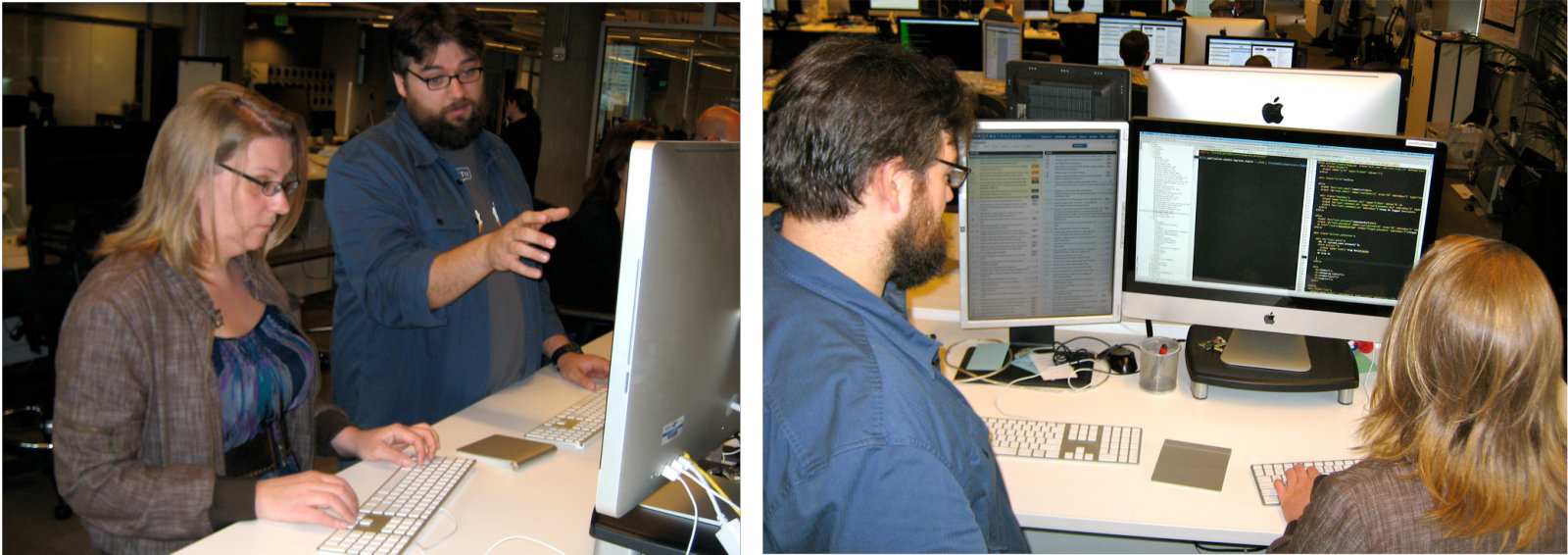
Pair programming is cooperative, and should involve a lot of talking. It focuses effort on the task at hand, and two people working together increases the likelihood of following good development practices. But it is effective only if both collaborators share a common focus throughout the process ((Rodrı́guez et al. 2017)); if one partner is silent or checking email, then it’s not pair programming, just two people sitting near each other. In fact, it is normal for the navigator to talk more than the driver, giving constant feedback. If one collaborator is uncertain about what’s going on, both collaborators should recognize that fact and pause for dialogue to get back in sync. If a large proportion of the pair’s dialogue focuses on uncertainty, the pair may benefit from outside help, such as consulting another team member or experienced developer.
Pair programming has the side effect of transferring knowledge between the pair, including programming idioms, tool tricks, company processes, customer desires, and so on. Thus, to widen the knowledge base, some teams purposely swap partners per task so that eventually everyone is paired together. For example, promiscuous pairing of a team of four leads to six different pairings.
The studies of pair programming versus solo programming support the claim of reduced development time and improvement in software quality. For example, (Cockburn and Williams 2001) found a 20% to 40% decrease in time and that the initial code failed to 15% of the tests instead of 30% by solo programmers. However, it took about 15% more hours collectively for the pair of programmers to complete the tasks versus the solo programmers. The majority of professional programmers, testers, and managers with 10 years of experience at Microsoft reported that pair programming worked well for them and produced higher-quality code ((Begel and Nagappan 2008)). A study of pair programming studies concludes that pair programming is quicker when programming task complexity is low—perhaps one point tasks on the Tracker scale—and yields code solutions of higher quality when task complexity is high, or three points on our Tracker scale. In both cases, it took more total effort than solo programming ((Hannay et al. 2009)).
The experience at Pivotal Labs suggests that these studies may not factor in the negative impact on productivity of the distractions of our increasingly interconnected modern world: email, Twitter, Facebook, and so on. Pair programming forces both programmers to pay attention to the task at hand for hours at a time. Indeed, new employees at Pivotal Labs go home exhausted since they were not used to concentrating for such long stretches.
Even if pair programming takes more effort, one way to leverage the productivity gains from Agile and Rails is to “spend” it on pair programming. Having two heads develop the code can reduce the time to market for new software or improve quality of end product. We recommend you try pair programming to see if you like it, which some developers love.
Summary: When it’s time to start coding, one approach is pair programming, which promises higher quality and shorter development time but perhaps higher programming costs due to two people doing the work. The pair splits into a driver and an observer, with the former working tactically to complete the task at hand and the latter thinking strategically about future challenges and making suggestions to the driver.
True or False: Research suggests that pair programming is quicker and less expensive than solo programming.
False. While there have not been careful experiments that would satisfy human subject experts, and it is not clear whether they account for the lack of distractions when pair programming, the current consensus of researchers is that pair programming is more expensive—more programmer hours per task—than solo programming.
True or False: A pair will eventually figure out who is the best driver and who is the best observer, and then stick primarily to those roles.
False: An effective pair will alternate between the two roles, as it’s more beneficial (and more fun) for the individuals to both drive and observe.
2.3 Introducing Ruby, an Object-Oriented Language
Ruby is a minimalist language: while its libraries are rich, there are relatively few mechanisms in the language itself. Its world view might be described as “extreme object orientation.” Two principles will help you quickly learn to read and write Ruby:
Everything is an object—even an integer—and it is literally the case that every operation is a method call on some object and every method call returns a value.
Like Java and Python, Ruby has conventional classes; but unlike Java public attributes or Python instance variables, only a class’s instance methods—not its instance variables—are visible outside the class. In other words, all access to instance variables from outside the class must take place via public accessor methods; instance variables lacking public accessor methods are effectively private. (Python supports a similar approach but doesn’t make it mandatory.)
Let’s break down our investigation of Ruby according to the elements proposed in the previous section and in light of the above principles.
Types, typing, and names. Ruby is dynamically typed: variables don’t have types, though the objects they refer to do. Hence x=’foo’ ; x=3 is legal. As row 1 of Figure 2.2 shows, a single or double @-sign precedes names of instance or class (static) variables, while local variables are “barewords”; all must begin with lowercase letters, and snake_case is strongly preferred over camelCase. Row 2 shows the syntax for other named entities such as classes and constants; all except globals (which you should never use anyway) must begin with a capital letter, with UpperCamelCase used for class names. (So even though strictly speaking lowerCamelCase is legal for local and instance variables, it’s highly discouraged because it is visually difficult to distinguish from UpperCamelCase and because of the ease with which a typo can change the former into the latter and cause errors.) The namespaces for each kind of named entity are separate, so that foo, @foo, @@foo, FOO, Foo, $FOO are all distinct.
In learning any new language, an annoying type-related eye-poke is having to memorize how the language handles Boolean evaluation of non-Boolean expressions. Some languages have special Boolean types and values, such as Python’s True and False (which have special type Bool), JavaScript true and false (type boolean), and Ruby’s true and false (TrueClass and FalseClass respectively). To avoid confusion with such actual Boolean literals, developers often say truthy or falsy to describe the value of a non-Boolean expression e when used in a conditional of the form if (e)…. Unfortunately, the rules for truthiness are different and largely arbitrary in each language. In Ruby, the literals false and nil are falsy, but all other values, including the number zero, the empty string, the empty array, and so forth, are truthy. In contrast, in Python, zero is falsy, but the empty string is truthy; in JavaScript, zero and the empty string are both falsy, as are the special values undefined and null, but the empty array is truthy; and so on. In languages that include both a true Boolean type and unary logical negation (usually !), writing as !!x forces the expression to have a Boolean-valued result (for example, if x is falsy, then !!x is the actual Boolean value for false).
Primitives. Figure 2.2 shows the mostly unsurprising syntax of basic Ruby elements.
An editor with language-specific highlighting and indentation is an essential tool for software writers. Popular choices today include Microsoft Visual Studio Code (VSCode), Sublime Text, and (for some old-timers such as one of your authors) the venerable Emacs.
Ruby has special Boolean values (row 3) including the special value nil, which is the usual result of an operation that otherwise would yield no meaningful return value, such as looking up a nonexistent key in a hash or a nonexistent value in an array.
Ruby has no separate “empty result” value such as Python none or JavaScript null. That is to say: a JavaScript variable whose value is null means that the variable references nothing in particular, rather than signifiying “falseness” in a Boolean sense, whereas Ruby nil may signal either Boolean falseness or a variable that refers to nothing.
In addition to strings (row 4), Ruby also includes a type called symbol (row 4), such as :octocat, essentially an immutable “token” whose value is itself. It is typically used for enumerations, like an enum type in C or Java, though it has other purposes as well. A symbol is not the same as a string, but as the figure shows, strings and symbols can be easily converted to each other.
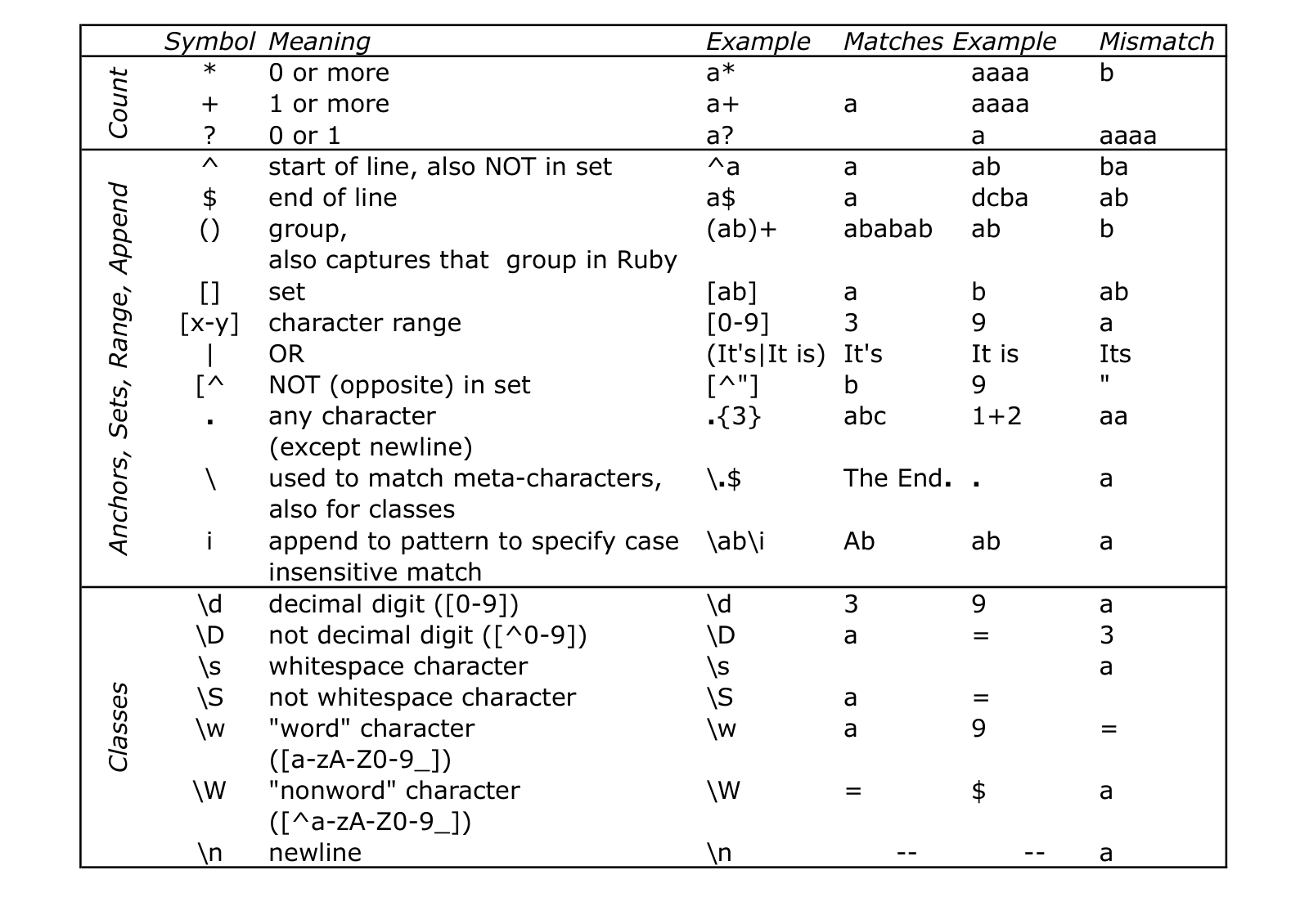
Row 6 and Figure 2.3 summarize Ruby’s straightforward support for manipulating regular expressions and capturing the results of regex matches. Given the amount of text handling done by modern SaaS apps, mastering regexes and understanding how a new language provides access to a regex engine is de rigeur for programmers.
Collections (rows 7–9: arrays and hashes) can combine keys and values of different types. Hashes in particular, also called associative arrays or hashmaps in other languages, are ubiquitous in Ruby.
Every Ruby statement is an expression that returns a value; assignments return the value of their left-hand side, that is, the value of the variable or other L-value that was just assigned to.
| 1.Variables | local_variable, @@class_variable, @instance_variable |
|---|---|
| 2. Constants | ClassName, CONSTANT, $GLOBAL, $global |
| 3. Booleans | false, nil are false; true and everything else (zero, empty string, etc.) is true. |
| 4. Strings and Symbols | "string", ’also a string’, %q{like single quotes}, %Q{like double quotes}, :symbol |
special characters (\n) expanded in double-quoted but not single-quoted strings |
|
| 5. Expressions in double-quoted strings | @foo = 3 ; "Answer is #{@foo}"; %Q{Answer is #{@foo+1}} |
| 6. Regular expression matching (Fig. 2.3) | "hello" =~ /lo/ or "hello".match(Regexp.new ’lo’) |
| 7. Arrays | a = [1, :two, ’three’] ; a[1] == :two |
| 8. Hashes | h = {:a => 1, ’b’ => "two"} ; h[’b’] == "two" ; h.has_key?(:a) == true |
| 9. Hashes (alternate notation, Ruby 1.9+) | h = {a: 1, ’b’: "two"} |
| 10. Instance method | def method(arg, arg)…end |
(use *args for variable number of arguments) |
|
| 11. Class (static) method | def ClassName.method(arg, arg)…end, |
def self.method(arg, arg)…end |
|
| 12. Special method names | def setter=(arg, arg)…end |
Ending these methods’ names in ? and ! |
def boolean_method?(arg, arg)…end |
| is optional but idiomatic | def dangerous_method!(arg, arg)…end |
| Conditionals | Iteration (see Section 2.4) | Exceptions |
|---|---|---|
if cond (or unless cond) |
while cond (or until cond) |
begin |
| statements | statements | statements |
1.upto(10) do i…end |
e is an exception of class AnError; |
|
collection.each do elt…end |
[ensure |
|
end |
this code is always executed] | |
end |
Hash) are ubiquitous.
Methods. A method is defined with def method_name(arg1,…,argN) and ends with end. All statements in between are the method definition. All methods return a value; if a method doesn’t have an explicit return statement, the value of the last expression evaluated in the method is its return value, which is always well-defined since every Ruby statement results in a value.
Everything in Ruby, even a lowly integer, is a full-fledged object that is an instance of some class.
Smalltalk, which inspires Ruby’s object model, was itself inspired by ideas in Simula, the first object-oriented programming language, whose inventors won the Turing Award for their contribution.
Every operation, without exception, is performed by calling a method on an object. The notation obj.meth() calls method meth on the object obj, which is said to be the receiver and is expected to be able to respond to meth. For example, the expression 5.class() sends the method call class with no arguments to the object 5. The class method happens to return the class that an object belongs to, in this case Fixnum.
As we’ll see in more detail in the next section, Ruby allows omitting parentheses around argument lists when doing so does not result in ambiguous parsing. Hence 5.class is equivalent to 5.class().
Furthermore, since everything is an object, the result of every expression is, by definition, something on which you can call other methods. Hence (5.class).superclass tells you what Fixnum’s superclass is, by sending the superclass method call with no arguments to Fixnum, an object representing the class to which 5 belongs. Method calls associate to the left, so this example could be written 5.class.superclass. Such method chaining is extremely idiomatic in Ruby.
A Ruby class such as Fixnum is itself an instance of Class, which is a class whose instances are also classes (we say that Class is a metaclass). Unless you’re a languages geek, don’t think too hard about this right away or it will make your head hurt.
This example gives a glimpse of Ruby’s comprehensive reflection—the ability to ask objects about themselves. 5.respond_to?(’class’) tells you that the object 5 would be able to respond to the method class if you asked it to. 5.methods lists all methods to which the object 5 responds, including those defined in its ancestor classes. 5.method(’+’) reveals that the + method is defined in class Fixnum, whereas 5.method(’ceil’) reveals that the ceil method is defined in Integer, an ancestor class of Fixnum.
As Figure 2.4 shows, even basic math operations and array references are actually method calls on their receivers. Hence, concepts such as type casting rarely apply in Ruby: while you can certainly call 5.to_s or "5".to_i to convert between strings and integers, for example, writing a+b means calling method + on receiver a, so the behavior depends entirely on how a’s class (or one of its ancestors or mix-ins) implements the instance method +. Hence, both 3+2 and "foo"+"bar" are legal Ruby expressions, but the first one calls + as defined in Numeric (the ancestor class of Fixnum) whereas the second calls + as defined in String.
You can verify this by evaluating "foobar".method(:+) and 5.method(:+).
Rubyists write ClassName#method to indicate the instance method method in ClassName and ClassName.method to indicate the class (static) method method in ClassName. We can therefore say that the expression 3+2 results in calling Fixnum#+ on the receiver 3.
| Sugared | De-sugared | Explicit send |
|---|---|---|
10 % 3 |
10.modulo(3) |
10.send(:modulo, 3) |
5+3 |
5.+(3) |
5.send(:+, 3) |
x == y |
x.==(y) |
x.send(:==, y) |
a * x + y |
a.*(x).+(y) |
a.send(:*, x).send(:+, y) |
a + x * y |
a.+(x.*(y)) |
a.send(:+, x.send(:*, y)) |
| (operator precedence preserved) | ||
x[3] |
x.[](3) |
x.send(:[], 3) |
x[3] = ’a’ |
x.[]=(3,’a’) |
x.send(:[]=, 3, ’a’) |
/abc/, %r{abc} |
Regexp.new("abc") |
Regexp.send(:new, ’abc’) |
str =~ regex |
str.match(regex) |
str.send(:match, regex) |
regex =~ str |
regex.match(str) |
regex.send(:match, str) |
$1…$n (regex capture) |
Regexp.last_match(n) |
Regexp.send(:last_match,n) |
send, which accepts either a string or (more idiomatically) a symbol for the method name.
Abstraction and encapsulation. Ruby supports traditional inheritance, using the notation class SubFoo<Foo to indicate that SubFoo is a subclass of Foo. A class can inherit from at most one superclass (Ruby lacks multiple inheritance), and all classes ultimately inherit from BasicObject, sometimes called the root class, which has no superclass. As with most languages that support inheritance, if an object receives a call for a method not defined in its class, the call will be passed up to the superclass, and so on until the root class is reached or an undefined method exception is raised.
Mix-ins, which we’ll describe shortly, can handle an undefined method call before punting up to the superclass.
The default constructor for a class must be a method named initialize, but it is always called as Foo.new—that is an idiosyncrasy of the language. Classes can have both class (static) methods and instance methods, and both class (static) variables and instance variables. Class variable names begin with @@ and instance variable names begin with @. Class and instance method names look the same.
Probably the biggest surprise to newcomers learning about Ruby’s class machinery is that there is no direct access to class or instance variables at all from outside the class. In other languages, certain instance variables of a class can be declared public, such as attributes in Java. In Ruby, access to class or instance state must be through getter and setter methods, also collectively called accessor methods. Figure 2.5 shows examples of getters (lines 10–12, 16), setters (lines 13–15: note that setter methods conventionally have names ending in =, allowing syntax such as line 33 shows), and a simple instance method that accesses other instance variables (line 18). From the caller’s point of view in lines 33–34, it is impossible to tell whether a given method simply “wraps” access to an instance variable (as title does) or produces its result by computing something (as full_title does). This design choice illustrates Ruby’s hard-line position on the Uniform Access Principle, which concerns one aspect of encapsulation in object-oriented programming: It should be impossible to determine the implementation details of an object’s state or its operations from outside the object.
Beware! If you’re used to Java or Python, it’s very easy to think of the syntax in line 33 as assignment to an attribute or instance variable, but it is just a method call, and in fact could be written as beautiful.send(’title=’, ’La vita e bella’). Furthermore, note that any instance variable that has not previously been assigned to will silently evaluate to nil.
ch_ruby/code/class_example.rb
class Movie
  def initialize(title, year)
    @title = title
    @year = year
  end
  # class (static) methods - 'self' refers to the actual class
  def self.find_in_tmdb(title_words)
    # call TMDb to search for a movie...
  end
  def title
    @title
  end
  def title=(new_title)
    @title = new_title
  end
  def year ; @year ; end
  # note: no way to modify value of @year after initialized
  def full_title ; "#{@title} (#{@year})"; end
end

# A more concise and Rubyistic version of class definition:
class Movie
  def self.find_in_tmdb(title_words)
    # call TMDb to search for a movie...
  end
  attr_accessor :title # can read and write this attribute
  attr_reader :year    # can only read this attribute
  def full_title ; "#{@title} (#{@year})"; end
end

# Example use of the Movie class
beautiful = Movie.new('Life is Beautiful', '1997')
beautiful.title = 'La vita e bella'
beautiful.full_title    #   => "La vita e bella (1997)"
beautiful.year = 1998 # => ERROR: no method 'year='Summary:
Everything in Ruby is an object, even primitive types like integers. Ruby objects have types, but the variables that refer to them don’t.
Every operation is performed by calling a method on an object; the notation
a.bmeans “call methodbon objecta.” Objectais said to be the receiver, and if it cannot handle the method call, it will pass the call to its superclass. This process is called looking up a method on a receiver.Every Ruby statement is an expression that has a well-defined value (which may be
nil).Ruby has classes and single inheritance, with the usual instance and class methods and variables.
Important Ruby idioms include the use of symbols, the use of keyword-based arguments to methods, and poetry mode, which allows omitting parentheses around method arguments and curly braces surrounding a hash when the resulting code is syntactically unambiguous.
An idiomatic primitive type in Ruby is the symbol, an immutable string whose value is itself. Symbols are commonly used in Ruby to denote “specialness,” such as being one of a set of fixed choices like an enumeration, and to pass named (keyword) arguments to methods.
Ruby has comprehensive reflection, allowing you to ask objects about themselves.
attr_accessoris an example of metaprogramming: it creates new code at runtime, in this case getters and setters for an instance variable. This style of metaprogramming is extremely common in Ruby.
ch_ruby/code/time_extension_example.rb
#  Time#now, Time#+ and Time#- represent time as 'seconds since 1/1/70'
class Fixnum
  def seconds  ; self ; end
  def minutes  ; self * 60 ; end
  def hours    ; self * 60 * 60 ; end
  def ago      ; Time.now - self ; end
  def from_now ; Time.now + self ; end
end
Time.now                # => 2018-11-22 16:58:04 +0100
5.minutes.ago           # => 2018-11-22 16:53:12 +0100
5.minutes - 4.minutes   # => 60
3.hours.from_now # => 2018-11-22 19:58:45 +0100Fixnum class and adding six new instance methods to it, we get a beautiful syntax for time arithmetic. (Rails includes a more complete version of this facility.) Unix was invented in 1970, so its designers chose to represent time as the number of seconds since midnight (GMT) 1970–01–01, sometimes called the beginning of the epoch.
attr_accessor is an example of metaprogramming—creating code at runtime that defines new methods— because attr_accessor is not built into the Ruby language, but instead is a regular method call that defines the getter and setter methods on the fly. That is, attr_accessor :foo defines instance methods foo and foo= that get and set the value of instance variable @foo. In fact, in a sense all Ruby programming is metaprogramming, since even the class definition in Figure 2.5 is not a declaration as it is in Java but actually code that is executed at runtime, creating a new object representing the Movie class and binding the name Movie to it. Going further, since defining a class happens at runtime, you can modify it later as well, as Figure 2.6 shows.

What is the explicit-send equivalent of each of the following expressions: a<b, a==b, x[0], x[0]=’foo’.
a.send(:<,b), a.send(:==,b), x.send(:[],0), x.send(:[]=,0,’foo’)
Verify in an interactive Ruby interpreter that 5/4 gives \(1\), but 5/4.0 and 5.0/4 both give \(1.25\). Explain this behavior by identifying which class’s / method is called in each case, and how you think it handles its argument.
In 5/4 and 5/4.0, the Integer class’s / instance method is called on the receiver \(5\). That method performs integer division if its argument is also an integer, but if its argument is a float, it converts the receiver to a float and performs floating-point division. In 5.0/4, the Float class’s / method is called, which always performs floating-point division.
Why is movie.@year=1998 not a substitute for movie.year=1998?
The notation a.b always means “call method b on receiver a”, but @year is the name of an instance variable, whereas year= is the name of an instance method.
Suppose we delete line 12 from Figure 2.5. What would be the result of executing Movie.new(’Inception’,2011).year?
Ruby would complain that the year method is undefined.
In Figure 2.6, is Time.now a class method or an instance method?
The fact that its receiver is a class name (Time) tells us it’s a class method.
Why does 5.superclass result in an “undefined method” error? (Hint: consider the difference between calling superclass on 5 itself vs. calling it on the object returned by 5.class.)
superclass is a method defined on classes. The object 5 is not itself a class, so you can’t call superclass on it.
Which of the following Ruby expressions are equal to each other: (a) :foo (b) %q{foo} (c) %Q{foo} (d) ’foo’.to_sym (e) :foo.to_s
(a) and (d) are equal to each other; (b), (c), and (e) are equal to each other
What is captured by $1 when the string 25 to 1 is matched against each of the following regexps:
(a) /(\d+)$/
(b) /^\d+([^0-9]+)/
(a) the string “1” (b) the string “ to ” (including the leading and trailing spaces)
Consider line 18 of Figure 2.5. Explain why the following would be an acceptable alternative way to define the full_title method, and the pros and cons compared to the way it appears in the figure:
def full_title ; "#``title`` (#``year``)"; end
This version calls the accessor methods title and year rather than accessing the instance variables directly. Doing so decouples the implementation of this method from the implementations of the underlying state of the movie (title and year).
2.4 Ruby Idioms: Poetry Mode, Blocks, Duck Typing
A programming idiom is a way of doing or expressing something that occurs frequently in code written by experienced users of a given programming language. While there may be other ways to accomplish the same task, the idiomatic way is the one that is most readily intention-revealing to other experienced users of the language. Your goal when learning a new language should be to learn to “think in” that language by understanding and using its idioms well, or in other words, to avoid the well-known pitfall that “you can write FORTRAN in any language”. In this section we explore three key Ruby idioms: passing arguments to methods (“poetry mode” and named parameters), blocks, and duck typing.
Poetry mode and named parameters. Figures 2.7 and 2.8 show two pervasive idioms related to Ruby method calls. The first, poetry mode, allows omitting parentheses around the arguments to a method call when the parsing is unambiguous. In addition, when the last argument to a method call is a hash, the curly braces around the hash literal can be omitted.
ch_ruby/code/poetrymode.rb
link_to (which we’ll meet in Section 4.4) that takes one string argument and one hash argument. The first is fully parenthesized, the second omits the parentheses around the call arguments and the curly braces around the final hash argument, and the third uses the alternative (Ruby \(\geq 2.0\)) syntax for the hash keys in the second argument.
In early versions of Ruby, hash arguments were often used to emulate the named parameter feature (also called keyword arguments) available in languages such as Python, C#, and others. For example, the documentation for the link_to method used in Figure 2.7 tells us that :controller and :action are just two of many possible additional (and optional) values that can be passed to the method as keys in a hash. True named parameters became available in Ruby 2.0, as Figure 2.8 shows; nonetheless, a great deal of Ruby code written prior to Ruby 2.0 still uses hashes to pass optional arguments or provide default values for arguments.
ch_ruby/code/optional_args_example.rb
# Using 'named keyword' arguments
def greet(name, last_name: "", greeting: "Hi")
  "#{greeting}, #{name} #{last_name}!"
end
greet("Dave")               # => "Hi, Dave! "
greet("Dave", last_name: "Fox") # => "Hi, Dave Fox!"
greet("Dave", greeting: "Yo")   # => "Yo, Dave!"
greet("Dave", greeting: "Hey", last_name: "Patterson")
        # => "Hey, Dave Patterson!" - order of keyword args irrelevant
greet(greeting: "Yo") # ArgumentError, since first arg is requiredBlocks. Ruby uses the term block somewhat differently than other languages do. In Ruby, a block is just a method without a name, or an anonymous lambda expression in programming-language terminology. Like a regular named method, it has arguments and can use local variables.
As Figure 2.9 shows, one of the most common uses of blocks is to implement data structure traversal. The instance method each, available in all Ruby classes that are collection-like, takes a single argument consisting of a block (anonymous lambda) to which each member of the collection will be passed. each is an example of an internal iterator. Rubyists like to say that Ruby collections “manage their own traversal,” because it’s up to the receiver of each to decide how to implement that method to yield each collection element. (Indeed, in Figure 2.9, we can’t even tell what the underlying type of movie_list is.)
Internal iterators first appeared in the research language CLU, an early vehicle for research on data hiding that garnered a Turing Award for Barbara Liskov.
ch_ruby/code/block_example.rb
each takes one argument—a block—and passes each element of the collection to the block in turn. A block is bracketed by do and end, and any arguments expected by the block are enclosed in pipe symbols after the do. Each time through the block, m is set to the next element of movie_list.
Figure 2.10 shows a simple example of such a collection operator, which can be used with any collection that implements each as a way of traversing itself. Note once again that we have no idea how the collection is implemented: all we need to know is that it implements the instance method each to enumerate its elements. Ruby provides a wide variety of such collection methods; Figure 2.11 lists some of the most useful. With some practice, you will automatically start to express operations on collections in terms of these functional idioms rather than in terms of imperative loops. Although Ruby allows for i in collection, each allows us to take better advantage of duck typing, which we’ll see shortly, to improve code reuse.
ch_ruby/code/collection_example.rb
# find largest element in a collection
def maximum(collection)
  result = collection.first
  collection.each do |item|
    result = item if item > result
  end
  result
end
maximum([3,4,2,1])     # => 4
maximum(["a","x","b"]) # => "x"
maximum([RomanNumeral.new('XL'), RomanNumeral.new('LI')]) # => 'LI'

class RomanNumeral
  include Comparable
  attr :value
  def initialize(roman_numeral_string)
    @orig_string = roman_numeral_string
    @value = RomanNumeral.convert_from_roman(roman_numeral_string)
  end
  def <=>(other)
    @value <=> other.value
  end
  def to_s
    @orig_string
  end
  def self.convert_from_roman(str)
    # ...code to convert Roman numerals from strings...
  end
endeach, and is agnostic to the type(s) of the element(s) in the collection as long as they respond to >. It even works on Roman numerals if we have a RomanNumeral class that either defines > explicitly, or defines <=> and mixes in the Comparable module to define <, >, and so on.
Method :=================================== c.map |
Block? :==================================: 1 | Returns a new collection containing… :============================================================================================================================================================================================================================================= elements obtained by applying block to each element of c |
|
c.select |
1 | Subset of c for which block evaluates to true |
|
c.reject |
1 | Subset of c obtained by removing elements for which block evaluates to true |
|
c.uniq |
all elements of c with duplicates removed |
||
c.reverse |
elements of c in reverse order |
||
c.compact |
all non-nil elements of c |
||
c.flatten |
elements of c and any of its sub-arrays, recursively flattened to contain only non-array elements |
||
c.partition |
1 | Two collections, the first containing elements of c for which the block evaluates to true, and the second containing those for which it evaluates to false |
|
c.sort |
2 | Elements of c sorted according to a block that takes 2 arguments and returns -1 if the first element should be sorted earlier, +1 if the second element should be sorted earlier, and 0 if the two elements can be sorted in either order. |
|
The following methods require the collection elements to respond to <=>; see Section 2.4. |
|||
c.sort |
If sort is called without a block, the elements are sorted according to how they respond to <=>. |
||
c.sort_by |
1 | Applies the block to each element of c and sorts the result. For example, movies.sort_by { ``m`` m.title } sorts Movie objects according to how their titles respond to <=>. |
|
c.max, c.min |
Largest or smallest element in the collection | ||
sort, whose block expects 2 arguments, might look like: c.sort { a,b a \(<=>\) b }. These methods all return a new object rather than modifying the receiver, but some methods also have a destructive variant ending in !, for example sort!, that modify the receiver in place as well as returning the modified value. Use destructive methods with extreme care, if at all.
 Duck Typing. You may be surprised to learn, though, that the collection methods summarized in Figure 2.11 (and several others not in the figure) aren’t part of Ruby’s
 Array class. In fact, they aren’t even part of any superclass from which Array and other collection types inherit. Instead, they take advantage of an even more powerful reuse mechanism: A mix-in is a named collection of related methods that can be added to any class fulfilling some “contract” with the mixed-in methods. A module is Ruby’s method for packaging together a group of methods as a mix-in. The Ruby statement include ModuleName inside a class definition mixes the instance methods, class methods, and variables of the module into that class. The collection methods in Figure 2.11 are defined in a module called Enumerable that is part of Ruby’s standard library and is mixed in to all of Ruby’s collection classes. As its documentation states, Enumerable requires the class mixing it in to provide an each method, since Enumerable’s collection methods are implemented in terms of each. It doesn’t matter what class you mix it into as long as that class defines the each instance method, and neither the class nor the mix-in have to declare their intentions in advance. For example, the each method in Ruby’s Array class iterates over the array elements, whereas the each method in the IO class iterates over the lines of a file or other I/O stream. Mix-ins thereby allow reusing whole collections of behaviors across classes that are otherwise unrelated.
Similarly, a class that defines the “spaceship operator” <=>, which returns \(-1, 0, 1\) depending on whether its second argument is less than, equal to, or greater than its first argument, can mix in the Comparable module, which defines <, <=, >, >=, ==, and between? in terms of <=>. For example, the Time class defines <=> and mixes in Comparable, allowing you to write Time.now.between?(Time.parse("19:00"), Time.parse("23:15")).
The term “duck typing” is a popular description of this capability, because “if something looks like a duck and quacks like a duck, it might as well be a duck.” From Enumerable’s point of view, if a class has an each method, it might as well be a collection, thus allowing Enumerable to provide other methods implemented in terms of each. When Ruby programmers say that some class “quacks like an Array,” they usually mean that it’s not necessarily an Array nor a descendant of Array, but it responds to most of the same methods as Array and can therefore be used wherever an Array would be used.
Summary
Poetry mode allows omitting parentheses around method call arguments, and omitting curly braces around a hash literal when it is the last argument to a method call. Hash arguments were previously used to emulate named parameters or keyword arguments, but this practice is now discouraged since Ruby supports true named parameters starting with version 2.0.
Ruby borrows great ideas from functional programming, especially the use of blocks—parameterized chunks of code called lambda expressions that carry their scope around with them, making them closures.
Because of Ruby’s dynamic typing, calling a method on an object is legal as long as the receiver responds to the method, regardless of the receiver’s class, a behavior sometimes called duck typing.
A mix-in takes advantage of duck typing by allowing a set of related behaviors to be added to any class that satisfies the mix-in’s contract; for example,
Enumerablejust requires the including class to respond toeach. A module is mixed into a class by puttinginclude ModuleNameafter theclass ClassNamestatement.Unlike interfaces in Java, mix-ins require no formal declaration. But because Ruby doesn’t have static types, it’s your responsibility to ensure that the class including the mix-in satisfies the conditions stated in the mix-in’s documentation, or you will get a runtime error.
The combination of blocks and iterators like each, which is how most Ruby operations on collections are expressed, is a technique Ruby borrows from functional programming. A Ruby block is a closure: whenever the block executes, it can “see” the entire lexical scope available at the place where the block appears in the program text. In other words, it’s as if the presence of the block creates an instant snapshot of the scope, which can be reconstituted later whenever the block executes. This fact is exploited by many Rails features that improve DRYness, including view rendering (which we’ll see in Section 4.4) and model validations and controller filters (Section 5.1), because they allow separating the definition of what is to occur from when in time and where in the structure of the application it occurs.

Write one line of Ruby that checks whether a string s is a palindrome, that is, it reads the same backwards as forwards. Hint: Use the methods in Figure 2.11, and don’t forget that upper vs. lowercase shouldn’t matter: ReDivider is a palindrome.
s.downcase == s.downcase.reverse
You might think you could say s.reverse=~Regexp.new(s), but that would fail if s happens to contain regexp metacharacters such as $.
Suppose you mix Enumerable into a class Foo that does not provide the each method. What error will be raised when you call Foo.new.map { elt puts elt }?
The map method in Enumerable will attempt to call each on its receiver, but since the new Foo object doesn’t define each, Ruby will raise an Undefined Method error.
Which statement is correct and why: (a) include ’enumerable’ (b) include Enumerable
(b) is correct, since include expects the name of a module, which (like a class name) is a constant rather than a string.
2.5 CHIPS: Ruby Intro
 https://github.com/saasbook/hw-ruby-intro
Write and run Ruby code that exercises the basics of control flow, classes and inheritance, accessor methods, regular expression and string manipulation, symbols, and common uses of blocks such as iterators and collection idioms. Learn your way around the interactive Ruby interpreter irb and the debugger byebug. Familiarize yourself with RSpec, a tool for creating automated tests, by writing code to get our provided tests to pass.
2.6 Gems and Bundler: Library Management in Ruby
Libraries. The Ruby standard library includes a large number of useful classes covering file and network input/output, time and date manipulation, manipulating strings and collections, and more.
An external library is packaged as a Ruby gem, a collection of classes with well-defined interfaces. Gems can be as simple as augmenting existing classes with a few utility functions, or as complex as an entire framework: Rails itself is distributed as a gem that depends on several other gems. Similar to Python import, require makes a gem’s classes and functions available within a file of Ruby code, as Figure 2.12 shows.
ch_ruby/code/gem_example.rb
gem install ’stripe’) or preferably via the Bundler tool discussed next. gem help gives brief help for the command-line tool that manages installed gems manually; by default it installs gems from the RubyGems website, the definitive gem repository.
Where Ruby really shines, though, is in managing dependencies among gems. GitLab, a popular open-source application written in Rails, relies on around 400 gems. Since some of those rely in turn on other gems, all in all GitLab depends on over 800 gems, many of which are constantly evolving. It’s therefore critical to specify which version(s) of libraries an app has been developed and tested with, so that when the app is deployed or distributed, it behaves the same way in every environment in which it’s run.
To manage complex dependencies, we need a dependency manager or package manager, such as pip for Python, npm for Node.js, or Apache Maven for Java. Ruby’s package manager, Bundler, is itself a gem. Once Bundler is installed with gem install bundler, you should allow it to do your dependency management.
To use Bundler, a Ruby project should have a file called Gemfile in its top-level directory that records the dependencies of the app on particular libraries. Bundler reads this file and tries to compute a set of library version(s) that respects all the constraints in the file. For example, if the app depends on version \(\geq 3.0\) and \(\leq
4.0\) for library X, but the app also depends on library Y which requires version 3.5 of library X, then version 3.5 of library X will be installed. Bundler can also detect when it’s impossible to satisfy all the constraints. In general, when you start a new Ruby project you immediately create a Gemfile for it, and when you download someone else’s Ruby project to work on, you first run bundle install in the project’s main directory to allow Bundler to locate and download all the necessary libraries.
Bundler then arranges to install all needed gems with their proper versions, and records the results in Gemfile.lock. Both Gemfile and Gemfile.lock should be stored as part of the codebase, since the latter records which versions of which libraries were actually used in development, whereas Gemfile just specifies constraints on which versions could be compatibly used.
gem installname[-vversion] |
Install version version (default: latest) of gem named name. The default location for downloading gems is rubygems.org. |
|---|---|
bundle install [--withoutenv] |
If Gemfile has not changed, inspect Gemfile.lock and ensure that the correct version(s) of gem(s) specified there are installed. If Gemfile has changed, recompute the dependency graph to regenerate Gemfile.lock, then ensure correct gems are installed. If --without is given, do not try to install gems associated with environment env. |
bundle updategemnames |
Force Bundler to update gemnames to their latest major versions, and recompute dependencies. Passing --all for gemnames forces updating all gems, ignoring and regenerating Gemfile.lock. |
bundle execcommand |
Execute command in the context of the current bundle, that is, make sure the correct version(s) of gem(s) are loaded and active before command runs. For example, if command relies on a particular version of some gem, but you have other version(s) of that gem also installed, without bundle exec the wrong version of the gem may be active when command is run. |
bundle help |
Show more detailed help; also see Bundler’s website. |
Increasingly, library version numbers follow semantic versioning, not just for Ruby gems but in other languages as well. The usual arrangement is for a version number to be formatted as major.minor.patch, where each field is an integer, such as 2.3.1. Changes in the value of patch are usually minor, backwards-compatible bug fixes, including security patches, that do not change the semantics or functionality of the gem. Changes in minor usually indicate that functionality has been added in a backward-compatible manner. Changes in major signal that the Application Programming Interface (API)—the way you call the library’s functions—has changed in a way that may break compatibility with previous versions.
Since breaking compatibility is a major decision that may affect thousands of apps using a library, a common practice is for such changes to first appear as deprecation warnings in a new minor version or patch version. Such warnings typically manifest as messages emitted at build time or run time to the effect of “Warning: this feature will work differently [or be dropped] in the next major release of this library.” As a general rule, deprecation warnings become errors when the major version changes. The prudent developer faced with a deprecation warning will therefore read the documentation and determine if there is a way to change the current code so that it uses the soon-to-be-new version of the feature or of the feature’s API.
Indeed, when upgrading to a new major version, a best practice is to first incrementally upgrade so that you can identify and address deprecations before the major version change. For example, suppose your app uses version 2.7.3 of the Foobaz gem, but the latest version is 3.1.5, and you haven’t been keeping up:
First, update to the latest whose major version is still 2—let’s say that turns out to be 2.8.1.
Identify and address any deprecation warnings generated by that upgrade.
Now upgrade to the first release whose major version is 3. In all likelihood this is 3.0.0, but might be different. Ensure all works well with the new major version.
Next, upgrade to the latest minor version—in our example, probably 3.1.0. Ensure all works well.
Finally, upgrade to 3.1.5, the latest patch release.
Bundler uses ~> 2 to mean “last release whose major version is 2”, or ~> 2.4 to mean “last release whose major and minor version is 2.4”. So 2.4.6 would satisfy both constraints, whereas 2.5 would satisfy the first but not the second.
Of course, in an ideal world, the developer has been gradually updating the gem over time, so it is not necessary to do all these steps at once.
In Chapter 8, we will have a lot to say about “ensuring all works well,” as this is one of the key roles of having a solid test suite.
Summary of libraries and dependency management in Ruby:
Besides a language’s standard library, which usually ships with the language distribution, most languages enjoy vast external libraries of contributed code. In Ruby, external libraries are distributed as Ruby gems.
Keeping track of which version(s) of which libraries an app depends on is critical. The Bundler tool largely automates this by allowing the developer to express constraints on library versions and then figuring out a set of versions that meet all the constraints.
Most libraries are semantically versioned as
major.minor.patch, where patches fix bugs, minor releases add new functionality, and major releases overhaul the library in ways that may break compatibility with previous major releases.To prepare developers for such breaking changes, updated patch or minor versions will often display deprecation messages warning the developer about the use of a feature that is about to change incompatibly. Frequently upgrading maximizes the likelihood you can see and act on deprecations before they become errors; the Gemfile you prepare for Bundler specifies what “safe” upgrades are permitted.
2.7 Fallacies and Pitfalls
If one member of the pair has much more experience, the temptation is to let the more senior member do all the driving, with the more junior member becoming essentially the permanent observer. This relationship is not healthy, and will likely lead to disengagement by the junior member.
Computer science legend and Turing Award winner Donald Knuth, who literally wrote the book(s) on the foundations of theoretical computer science, says that writing code is “harder than anything else I’ve ever had to do.” And Peter Norvig, Google’s Director of Research, has eloquently said that there is no shortcut around such a challenge: it requires deep study and lots of ongoing practice. Following a step-by-step tutorial without an understanding of the underlying mechanisms being explained will put something on the screen quickly, but you won’t understand how it got there nor be able to replicate this success with your own apps.
In strongly-typed or statically-typed languages, the compiler can usually detect if a variable of one type is erroneously being assigned a value of an incompatible type, for example, writing x=foo() where foo returns a numeric value but x has been declared as a string variable. In weakly-typed or dynamically-typed languages (Ruby is both), there are no such “compile-time” checks—instead you’ll get a runtime error. So you must be that much more careful in your testing and in the design of your code. Chapter 8 will introduce techniques for ensuring your code is well tested. The debate over the relative merits of static vs. dynamic typing is a long-running “holy war” among programmers that we won’t wade into here.
It takes some mileage to learn a new language’s idioms and how it fundamentally differs from other languages. Common examples for Python programmers new to Ruby include:
Reading an expression such as
person.ageas “theageattribute of thepersonobject” rather than “call the instance methodageon the objectperson.”Thinking that
person.age=40is an assignment to an attribute when in fact it is a method call. In fact, theage=method called onpersonis passed the argument (40), and can do whatever it wants. Ruby code often uses this mechanism as a way to provide syntactic sugar for “assignments” that cause side effects.Forgetting that any instance variable that has not previously been assigned will silently evaluate to
nil.Thinking of
attr_accessoras a declaration of attributes. This shortcut and related ones save you work if you want to make an attribute publicly readable or writable. But you don’t need to “declare” an attribute in any way at all (the existence of the instance variable is sufficient) and in all likelihood some attributes shouldn’t be publicly visible. Resist the temptation to useattr_accessoras if you were writing attribute declarations in Java.Writing explicit for-loops rather than using an iterator such as
eachand the collection methods that exploit it via mix-ins such asEnumerable. Use functional idioms likeselect,map,any?,all?, and so on.Using
lowerCamelCaserather thansnake_caseto name variables. It seems trivial, but experienced programmer find it jarring to read code that violates the typographical conventions of a language, just as experienced musicians wince when they hear a note played out of tune. If in doubt, find other Ruby code with an example of what you want to do, and emulate it.
While many Rails methods are explicitly constructed to accept either a string or a symbol, the two are not in general interchangeable. A method expecting a string may throw an error if given a symbol, or depending on the method, it may simply fail. For example, [’foo’,’bar’].include?(’foo’) is truthy, whereas [’foo’,’bar’].include?(:foo) is falsy.
Suppose class C defines a method x=. In an instance method of C, writing x=3 will not have the desired effect of calling the x= method with the argument 3; rather, it will set a local variable x to 3, which is probably not what you wanted. To get the desired effect, write self.x=3, which makes the method call explicit.
require with include.
require loads an arbitrary Ruby file (typically the main file for some gem), whereas include mixes in a module. In both cases, Ruby has its own rules for locating the files containing the code; the Ruby documentation describes the use of $LOAD_PATH, but you should rarely if ever need to manipulate it directly if you use Rails as your framework and Bundler to manage your gems.
2.8 Concluding Remarks: How (Not) To Learn a Language By Googling
Your authors will allow themselves a literary flourish and frame the advice in this section with two quotes. The first is from Tom Knight, one of the principal designers of Lisp machines—research computers designed at MIT to optimize running programs in the Lisp programming language.
A novice was trying to fix a broken Lisp machine by turning the power off and on. Knight, seeing what the student was doing, spoke sternly: “You cannot fix a machine by just power-cycling it with no understanding of what is going wrong.” Knight turned the machine off and on. The machine worked.
— “AI Koans” section of The New Hacker’s Dictionary
To us, the above quote captures the perils of blindly copy-pasting code without understanding how it works: the code may appear to work initially, but if you don’t know why, or if it breaks something else, you may get into trouble in the future, and you certainly won’t learn much. While programmer Q&A sites such as StackOverflow are invaluable for both asking questions and discovering code snippets to perform specific tasks, your strategy should be to find a general pattern matching what you’re trying to do, then once you fully understand how the found example works, adapt it for your specific situation. In other words, search for how, not what.
The second quote is from the author of The Cathedral and the Bazaar ((Raymond 2001)), an early exposition of the potential advantages of open-source development:
Ugly programs are like ugly suspension bridges: they’re much more liable to collapse than pretty ones, because the way humans (especially engineer-humans) perceive beauty is intimately related to our ability to process and understand complexity. A language that makes it hard to write elegant code makes it hard to write good code.
— Eric S. Raymond
Learning to use a new language and making the most of its idioms is a vital skill for software professionals. These are not easy tasks, but we hope that focusing on unique and beautiful features in our exposition of Ruby and JavaScript will evoke intellectual curiosity rather than groans of resignation, and that you will come to appreciate the value of wielding a variety of specialized tools and choosing the most productive one for each new job.
If this is your first exposure to Ruby, then functional programming and blocks in Ruby and closures in JavaScript may take some getting used to. But as with any language, not learning to use the idioms properly may result in missing the opportunity to use a mechanism in the new language that might provide a more beautiful solution. 
Our advice is therefore to persevere in a new language until you’re comfortable with its idioms. Resist the temptation to “transliterate” your code from other languages without first considering whether there’s a more idiomatic way to express what you need in the target language.
If you want to expand your “programming language cross training” program, we recommend Seven Languages In Seven Weeks ((Tate 2010)), which introduces the reader to a set of languages that invite radically different ways of thinking about expressing programming tasks.
Finally, we recommend these resources for more detail on Ruby itself. Again, we assume that Ruby is not your first language and that this book and course are not your first exposure to programming, so we omit references aimed at beginners.
Programming Ruby and The Ruby Programming Language ((Flanagan and Matsumoto 2008)), co-authored by Ruby inventor Yukihiro “Matz” Matsumoto, are definitive references for Ruby.
The online documentation for Ruby gives details on the language, its classes, and its standard libraries. A few of the most useful classes include
IO(file and network I/O, including CSV files),Set(collection operations such as set difference, set intersection, and so on), andTime(the standard class for representing times, which we recommend overDateeven if you’re representing only dates without times). These are reference materials, not a tutorial.Learning Ruby ((Fitzgerald 2007)) takes a more tutorial-style approach to learning the language.
The Ruby Way is an encyclopedic reference to both Ruby itself and how to use it idiomatically to solve many practical programming problems.
Ruby Best Practices ((Brown 2009)) focuses on how to make the best of Ruby’s “power tools” like blocks, modules/duck-typing, metaprogramming, and so on. If you want to write Ruby like a Rubyist, this is a great read.
Many newcomers to Ruby have trouble with
yield, which has no equivalent in Java, C or C++ (although recent versions of Python and JavaScript do have similar mechanisms). The coroutines article on Wikipedia gives good examples of the general coroutine mechanism thatyieldsupports.