3 SaaS Application Architecture: Microservices, APIs, and REST
Dennis Ritchie (1941–2011) and Ken Thompson (1943–) were co-recipients of the 1983 Turing Award for fundamental contributions to operating systems design in general and the invention of Unix in particular.

I think the major good idea in Unix was its clean and simple interface: open, close, read, and write.
*— Unix and Beyond: An Interview With Ken Thompson, IEEE Computer 32(5), May 1999
Concepts
SaaS apps follow the client-server pattern, in which a client makes requests and a server responds to the requests of many clients.
Fundamental to the Web’s architecture are the Hypertext Transfer Protocol (HTTP), a request-reply protocol over which Web content is delivered, and Universal Resource Identifiers (URIs), which name a particular resource on the Web and may specify parameters (options) for accessing it. A basic building block of SaaS is an HTTP route, which combines a method such as
GETorPOSTwith a URI.Over time, the Web shifted from a collection of static resources to a collection of programs (services) that could be remotely accessed via either a Web browser or another SaaS app. This shift towards service-oriented architecture laid the groundwork for the explosion of microservices.
An Application Programming Interface (API) for a microservice is a formal description of the operations the microservice can do. The “API first” design stance suggests that even when creating a large SaaS app, we achieve a more modular design by thinking about the app in terms of its smaller components and the APIs by which they communicate.
Since most mobile apps are just SaaS clients that access a SaaS app in the same way a microservice would, the API-first design stance espoused in this chapter is an ideal complement to the mobile-first design stance in Chapter 1.
3.1 The Web’s Client–Server Architecture
Every time you use a Web browser to visit a site, or use a mobile app that also makes use of the cloud (such as when a weather app downloads the latest weather forecasts), you are using a Software-as-a-Service (SaaS) client to make one or more requests of a SaaS server. SaaS based on Web protocols is the most widely deployed example of a client-server architecture: clients are programs whose specialty is asking servers for information and (usually) allowing the user to interact with that information, and servers are programs whose specialty is efficiently serving large numbers of clients simultaneously.
Modern SaaS clients can take many forms. Whether you visit Google Maps using a browser on your PC, a browser on a smartphone, or a smartphone platform app, you’re using a SaaS client. And while the clients differ in how they present and let you interact with Google Maps since each is specialized to its task, all three are communicating with the same Google Maps SaaS service.
In contrast to the client software, which is typically a discrete app running on a single device such as a PC or smartphone, the “server” is in fact typically a collection of computers running multiple different software components (which we will meet in due time) that together comprise the functionality of the actual site. The way these components are distributed over one or many computers depends on the type of hosting environment and the number of users the app must serve. In any case, “the server” appears as a single logical entity to the client, which can remain blissfully unaware of the server’s deployment topology. Indeed, you will deploy on your own computer a “mini-server” with just enough functionality to let one user at a time (you, the developer) interact with your SaaS app during development and testing.
“Your computer” throughout this book refers to the environment in which you do your development, which may well be an IDE (Integrated Development Environment) running in the cloud that you access via a browser.
| Year | System | Client | Server | Protocol(s) |
|---|---|---|---|---|
| 1960 | Sabre, airline reservations system for American Airlines | Custom electromechanical terminals installed at travel agencies | Two IBM 7090 mainframes | Custom FM-based protocol over leased telephone lines |
| 1971 | FTP (File Transfer Protocol), which allowed clients to download files from servers | Originally, command-line client ftp; today, command-line clients (cURL, NcFTP, WinSCP), GUI apps (Cyberduck, Fetch), and all Web browsers |
Various server software packages, including Unix ftpd, FileZilla, Vsftpd |
ASCII-based FTP protocol over TCP/IP |
| 1983 | Novell NetWare, which allowed PCs running the CP/M or MS-DOS operating systems to share files on a server | Custom client software compatible with MS-DOS | Custom Novell file server appliance based on Motorola 68000 microprocessor | Custom protocols over custom PC-compatible network interface |
| 1984 | POP (Post Office Protocol), which allowed separation of email clients from servers | Various PC apps, including Eudora, Thunderbird, Apple Mail, Microsoft Outlook, Elm, Pine, Eureka | Various server software packages, including Apache James, Nginx, Eudora, Qpopper | ASCII-based POP protocol over TCP/IP; largely superseded by IMAP |
| 1990 | World Wide Web | Various PC apps, including NCSA Mosaic, Netscape Navigator, Microsoft Internet Explorer, Mozilla Firefox, Google Chrome, Apple Safari | Various server software packages, including Apache Httpd, Microsoft Internet Information Server, Nginx | ASCII-based HyperText Transfer Protocol (HTTP) over TCP/IP |
Distinguishing clients from servers allows each type of program to be highly specialized to its task: the client can have a responsive and appealing user interface, while the server concentrates on efficiently serving many clients simultaneously. Client-server is therefore our first example of a design pattern—a reusable structure, behavior, strategy, or technique that captures a proven solution to a collection of similar problems by separating the things that change from those that stay the same. In the case of client-server architectures, what stays the same is the separation of concerns between the client and the server, despite changes across implementations of clients and servers.
Of course, client-server isn’t the only architectural pattern found in Internet-based services. In the peer-to-peer architecture, used in BitTorrent, every participant is both a client and a server—anyone can ask anyone else for information. In such a system where a single program must behave as both client and server, it’s harder to specialize the program to do either job really well. In the early days of computing, client-server architectures made particularly good sense because client hardware needed to be less expensive than server hardware, so that one could deploy large numbers of clients served by one or a few very expensive servers. Today, with falling hardware costs leading to powerful smartphones and Web browsers that support animation and 3D effects, a better characterization might be that clients and servers are comparably complex but continue to be specialized for their very different roles. Indeed, we will see those distinct roles reflected in the design patterns that appear in client frameworks (Angular, React, and so on) vs. those that appear in server frameworks (Rails, Django, Node, and so on). Even terms such as “client push” reflect the built-in assumption that clients are distinct from servers.
Although client-server systems long predate the emergence of SaaS, the Web, or even the Internet, because of the Web’s ubiquity we will use the term “SaaS” (software as a service) to mean “client-server systems built to operate using the open standards of the World Wide Web,” that is, in which Web services are accessed using the protocols and data formats described in this chapter, with Web sites accessed via browsers or via mobile apps being the most common examples.
Summary:
SaaS Web apps are examples of the client-server architectural pattern, in which client software is typically specialized for interacting with the user and sending requests to the server on the user’s behalf, and the server software is specialized for handling large volumes of such requests.
The Web’s heritage as a fundamentally client-server architecture is ubiquitous throughout the software stacks, protocols, and terminology we will encounter throughout the rest of this book.
Because Web apps use open standards that anyone can implement royalty-free, in contrast to proprietary standards used by older client-server apps, the Web browser has become the “universal client.”
An alternative to client-server is peer-to-peer, in which all entities act as both clients and servers. While arguably more flexible, this architecture makes it difficult to specialize the software to do either job really well.
What is the primary difference between the roles of clients and servers in SaaS?
A SaaS client is optimized for allowing the user to interact with information, whereas a SaaS server is optimized for serving many clients simultaneously.
Identify some advantages of a stateless client-server protocol.
3.2 SaaS Communication Uses HTTP Routes
How do SaaS clients and SaaS servers communicate? A network protocol is a set of communication rules on which agents participating in a network agree. The fundamental protocol linking all computers on the Internet is TCP/IP, the venerable Transmission Control Protocol/ Internet Protocol. TCP/IP allows a pair of communicating agents to exchange ordered sequences of bytes in both directions simultaneously (full duplex), analogous to a telephone conversation in which both parties can speak and listen at the same time. If a program at one end of the TCP/IP connection (say, the client) emits a string to the connection, the server will receive that exact string, and vice versa. TCP/IP doesn’t distinguish the roles of the agents on either side of the connection—it doesn’t care if one is the server and one is the client, or if they are peers in a peer-to-peer network—and it doesn’t place any restrictions on what strings are communicated. It is up to the individual programs communicating over a TCP/IP connection to determine the rules of communication. As we will see, in the case of Web browsers and servers, those rules are defined by HTTP, the HyperText Transfer Protocol.
How do computers contact each other in a TCP/IP-based network? Each computer is assigned an IP address consisting of four bytes separated by dots, such as 128.32.244.172.
Octet is sometimes used in the networking literature to refer to a group of 8 bits—a legacy from the era before the IBM System/360 standardized the 8-bit byte.
Most of the time we don’t use IP addresses directly—another Internet service called Domain Name System (DNS), which has its own protocol also based on TCP/IP, is automatically invoked to map hostnames like www.eecs.berkeley.edu to IP addresses. When you type a site name such as www.eecs.berkeley.edu into your browser’s address bar, the browser automatically contacts a DNS server to translate that name into an IP address, in this case 128.32.244.172. For reasons related to the design and history of IP, the IP address 127.0.0.1 and the hostname localhost always refer to the very computer on which the app is running. This capability lets you develop and test Web apps by connecting to the server running on your own computer: from the client’s point of view such a server functions identically to one in the cloud backed by thousands of computers. That is, a TCP/IP based server program provides the same abstraction to the client regardless of where the server software is running and how it is distributed over one or many computers.
Because multiple TCP/IP-based programs can be running on the same computer simultaneously—for example, a Web server and an email server—the IP address isn’t sufficient to distinguish them. Therefore, establishing a TCP/IP connection also requires a port number from 1 to 65535 to indicate which program on the server is the intended communication partner. Some program must be listening to that port number on the server in order to accept connections.
65535 (\(2^{16}-1\)) is the largest unsigned value that will fit in the 16 bits originally allocated to the port number in IP’s original design.
The default ports for production Web servers are 80 for HTTP and 443 for HTTPS. The latter stands for Secure HTTP, which uses public-key cryptography to encrypt HTTP communication and protect it from eavesdroppers, as Chapter 12 describes. When you start up a development server (to test your app) in your own development environment, which port it “listens” on may be determined by the IDE you use, the framework you use (Rails uses port 3000, for example), or the manner in which you start the server.
The HTTP protocol—the rules for communication to make a request and receive a response—are well-circumscribed and may be summarized as follows:
The client initiates a TCP/IP connection to a server by specifying the IP address and port number (usually 80). If the computer at that IP address does not have an HTTP server process listening on the specified port, the client immediately experiences an error, which most browsers report as “This site can’t be reached” or “Connection refused.”
Otherwise, if the connection succeeds, the client immediately sends an HTTP request describing its intention to perform some operation on a resource. A resource is any entity that the server app manipulates—a Web page, an image, and a form submission that creates a new user account are all examples of resources.
The server delivers an HTTP response either satisfying the client’s request or reporting any errors that prevented the request from succeeding. The response may also include information in the form of an HTTP cookie that allows the server to correctly identify this same client on future interactions.
What does the client’s HTTP request in step 2 look like? An HTTP request consists of a route, zero or more headers, and possibly a request body, all of which are just strings sent over the TCP/IP connection. As Figure 3.2 shows, an HTTP route consists of an HTTP method—usually, one of GET, POST, PUT, PATCH, or DELETE—plus a URI, or Uniform Resource Identifier. You are familiar with URIs as the strings usually beginning with http:// that you type into a browser’s address bar. Importantly, though, it is the combination of the HTTP method and URI that defines a route: the same URI with different HTTP methods can have different meanings to a SaaS app.
URI or URL? URIs are sometimes referred to as URLs, or Uniform Resource Locators. Despite subtle technical distinctions, for our purposes the terms can be used interchangeably. We use URI because it is more general and matches the terminology used by most libraries.
We will have much more to say about the semantics of routes later in the chapter, but in general, GET typically means “deliver a copy of the resource to the client without modifying the resource or causing any side effects,” whereas POST, PUT, PATCH, DELETE are typically used to perform an operation that creates, modifies, or deletes a resource. When you visit a URI by typing it into a browser’s address bar, your browser performs a GET to that URI; when you submit a fill-in form, the browser may perform either a GET or a POST to a specified URI, depending on how the page is authored. For historical reasons, most browsers don’t generate PUT, PATCH, or DELETE directly; we will return to their use shortly.
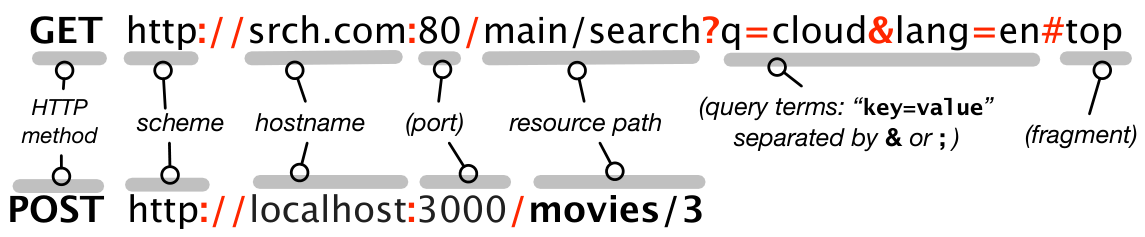
http or https, which describes what protocol is to be used to access the resource, and includes the above components. Optional components are in parentheses; if the port number is omitted, it defaults to 80 for HTTP or 443 for HTTPS. A partial URI omits any or all of the leftmost components, in which case those components are filled in or resolved relative to a base URI determined by the specific application. Best practice is to use full URIs.
You’ll get hands-on practice with HTTP in an upcoming CHIPS exercise, but this background will serve to orient you in advance. HTTP’s simplicity derives from two characteristics. First, HTTP is a request-response protocol: every HTTP interaction begins with the client making a request, to which the server delivers a response (unless the server crashes or the network becomes unavailable, of course!) The HTTP request must include the route and HTTP protocol version, and usually also includes some request headers that provide information about the client. The HTTP protocol version tells the server which HTTP features the client can understand, so that (for example) servers can avoid using newer HTTP features if the client only understands an older protocol version. The server reply must include the HTTP version and 3-digit status code indicating the result of the requested operation; any text following the status code on the first response line is optional and ignored, but is often used to provide a human-readable version of the status. The response also includes headers describing the rest of the response data, followed by a blank line and then the response payload itself.
Second, HTTP is a stateless protocol: every HTTP request is independent of and unrelated to all previous requests. If this is so, how can a web site keep track of information such as whether you have logged in? HTTP provides a mechanism called cookies for this purpose. The first time a client makes a request to a particular server, the server can include in the response a Set-Cookie: header, containing a chunk of information that the server can use to identify this client on future HTTP requests. It is the client’s responsibility to store that information and pass it back via a Cookie: header on every subsequent request to that same server. Analogously to a coat-check token, a cookie should be both tamper-evident and opaque to (not interpretable by) the client, but if presented later to the server, is sufficient to identify the client, thereby enabling the concept of a continuing session between the server and that client.
Cookie in hacker jargon has long meant “an uninterpretable blob of data that must be presented later to identify yourself or achieve some task.”
Stateless protocols therefore simplify server design at the expense of more complex application design, but happily, successful frameworks such as Rails shield you from much of this complexity.
Summary
Web browsers and servers communicate using the HyperText Transfer Protocol. HTTP relies on TCP/IP (Transmission Control Protocol/Internet Protocol) to reliably exchange an ordered sequence of bytes.
Each computer connected to a TCP/IP network has an IP address such as 128.32.244.172, although the Domain Name System (DNS) allows the use of human-friendly names instead. The special name
localhostrefers to the local computer and resolves to the special IP address 127.0.0.1.Each application running on a particular computer must “listen” on a distinct TCP port, numbered from 1 to 65535 (\(2^{16}-1\)). Port 80 is used by HTTP (Web) servers.
A Uniform Resource Identifier (URI) names a resource available on the Internet. The interpretation of the resource name varies from application to application.
An HTTP route consists of both an HTTP method (such as
GETorPOST) and a URI. The same URI with different methods results in different routes, which may or may not behave the same way in a particular SaaS app.HTTP is a stateless protocol in that every request is independent of every other request, even from the same user. HTTP cookies allow the association of HTTP requests from the same user. It’s the browser’s responsibility to accept a cookie from an HTTP server and ensure that the cookie is included with future requests sent to that server.
We have drastically simplified many aspects of TCP/IP, including multi-homed devices and the slow phase-out of the current version of IP (IPv4) in favor of version 6 (IPv6), which uses a different format for addresses. However, since SaaS app writers rarely have to deal directly with IP addresses, these simplifications don’t materially alter our explanations.
Is DNS a client–server protocol? Why or why not?
Yes. DNS clients only ask for lookup services (DNS resolution). DNS servers provide the responses, though they may consult other servers (in effect temporarily acting as clients) as part of doing so.
Can you make a TCP connection without specifying a port number, and if so, what happens?
All TCP connections must specify a port number. However, specific types of clients (Web browsers, email readers, and so on) have the knowledge built into them of the default port numbers for those services, so end users of such clients rarely have to know this information.
True or false: HTTP as a protocol has no concept of a “session” consisting of a sequence of related HTTP requests to the same site.
True. HTTP is stateless, with every request being completely independent of all other requests from the same client. Therefore a mechanism such as HTTP Cookies must be used to create the abstraction of a session.
Many HTTP servers rely on using HTTP cookies to identify a client on repeated requests to the same site, for example, to track information such as whether that user has logged in. What happens if you completely disable cookies in your browser and try to visit such a site?
Try it and see. Use a search engine to find instructions on how to (temporarily) disable cookies entirely in your browser, and try to log in to a site where you have an account. Don’t forget to re-enable cookies when you finish your experiment.
Identify the required parts of an HTTP request.
Assemble a URI from its component parts (HTTP verb, protocol, host, path, parameters).
Decompose a URI into its component parts.
Identify the implications of HTTP being stateless for how SaaS apps keep track of user state.
3.3 CHIPS: HTTP and URIs
 https://github.com/saasbook/hw-http-intro
Construct URIs and make direct HTTP requests using command-line power tools that all SaaS developers should know. Examine and understand HTTP request and response headers, error codes, and cookies.
3.4 From Web Sites to Microservices: Service-Oriented Architecture
Nobody should start to undertake a large project. You start with a small trivial project, and you should never expect it to get large. If you do, you’ll just overdesign and generally think it is more important than it likely is at that stage. Or worse, you might be scared away by the sheer size of the work you envision. So start small, and think about the details. Don’t think about some big picture and fancy design. If it doesn’t solve some fairly immediate need, it’s almost certainly over-designed. And don’t expect people to jump in and help you. That’s not how these things work. You need to get something half-way useful* first, and then others will say “hey, that almost works for me,” and they’ll get involved in the project.*
— Linus Torvalds, interviewed by Preston St. Pierre in Linux Times, Oct 25, 2004.
When the Web began in 1990, HTTP servers existed primarily to serve static content (originally the text and images of scientific papers) that browsers would display. Each time the browser made another HTTP request, the server would deliver a new web page for the browser to show. But the emergence of SaaS around 1995 soon shifted the functionality of servers: rather than simply returning copies of static Web pages, servers would now run a program, and create HTML pages “on the fly” that implemented that program’s user interface. However, it was still the case that every new HTTP request resulted in the browser loading and displaying a new page. The next evolutionary step was the appearance of AJAX, or Asynchronous JavaScript And XML. If a browser supported AJAX, pages could include code written in the JavaScript language, and that code could make subsequent HTTP requests to the server without causing a page reload. In response to those requests, the server would return not an HTML page, but a data structure in either XML or JSON format, both of which we’ll meet shortly. The JavaScript code running in the browser would use that data to determine how to change the appearance or behavior of the displayed page, all without causing a page reload.
Internet Explorer 5, predecessor to Microsoft Edge, was the first browser to support AJAX, in 1998. Google Maps, launched in 2005, was a dramatic demonstration of using AJAX to build truly interactive Web apps.
AJAX marked a turning point in the relationship between a Web site and a client: instead of receiving HTML pages and functioning primarily as a display engine, the client was essentially calling a function on the remote server and expecting to get some data back, just as if the client was calling a library function. This shift in perspective invited a new way of looking at the Web: as a set of independent services that could be composed to produce larger sites—a so-called Service Oriented Architecture (SOA).
SOA had long suffered from lack of clarity and direction.…SOA could in fact die—not due to a lack of substance or potential, but simply due to a seemingly endless proliferation of misinformation and confusion.
— Thomas Erl, About the SOA Manifesto, 2010
SOA as an architectural pattern may have been a new perspective on structuring the Web, but it was certainly not a new idea. Despite initial skepticism about whether SOA was more than just a marketing “buzzword,” one very prominent company was internally (and, at the time, silently) making SOA quite concrete. The e-commerce giant Amazon.com launched its retail site in 1995 powered by a monolithic application—a single large application that handled all aspects of the site. According to the blog of former Amazonian Steve Yegge, in 2002 the CEO and founder of Amazon mandated a change to what we would today call SOA. Yegge claims that Jeff Bezos broadcast an email to all employees along the following lines (we are paraphrasing the main points of Yegge’s description for conciseness):
All teams responsible for different subsystems of Amazon.com will henceforth expose their subsystem’s data and functionality through service interfaces only. No subsystem is to be allowed direct access to the data “owned” by another subsystem; the only access will be through an interface that exposes specific operations on the data. Furthermore, every such interface must be designed so that someday it can be exposed to outside developers, not just used within Amazon.com itself.
In this decree, Bezos captures the critical distinction of SOA: the only way one service can name or access another service’s data is to request specific operations on that data through an external interface that provides those operations. As an example, suppose we wanted to create a simple bookstore service where users can post reviews of books they’ve bought and maintain a profile of their reading interests. We’d need three subsystems: book reviews, user profiles, and buying. The left side of Figure 3.3 shows the silo version, similar to how Amazon.com worked in 1995. Each subsystem can internally share access to data directly in different subsystems. For example, the reviews subsystem can get user profile info out of the users subsystem. The only externally visible interface is “the bookstore.”
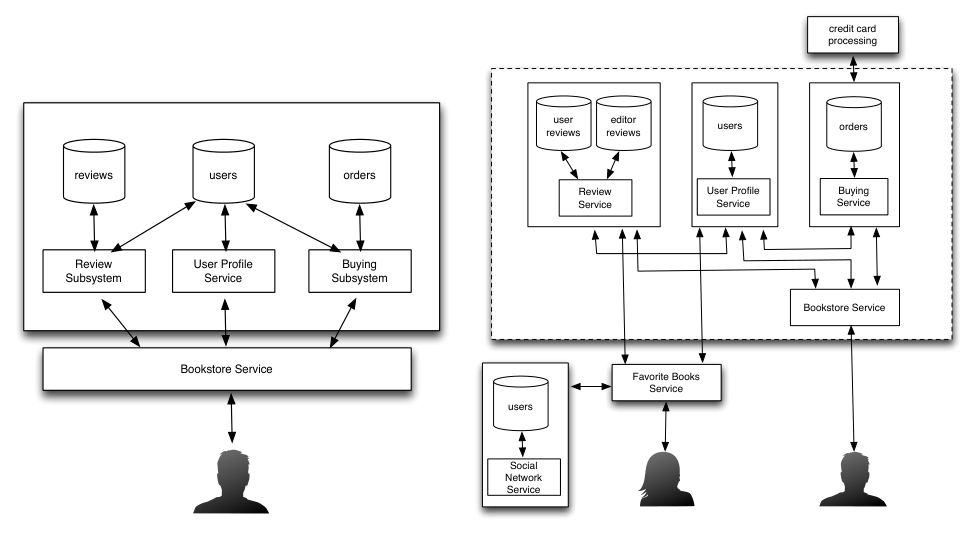
In other words, you as an independent web developer cannot access Amazon’s User Profile service to manage users’ profiles for your own e-commerce site; it’s for Amazon’s internal use only. In contrast, the right side of Figure 3.3 shows the SOA version of the bookstore service, in which all subsystems are separate and independent. Even though all are inside the dotted-rectangle “boundary” of the bookstore, the subsystems interact with each other as if they were separate. For example, if the reviews subsystem wants to update a user’s profile to indicate that the user has written a review, the reviews subsystem can’t reach directly into the users database. Instead, it has to ask the users service to update the user’s information, via whatever interface is provided for that purpose. If no such operation is provided, the reviews team must negotiate with the user database team to get them to expose the necessary operation.
A microservice is a standalone service that performs just one type of task, and is specifically designed to be accessible from and incorporated into the functionality of any other outside service (perhaps for a fee). In the bookstore example, the user profile service and order-placement service might be structured as microservices. Though there is no hard-and-fast criterion distinguishing the scope of a microservice from that of a service, the prefix micro is intended to promote an “extreme SOA” design stance in which each microservice is responsible for a single narrowly-defined function. For example, Google Maps feels like a single app when you use it in a browser, but the different “clusters” of related functionality used by that app—drawing the map, computing driving directions, geocoding addresses, and so on—appear as distinct microservices to the underlying JavaScript code that implements the app. A rough rule of thumb is that the scope of a microservice should correspond to a set of closely related operations on a very tightly integrated set of resources. Notwithstanding, since there is no hard distinction between a service and a microservice, we will use the term service throughout. We will adopt the following rough definition, found in (Nadareishvili et al. 2016): “A (micro)service is an independently deployable component of bounded scope that supports interoperability through message-based communication.” Based on this definition, we can see that the monolithic bookstore fails to be “micro” not just because of its size, but because its components are not independently deployable since they share access to databases.
| Pro | Con |
|---|---|
| Reusability: Others can recombine existing services to create new apps, as in Figure 3.3, and each microservice can be implemented using the most appropriate language or framework, since its implementation is completely hidden behind its API. | Performance: each invocation of a service involves the higher cost of wading through the deeper software stack of a network interface, so there is a possible performance penalty to SOA. |
| Easier testing: a microservice does only one thing, so testing each microservice is easier. | Managing partial failure: a monolithic system is either working or not, but in an SOA, some services may fail while others are working, making dependability more challenging. |
| More Agile-friendly: Chapter 1 reveals that Agile works best with small-to-medium projects and teams. SOA allows large services to be created by composing smaller ones, each of which can be built and operated by a small Agile team. | More development work: you must design and implement an interface for each service component, rather than a single interface for the entire site. Fortunately, an approach called REST, which we describe next, simplifies this task. |
| “You build it, you run it” (as Amazon Web Services CTO Werner Vogels has said): the same tightly-knit team is responsible for developing, testing, and operating the microservice, allowing the microservice to be improved more quickly in response to customer requests. | Developers must learn about operations, and vice versa; hence “dev/ops.” This is a reality of modern SaaS to which we return in Chapter 12. |
As Figure 3.4 shows, there are both pros and cons to preferring a service-oriented architecture over a monolithic one. In short, we can think of microservices as a manifestation of extreme programming (XP) as applied to service-oriented architecture: If it’s good for services to be independently evolvable, make each one as compact as possible to maximize that independence. Microservices may also arise by design or by splitting up an existing large service, as occurred with Twitter. Around 2013, their monolithic Rails application, which they humorously called “the MonoRail” internally, was split up into a large number of microservices, most of which were written in Java, Scala, or Clojure ( (Krikorian 2013)).
Summary of Service-Oriented Architecture and Microservices
Although the term was nearly lost in a sea of confusion, Service Oriented Architecture (SOA) just means an approach to software development in which subsystems can only access each others’ data via external interfaces.
From 1990 to 2010, the Web underwent a transformation from serving static content (Web 1.0) to serving dynamically-generated user interfaces (SaaS) to allowing ongoing interactions after the initial page load (AJAX) to architecting large apps by composing independent services (SOA).
Although there is no bright line separating a service from a microservice, a microservice should perform a related set of operations on a well-circumscribed set of resources, should be independently deployed and operated (usually by the same team that builds it), and should be designed to be readily incorporated with other external services.
The influence of the Unix operating system is pervasive throughout software engineering, due in part to its careful design choices. In particular, the “Unix philosophy” promotes the building of simple components that perform just one task and are easily composable, in that the output from any component should constitute legal input to any other. Microservices can be seen as the triumph of the Unix philosophy in the world of SaaS: a microservice should do just one thing very well, and make the fewest possible assumptions about how it will be integrated into a larger SOA.
Another take on SOA is that it is just a common sense approach to improving programmer productivity. Which productivity mechanism does SOA best exemplify: Clarity via conciseness, Synthesis, Reuse, or Automation and Tools?
Reuse! The purpose of making internal interfaces visible is so that programmers can stand on the shoulders of others.
Understand the key characteristic(s) that make something a service-oriented architecture.
3.5 RESTful APIs: Everything is a Resource
An API that isn’t comprehensible isn’t usable.
— James Gosling, inventor of Java
SaaS microservices using HTTP are just the latest manifestation of remote procedure call, an idea with a long history ((Birrell and Nelson 1984)).
The premise of service-oriented architecture is that each service provides a well-defined set of operations on one or a few related types of resources—analogous to a library for a programming language. In other words, clients need a way to name the server function to be called, pass arguments to it, consume return values, detect and handle server exceptions (errors in execution), and so on, just as when an application calls a library function, but all subject to the constraints of using HTTP for communication. The term API, or Application Programming Interface, refers to the “contract” between a caller and callee, whether these are a program calling a library function or a SaaS client invoking a service on a SaaS server, as Figure 3.5 shows.
| Python program (caller) calls a method in a Python package or library (callee) | SaaS client (caller) invokes SaaS service (callee) | |
|---|---|---|
| 1. How does the caller identify the callee? | Same computer and same process as caller; import makes a particular named library available to the caller, as in import numpy |
An endpoint is a logical address that clients contact in order to use the service. In our case, it usually takes the form of a “base URI,” that is, a URI prefix (including the microservice’s hostname and port number if necessary) that is common to all API calls made through that endpoint |
| 2. Which operation is called? | Method named in code, e.g. numpy.array(…) |
Operation named in path portion of URI |
| 3. How does the caller pass required and optional parameters to the callee? | Passed as arguments to method call, e.g. numpy.array([1,2,3]) |
May be passed as part of URI path, as key-value pairs in URI query string, or as a data payload in JSON or XML format in the request body |
| 4. How does the caller receive a return value? | Returned from method call and usually assigned to a variable, e.g. n=numpy.array([1,2,3]) |
Service typically returns a data structure in JSON or XML format |
| 5. How does the callee signal an error? | Callee may return a “sentinel” error value (such as None in Python), or raise an exception |
Service returns an appropriate HTTP status code to indicate error type, and usually provides an error message as part of the returned data structure |
Unfortunately, rows 2 and 3 in the figure are problematic, because HTTP does not prescribe a way to “name a remote function” or “pass parameters” since those tasks were never part of its original design. In particular, the HTTP and URI specifications offer no conventions regarding the semantics (implied meaning) of how URIs are constructed or how these tasks should occur. There was early and widespread recognition that standardizing the conventions for such communication would enable the creation of an ecosystem in which any client, not just a Web browser, could make use of a given server in different ways.
In most of the microservices world, these conventions are articulated by REST, short for REpresentational State Transfer. In 2000, computer scientist Roy Fielding proposed REST in his Ph.D. dissertation as a way of mapping requests to actions that is particularly well suited to a service-oriented architecture. REST is not a standard, but a design stance regarding how a service should be constructed, and by extension, what its API should look like. Fielding’s idea was to represent the various entities manipulated by a Web app as resources (hence representational), and to construct routes so that any HTTP request would contain all the information necessary to identify both a resource and the action to be performed on it, which might cause a change of state in one or more resources (hence state transfer). An API that adheres to Fielding’s guidelines is said to be RESTful, and the routes (HTTP method plus URI) defined by the API to invoke particular actions are said to be RESTful routes.
Although simple to explain, REST is an unexpectedly powerful principle for simplifying and organizing SaaS applications, because it makes the app designer think carefully about how each type of entity manipulated by the app can be represented as a resource, what operations can be done to that resource, and what conditions or assumptions must hold in order for a request for such an operation to be self-contained. For any RESTful API operation, it should be straightforward to answer the following questions:
What is the primary resource affected by the operation?
What is the operation to be done on that resource? What are the possible results? What are the possible side effects, if any?
What other data is necessary to complete the operation, if any, and how is it specified?
For example, consider the answers to the above questions in the case of posting a review for the movie “2001: A Space Odyssey,” a classic favorite of one of your authors:
The primary resource is the new review for the specific movie “2001: A Space Odyssey,” which might include (for example) a numerical rating and a few lines of text.
The operation is to create a new review using that information. One possible result is success, with the side effect that a new review is created. The other possible result is that creating the review fails for a variety of possible reasons (perhaps this client is not authorized to post reviews, or the database is full, or no more reviews are allowed for this movie), in which case there are no side effects.
Besides the review itself, the additional necessary data is some identification of which movie the review is intended to be linked to. As we will see, this identifier will likely be passed as part of the route, either as a component in the path portion of the URI or as a parameter in the query-string portion of the URI. Also, if the review app allows optionally associating a reviewer name or reviewer ID with the review, an identifier representing the reviewer may similarly be necessary.
The API documentation should describe what operations are available and how the required and optional arguments should be provided for each operation. As we’ll learn in Chapter 4, Rails and other frameworks have built-in support for easily defining RESTful routes.
In its purest form, a RESTful API defines up to five operations on a resource, captured by the acronym CRUDI: Create a new instance of a resource, Read (retrieve) a copy of a resource, Update (make changes to) a resource, Delete a resource, and list an Index of all available resources of a given type, possibly filtered by particular criteria. Many APIs go further and define additional operations specific to the resource types used by that service. Nearly always, each resource is given a unique ID—usually a number—that will serve as the “permanent handle” to that resource and is never reused even if the resource is deleted. A common usage pattern for RESTful APIs is to return a list of resources (with their IDs) corresponding to a search operation; the client can then retrieve the desired resources one by one via their IDs. Consistent with Section 3.2, RESTful routes whose actions have no side effects typically use GET, while those with side effects use POST, PUT, PATCH, or DELETE.
We can now describe concretely how RESTful service APIs address the requirements of rows 1–3 of Figure 3.5. (You’re strongly encouraged to consult the API documentation at https://developers.themoviedb.org as you read the rest of this section.) Recall Figure 3.2, which shows the various parts of a URI. RESTful APIs observe several conventions for how those parts of the URI are constructed when making an API call:
The hostname component of the URI tells us which server provides the service:
https://api.themoviedb.org.In addition, most servers providing RESTful APIs specify a base URI, or common URI prefix that should be prepended to all API calls. You can see from the API documentation that all of the URIs begin with
https://api.themoviedb.org/4/; this base URI or hostname-plus-prefix is sometimes referred to as the API endpoint, or logical address that clients contact in order to use the service.In this case, the API documentation tells us that the component
4of the endpoint name refers to the version number of the API. Making the version number part of the URI allows the API to evolve while preserving compatibility with older clients. You may also see variants such ashttps://themoviedb.org/api/v4/,https://api.themoviedb.org/v4/, and others.The URI path components following the prefix specify the operation to be performed and the resource on which to perform it. API documentation frequently uses a colon (:) or curly braces to indicate a URI component corresponding to a resource ID, so the API documentation might state that the route
GET /movie/{movie_id}orGET /movie/:movie_idrequests detailed information for the specific movie whose numeric ID is substituted for{movie_id}or:movie_idin the URI.
In the next section we describe exactly how the data associated with these requests is formatted and how errors are handled—rows 4 and 5 of Figure 3.5.
A common though not universal feature of RESTful APIs is that the structure of the URI path itself reveals information about the relationships among resource types. For example, the TMDb API route GET /movie/{movie_id}/reviews retrieves all the reviews for a particular movie—effectively, the Index operation on reviews, constrained to a particular movie. The structure of the URI suggests that the same movie can have many associated reviews (a so-called “has-many” relationship, which we’ll meet in Chapter 5).
Singular or plural? Some styles of REST API, including that used by Rails, use plural resource names when there can be more than one resource of that type, as in GET /movies/35, and singular names when there’s exactly one such resource, as in GET /homepage.
Similarly, a hypothetical route such as GET /movies/5/reviews/22, to request the content of review ID 22 associated with movie ID 5, might seem redundant since the review ID must be unique anyway; but again, the route structure reveals an otherwise non-obvious relationship. Not all RESTful sites follow this practice, though: the TMDb route for a particular review is in fact just GET /reviews/{review_id}, and some TMDb routes use multiple path components (terms separated by slashes) to express different sub-operations on a resource rather than relationships among resource types.
You can verify by reading the TMDb API docs that the call for retrieving all reviews for a movie actually returns some of the content of each review. In a “purer” RESTful API, such an Index call might just return a list of review IDs, and the client could then retrieve the contents of individual reviews by their review ID. It’s possible that the TMDb API sought to make things more efficient so that enough information is returned for each review that the client could decide which reviews were worth getting more details on. But if a movie had thousands of reviews, returning review data rather than just review IDs for all those reviews might become unwieldy.
RESTfulness may seem an obvious design choice, but until Fielding crisply characterized the REST philosophy and began promulgating it, many Web apps were designed non-RESTfully. Figure 3.6 shows how a hypothetical non-RESTful e-commerce site might implement the functionality of allowing a user to login, adding a specific item to his shopping cart, and proceeding to checkout. For the hypothetical non-RESTful site, every step after the login (step 1) relies on implicit information: step 2 assumes the site “remembers” who the currently-logged-in user is to show them the welcome page, and step 5 assumes the site “remembers” who has been adding items to their cart for checkout. In contrast, each URI for the RESTful site contains enough information to satisfy the request without relying on such implicit information: after Dave logs in, the fact that his user ID is 301 is present in every request, and his cart is identified explicitly by his user ID rather than implicitly based on the notion of a currently-logged-in user.
| Non-RESTful site URI | RESTful site URI | |
|---|---|---|
| 1. Login to site | POST /login/dave |
POST /login/dave |
| 2. Welcome page | GET /welcome |
GET /user/301/welcome |
| 3. Add item ID 427 to cart | POST /add/427 |
POST /user/301/add/427 |
| 4. View cart | GET /cart |
GET /user/301/cart |
| 5. Checkout | POST /checkout |
POST /user/301/checkout |
Summary
To treat one or more SaaS apps as “services” that can accept remote procedure calls on behalf of a client, we need to be able to identify the service, identify which operation (which function) is to be called, pass data to and receive data from the service, and handle errors.
While there is no enforced standard regarding the mapping between HTTP routes and API operations on a service, REST (REpresentational State Transfer) has emerged as a simple, consistent way to do so that works well with Web technologies.
The key idea of REST is to represent each type of thing managed by the service as a resource, and provide a limited set of operations (typically Create, Read, Update, Delete, and Index) that can be performed on a resource. The corresponding RESTful request includes all the information necessary to complete the specified action on that resource.
Noted software engineering researcher Bertrand Meyer has long advocated ((Meyer 1997)) command-query separation: a given method or operation should either be data-altering (command) or read-only (query) but not both. REST respects this principle by not only separating these operations but, in the “pure REST” formulation, giving each operation only a single responsibility: a given API call either returns data—an individual resource, or a possibly filtered collection of resources of one particular type—or it creates, updates, or deletes a single resource of a particular type.
Which of these routes for updating the information of movie ID 35 follow good HTTP and REST practices: (a) POST /movie/35, (b) POST /movies/35, (c) PUT /movie/35, (d) PUT /movies/35, (e) GET /movie/35, (f) GET /movies/35,
All except (e) and (f) follow defensible practices. Whether to use singular or plural is a matter of style and convention, but GET should not be used for routes whose actions have side effects.
Understand the minimal required parts of a RESTful HTTP route.
Understand the role of the HTTP method (GET, POST, and so on) in how routes are used by SaaS apps.
3.6 RESTful URIs, API Calls, and JSON
In considering how to treat a collection of SOA servers as a fabric for programming, we’ve addressed rows 1–3 of Figure 3.5. We next describe how data is passed to or received from such services, and some operational considerations such as authorization (is the client allowed to make this API call on this resource?) and how errors are handled.
At the highest level, there are three ways to pass parameters from an HTTP client to a service: in the URI, in the request body (for POST or PUT requests), and rarely, as the value of an HTTP header.
When the number of parameters is small, and in particular when the parameters are simple types such as strings or numbers, they can often be passed as parameters embedded in the URI, as Figure 3.2 showed: param1=value1¶m2=value2&...¶mN=valueN. This situation is typical for GET requests, where we’re usually asking for data based on an ID and perhaps some optional parameters. For example, verify using the TMDb API documentation that the route GET /search/movies?query=Batman+Returns will search TMDb for a movie whose title matches the query string “Batman Returns”.
When the data to be passed is more complex, or when the API operation involves a state-changing HTTP method such as POST or PUT, the data is sent as part of the request body, as browsers do when submitting the values entered on a fill-in form. (Recall that GET requests have no request body.) How is this data presented to the server? While there are many choices, there is no question that the SOA community has rapidly converged on JSON (pronounced “JAY-sahn”), or JavaScript Object Notation, as the common interchange format. JSON is so called because its syntax resembles, though is not identical to, the syntax of a JavaScript object literal—a set of unordered key/value pairs, like a Ruby hash, Python dict, or Java HashMap.
Like JavaScript itself, the JSON standard is stewarded by ECMA, the European Computer Manufacturers Association.
In JSON, each key (or “slot,” as we’ll learn in Chapter 6) must be a double-quoted string, and its value may be a simple type (string, numeric, true, false, null), a linear array each of whose elements can be any of these, or another object whose slots are constrained to these same types. The JSON web site shows some simple examples, and because of JSON’s popularity as the default data format for SOA, virtually every modern language comes with libraries to both generate and parse JSON. Whitespace (spaces, tabs, newlines) is optional in JSON, and most servers return whitespace-free JSON. Unix command-line tools such as json_pp and browser extensions like JSONView restore spacing and indentation to make JSON more readable.  Note that calls that require sending JSON data may also allow (or require) sending some parameter values encoded in the URI; you must check the API documentation for details.
HTTP headers are sometimes used to pass very specialized types of parameters. For example, some APIs require you to add the HTTP header Content-Type: application/json to a request that will be accompanied by a JSON payload, while others don’t. Finally, nearly all APIs require authorization—the client must prove it has the right to make each API call. While authorization schemes vary, the most common is to include a client-specific API key with each request.
C hapter 12 explains why HTTPS makes it OK to transmit what amounts to a password as part of a Web request.
API keys are usually requested manually and may be free or paid (TMDb’s are free), and the service may impose limits such as the number of calls made per day. Depending on the API, the key may be sent as an argument in the URI (as with TMDb), as the value of an HTTP Authorization: header, or either.
Scopes let a caller specify, at token request time, what kinds of operations it wants to do using the API. The GitHub API supports a variety of scopes; simpler APIs such as TMDb’s usually don’t support scopes.
ch_arch/code/curl_json_post.sh
# set endpoint for TMDb API
export BASE=https://api.themoviedb.org/v3
# set our API key for use in other calls
export KEY="my API key here"
# Search for a movie by keywords
curl "$BASE/search/movie?api_key=$KEY&query=Batman+Returns"
# For better legibility, pipe the output to json_pp:
curl "$BASE/search/movie?api_key=$KEY&query=Batman+Returns" | json_pp
# Start a new guest session
curl "$BASE/authentication/guest_session/new" | json_pp
# capture the guest session ID from Curl's output:
export SESSION=e91f07cca8166b7b1e707d8a826e8a38
# Create a file containing  the JSON object for rating a movie:
echo '{ "rating": 6.5 }'  > myrating.json
# Use Curl to POST a movie rating request using the file's contents:
curl -X POST -H "Content-Type: application/json" -d @myrating.json \
"$BASE/movie/364/rating?api_key=$KEY&guest_session_id=$SESSION"KEY with your TMDb API key. After line 8 you’ll have to visually parse out the correct movie ID from the JSON response, and after line 10 the correct guest session ID to use in line 12. If your system doesn’t have json_pp installed, you can omit it.
Putting this all together, Figure 3.7 shows the use of the curl tool to do a sequence of RESTful API requests—all but the last are GETs—exercising the TMDb API. Note in particular that the API key is a required URI parameter for every request, and verify against the API documentation the correct format for the object in line 14 representing the desired rating you wish to submit for a movie.
What if an error occurs? Recall from Section 3.2 that every HTTP response begins with a 3-digit status code; these are catalogued and maintained by the World Wide Web Consortium. Services use status codes to indicate various types of errors:
2xx codes indicate success. For example, code 200 (“OK”) would be the usual success status for a
GET, whereas code 201 (“Created”) would be more typical for aPOSTthat creates a new resource.3xx codes indicate the client must take further action to complete the request—that is, a redirect. Perhaps the requested resource has moved to a different URI, which would be specified in the response body.
4xx codes indicate that the service encountered an application error processing the request. 400 means the request was malformed, but other codes for well-formed requests include 401 (Unauthorized), 402 (Payment required), and others.
5xx codes indicate a problem with the service infrastructure itself—an error that prevented the remote call from even completing, such as the server encountering an internal error so severe that it is too broken to even explain what went wrong.
In case of an error (any status other than 2xx), the response body usually contains a message explaining what went wrong. Depending on the API, the response body will consist of either just this string, or more commonly, a JSON object with a single string-valued slot named message or error or something similar.
Summary
One way to apply the RESTful design stance to HTTP routes is to use the HTTP method (
GET,POST, and so on) and the URI path to encode the resource and operation to be performed. ForGETrequests, optional arguments can be encoded in the URI itself (?param1=value1&…¶mN=valueN). ForPOSTorPUTrequests, typically used for form submission, both the form’s field values and additional optional arguments can be transmitted as part of the request body.Requests to a service may require that the client present some credentials to prove it is authorized to use the service. Many schemes exist, but among the simplest is HTTP Basic Authentication, in which a username and password (possibly collected from the user by the browser’s UI) are embedded in the HTTP headers. The use of Secure HTTP (HTTPS), which we describe in Chapter 12, ensures that eavesdroppers cannot read this sensitive data.
JSON (JavaScript Object Notation), based on JavaScript language syntax, has become the most popular data format for sending data to and receiving data from SaaS services.
No one “legislated” that REST would defeat dozens of competing proposals to become the preferred way to design services. Instead, REST became widely adopted because it was simple to understand and implement, well matched to the underlying Web protocols, and unencumbered by intellectual property restrictions.
The road to today’s microservices is littered with acronyms of proposed conventions and standards for interoperation that never fully caught on: SOAP, WSDL, UDDI, XML-RPC, DCOM, Jini, and CORBA, to name just a few. Since no single entity controls the Internet and gets to “pick the winner,” a winner usually emerges by rough consensus for practical reasons: it is easy for developers to understand and use (especially to get simple common cases working quickly), it is well matched to the underlying technology stack (in this case the Web’s protocols and standards, especially HTTP), and it is not subject to a costly or restrictive developer license. REST meets these criteria—it is simple enough to be described in this one textbook section—but it achieves the goal of being a good match for HTTP by cheating: it is a retrospective codification of the practices that were observed to work well as the Web went through its growing pains, such as an emphasis on stateless design, a scheme for constructing URIs that plays nicely with Web caching (Chapter 12), no reliance on an implicit notion of a session, and so on. Most of the competing protocols ignored one or more of these lessons and so failed to hit the “sweet spot.”
You try an API call on TMDb and the status code of the response is 400. Assuming TMDb adheres to the official W3C semantics of the status codes, which of the following could be the reason for the error: (a) your request was malformed so could not be attempted; (b) you forgot to include your API key; (c) your request and API key were well-formed, but you are attempting an operation that you’re not authorized to do.
(a) is most likely. 401 Unauthorized would be more likely for the other two cases.
build.api.request
Given an API specification or documentation, construct a route that makes a particular request against that API.
3.7 CHIPS: Create and Deploy a Simple SaaS App
https://github.com/saasbook/hw-sinatra-saas-wordguesser
Create and deploy a SaaS app that plays a letter-guessing-based word game, using Ruby and the simple Sinatra SaaS framework. Design how game actions map to HTTP routes, how game state is represented, how cookies are used to manage that state, and how to detect and prevent cheating (that is, realizing that you cannot trust any HTTP client).
Add some simple functionality to the Word Guesser game, such as allowing the player to immediately try to guess the word.
3.8 Fallacies and Pitfalls
The complexity of a system’s application logic does not disappear from splitting it or designing it to be service-oriented; the complexity is simply distributed among the microservices, and in particular, how the interaction among those microservices is managed. The two main structural patterns for coordination among microservices are orchestration (the composition layer has a higher level of complexity and holds more of the application’s logic) and choreography (the services interact among themselves without a separate composition layer). Finally, splitting a large service into microservices requires thinking about module boundaries just as one would in designing a large service in the first place.
A published API just means that external calls are allowed; the API’s understandability and usability will determine whether the API or service is widely adopted, since the API defines the boundary negotiation for what the service will do (expected output) and how the caller will access it (expected input). REST is not the only good way to design an API, but there are certainly many bad ways to design an API, and carefully following REST makes it less likely you’ll accidentally choose one of those ways.
Every publicly-accessible website already has a de facto HTTP API, because URIs can be constructed to interact with the site. Of course, such an “accidental” API will rarely adhere to good design practices; a client wishing to use it might have to (for example) pick apart a returned HTML page to extract the information it wants, a process sometimes called HTML scraping. Nonetheless, if your app is publicly available, it has an API whether you intended it or not. If you do intend for your app to be used programmatically as a service or microservice, you should design and expose an API according to the guidelines in this chapter.
Consider a sequence of steps for a hypothetical e-commerce site: in step 1, a user visits a product page; in step 2, they add a product to a shopping cart; perhaps they repeat steps 1 and 2 to add multiple products; and in step 3, they pay for the product(s). If you design the business logic for such an app from a “Web-page-centric” point of view, you might be tempted to simply keep track of which step the user is on (say, as part of the session or by including the step number as a parameter in a URL) and include logic that dispatches to the appropriate internal action for each step. But such a design approach doesn’t force you to think about important questions such as: If the user leaves the site and returns later, how can we ensure their cart contents haven’t changed? If the user abandons the order without paying, at what point do we decide to delete it? If the payment step fails, can we easily direct the user to retry only that step without going through all the previous steps again? In contrast, a RESTful API design approach would begin by asking: What kind of resource is an order, and what operations are available on it? What kind of resource is a product, and what operations are available on it? What can go wrong during each type of operation? How is each kind of resource stored on the server, and under what conditions can it be deleted? How does the client refer to a particular resource that was created earlier, even if the user has been away from the keyboard for a long time? Thoughtful answers to such questions result in a clean service design that is suitable for use both as a standalone (micro)service and as the back end of a browser-based experience.
We noted that the TMDb API call for “get reviews associated with this movie” actually returns the reviews’ contents, not just their IDs. This design makes sense if most requests of this type are likely to inspect the content of most of the reviews. But if the more common use case was (for example) to allow an end user to display details of reviews with particular characteristics such as numerical rating, a leaner API might allow specifying those options to constrain the result.
In general, insufficient understanding of how customers will use your API may lead to inefficient resource representation internally, but as we will see, the good news is that the internal representation of resources can be changed later as long as the details of that representation haven’t leaked into the API.
3.9 Concluding Remarks: Continuity From CGI to SOA
Because an early use of the Web was to serve static files stored in a file system, early HTTP servers such as Apache could be configured to expose a subdirectory of the file system as a browsable tree of files, so early URIs typically mimicked the hierarchical structure of a file system. For example, the URI http://www.cs.berkeley.edu/reports/1997/daedalus.ps very likely referred to the actual file daedalus.ps located in subdirectory reports/1997/ somewhere on the computer whose hostname is www.cs.berkeley.edu.
In 1993 the Common Gateway Interface or CGI protocol marked the emergence of SaaS. A CGI-capable Web server could interpret certain URIs not as the name of a local file, but as a directive to run a program and send its output back to the client. While no conventions were proposed for how to construct such URIs, a common one was to place all such “CGI programs” under a single subdirectory, often called cgi-bin, and use a combination of URI path components and parameters in the query string to “pass arguments” to the program to be run. The CGI program had to emit a complete well-formed HTTP response, including appropriate HTTP response headers and a content payload such as an HTML page.
bin is short for binary (executable) almost everywhere in computing, even though later CGI programs were not binary files but scripts in languages like Perl or Python.
As SaaS became an increasingly common way to deploy Web sites, application server frameworks began to emerge that automatically took care of some of this “plumbing,” such as building an HTTP response or handling common HTTP errors, freeing the application writer to focus only on the content.
The rapid rise in popularity of the “microservices with RESTful APIs” model has led to a renewed focus on API design and tools to support it. Joshua Bloch’s article How To Design a Good API And Why It Matters ((Bloch 2006)), and the accompanying technical talk given at Google, provide a good overview of how to think about API design. Bloch compares API design decisions to language design decisions, which have been debated for decades, and offers a concise operational definition of an API as “the methods of operation by which components in a system use one another.” (Another talk by the same author provides a wry and opinionated history of APIs since 1950.) Furthermore, since the API is the visible “contract” with callers of the service, formally documenting the API itself has become increasingly important, along with ensuring that as the service evolves, the API documentation stays current. The OpenAPI (formerly Swagger) tools include an API editor for designing APIs with the OpenAPI specification, a code generator to generate server and client stubs for using an API, and tools to automatically extract and publish documentation with “live” API exercisers from an OpenAPI description.
A recent alternative to purely-procedural REST APIs is GraphQL, which is based on describing data structures rather than procedure calls. In a RESTful API, the server decides what operations to expose and what data structures are required to invoke them. In contrast, a GraphQL client defines the data structures it needs, and the same structures are returned from the server. The richness and complexity of GraphQL may not be worthwhile for simpler APIs, but it is an interesting emerging alternative to REST for data-intensive services.
Lastly, it is worth remembering that such APIs are really just the latest manifestation of a key factor in the Web’s success: separating the things that change from those that stay the same. TCP/IP, HTTP, and HTML have all gone through several major revisions, but all include ways to detect which version is in use, so a client can tell if it’s talking to an older server (or vice versa) and adjust its behavior accordingly. Today, APIs allow separation of interface from implementation at the level of entire services. Although dealing with multiple protocol and language versions puts an additional burden on browsers and other clients, it has led to a remarkable result: A Web page created in 2019, using a markup language based on 1960s technology, can be retrieved using network protocols developed in 1969 and displayed by a browser first created in 1992. Separating the things that change from those that stay the same is part of the path to creating long-lasting software.
Tim Berners-Lee, a computer scientist at CERN, led the development of HTTP and HTML in 1990. All open Web standards, including these, are now stewarded by the nonprofit vendor-neutral World Wide Web Consortium (W3C).