1 Introduction to Software as a Service, Agile Development, and Cloud Computing
Donald Knuth (1938– ), one of the most illustrious computer scientists, received the Turing Award in 1974 for major contributions to the analysis of algorithms and the design of programming languages, and in particular for his contributions to his multi-volume The Art of Computer Programming, arguably the definitive reference on analysis of algorithms. Knuth also invented the widely-used TeX typesetting system, with which this book was prepared.

Let us change our traditional attitude to the construction of programs: Instead of imagining that our main task is to instruct a computer what to do, let us concentrate rather on explaining to human beings what we want a computer to do.
— Donald Knuth, Literate Programming, 1984
Each chapter opening starts with a brief summary of the chapter’s prerequisites and big concepts. Prerequisites are skills or knowledge you should already have in order to get the most out of the material in the chapter. Big concepts are the main ideas we want you to take away after finishing the chapter when you step back from the details.
Prerequisites
The first prerequisite is to determine whether this book is right for you!
| This book is a good fit if you want to… | But not if you want to… |
|---|---|
| Allow software design principles to inform your evaluation and creation of new technologies | Just learn framework X, without understanding its design principles |
| Learn how to learn new frameworks and languages, and put them to use quickly | Follow a step-by-step “recipe” tutorial for a specific framework or language |
| Learn by doing | Learn by only reading and watching videos |
For this chapter, the technical prerequisite is basic knowledge of HTML, the HyperText Markup Language that is the lingua franca of the web. We recommend the free Introduction to HTML module from the Mozilla Developer Network. We suggest working through all the sections under Guides and the two Assessments.
Concepts
The big concepts of this chapter are the contrasts between Plan-and-Document software development and Agile software development, and the synergy among Agile development, Software as a Service, and cloud computing.
Plan-and-Document software development processes or lifecycles rely on careful, up-front planning, whereas Agile software development relies on incrementally refining a prototype with continuous feedback from the customer over the course of many 1–4 week iterations. Of the two, Agile has the superior track record for managing change, running compact projects with small teams, and delivering quality software on time and within budget.
Software quality is defined as providing business value to both customers and developers and involves many kinds of testing. In Agile, the developers themselves, rather than a separate QA team, bear primary responsibility for software quality.
Clarity via conciseness, synthesis, reuse, and automation via tools are four paths to improving developer productivity. Ruby on Rails employs all of them.
Software as a Service (SaaS) is software deployed on Internet servers accessible to millions of users. Compared with Software as a Product (SaaP) that users install on their devices, SaaS is easier to upgrade and evolve because there is only a single copy deployed in the field. Cloud Computing supplies the dependable and scalable computation and storage for SaaS by utilizing Warehouse Scale Computers containing as many as 100,000 servers. Economies of scale allow Cloud Computing to be offered as a utility, where you pay only for actual use.
Mobile devices now account for the majority of visits to web sites. “Mobile-first” apps can be developed, tested, and deployed using the same tools as SaaS for desktop browsers, using responsive web design to automatically adapt to a variety of screen sizes while accommodating for users with disabilities.
Legacy Code evolution is vital in the real world, yet often ignored in software engineering books and courses. Agile practices enhancing code each iteration, so the skills gained also apply to legacy code.
1.1 Introduction
Now, this is real simple. It’s a website where you can compare and purchase affordable health insurance plans, side-by-side, the same way you shop for a plane ticket on Kayak or the same way you shop for a TV on Amazon…Starting on Tuesday, every American can visit HealthCare.gov to find out what’s called the insurance marketplace…So tell your friends, tell your family…Make sure they sign up. Let’s help our fellow Americans get covered. (Applause.)
— President Barack Obama, Remarks on the Affordable Care Act, Prince George’s Community College, Maryland, September 26, 2013
…it has now been six weeks since the Affordable Care Act’s new marketplaces opened for business. I think it’s fair to say that the rollout has been rough so far, and I think everybody understands that I’m not happy about the fact that the rollout has been, you know, fraught with a whole range of problems that I’ve been deeply concerned about.
— President Barack Obama, Statement on the Affordable Care Act, The White House Press Briefing Room, November 14, 2013
When the Affordable Care Act (ACA) was passed in 2010, it was seen as the most ambitious US social program in decades, and it was perhaps the crowning achievement of the Obama administration. Just as millions shop for items on Amazon.com, HealthCare.gov—also known as the Affordable Care Act website—was supposed to let millions of uninsured Americans shop for insurance policies. Despite taking three years to build, it fell flat on its face when it debuted on October 1, 2013. Figure 1.1 compares Amazon.com to HealthCare.gov in the first three months of operation, demonstrating that not only was it slow, error prone, and insecure, it was also down much of the time.
| Topic | Amazon.com | ACA Oct | ACA Nov | ACA Dec |
|---|---|---|---|---|
| Customers/Day (Goal) | – | 50,000 | 50,000 | 30,000 |
| Customers/Day (Actual) | >10,000,000 | 800 | 3,700 | 34,300 |
| Average Response time (seconds) | 0.2 | 8 | 1 | 1 |
| Downtime/Month (hours) | 0.07 | 446 | 107 | 36 |
| Availability (% up) | 99.99% | 40% | 85% | 95% |
| Error Rate | – | 10% | 10% | – |
| Secure | Yes | No | No | No |
Why is it that companies like Amazon.com can build software that serves a much large customer base so much better? While the media uncovered many questionable decisions, a surprising amount of the blame was placed on the methodology used to develop the software ((Johnson and Reed 2013)). Given their approach, as one commentator said, “The real news would have been if it actually did work.” ((Johnson 2013a))
We’re honored to have the chance to explain how Internet companies and others build successful software services and extend the reach of those services to the billions of mobile devices out there. As this introduction illustrates, this field is not some dreary academic discipline where few care what happens: failed software projects can become infamous, and can even derail Presidents. On the other hand, successful software projects can create services that billions of people use every day whose creators become household names. All involved with such services are proud to be associated with them, unlike the ACA.
The rest of this chapter explains why disasters like ACA can happen and how to avoid repeating this unfortunate history. We start our journey with the origins of software engineering itself, which began with software development methodologies that placed a heavy emphasis on planning and documenting, since that approach had worked well in other “big” engineering projects such as civil engineering. We next review the statistics on how well the Plan-and-Document methodologies worked, alas documenting that project outcomes like ACA are all too common, if not as well known. The frequently disappointing results of following conventional wisdom in software engineering inspired a few software developers to stage a revolt. While the Agile Manifesto was quite controversial when it was announced, over time Agile software development has overcome its critics. Agile allows small teams to outperform the industrial giants, especially for small projects. Our next step in the journey demonstrates how service-oriented architecture allows the successful composition of large software services like Amazon.com from many smaller software services developed and operated by small Agile teams.
As a final but critical point, it’s rare in practice for software developers to do “green field” development, in which they start from a blank slate. It’s much more common to enhance large existing code bases. The next step in our journey observes that unlike Plan-and-Document, which aims at a perfect design up front and then implements it, the Agile process spends almost all of its time enhancing working code. Thus, by getting good at Agile, you are also practicing the skills you need to evolve existing code bases.
To start us on our journey, we introduce the software methodology used to develop HealthCare.gov.
1.2 Software Development Processes: Plan-and-Document
*If builders built buildings the way programmers wrote programs, then the first woodpecker that came along would destroy civilization.*
— Weinberg’s Second Law, 1978, attributed to Gerald Weinberg, University of Nebraska computer scientist
The general unpredictability of software development in the late 1960s, along with the software disasters similar to ACA, led to the study of how high-quality software could be developed on a predictable schedule and budget. Drawing the analogy to other engineering fields, the term software engineering was coined ((Naur and Randell 1969)). The goal was to discover methods to build software that were as predictable in quality, cost, and time as those used to build bridges in civil engineering.
One thrust of software engineering was to bring an engineering discipline to what was often unplanned software development. Before starting to code, come up with a plan for the project, including extensive, detailed documentation of all phases of that plan. Progress is then measured against the plan. Changes to the project must be reflected in the documentation and possibly to the plan.
The goal of all these “Plan-and-Document” software development processes is to improve predictability via extensive documentation, which must be changed whenever the goals change. Here is how textbook authors put it ((Lethbridge and Laganiere 2002; Braude 2001)):
Documentation should be written at all stages of development, and includes requirements, designs, user manuals, instructions for testers and project plans.
— Timothy Lethbridge and Robert Laganiere, 2002
Documentation is the lifeblood of software engineering.
— Eric Braude, 2001
This process is even embraced with an official standard of documentation: IEEE/ANSI standard 830/1993.
Governments like that of the US have elaborate regulations to prevent corruption when acquiring new equipment, which lead to lengthy specifications and contracts. Since the goal of software engineering was to make software development as predictable as building bridges, including elaborate specifications, government contracts were a natural match to Plan-and-Document software development. Thus, like many countries, US acquisition regulations left the ACA developers little choice but to follow a Plan-and-Document lifecycle.
(Sidebars like this one provide historical context or perspective. They are optional, but as George Santayana famously said, “Those who do not know history are condemned to repeat it.”) CGI Group won the contract for the back end of the ACA website. The initial estimate ballooned from US$94M to $292M ((Begley 2013)). This same company was involved in a Canadian firearms registry whose costs skyrocketed, from an initial estimate of US$2M to $2B (\(2\times 10^9\)). When MITRE investigated the problems with Massachusetts’ ACA website, it said CGI Group lacked expertise to build the site, lost data, failed to adequately test, and managed the project poorly ((Bidgood 2014)).
Of course, like other engineering fields, the government has escape clauses in the contracts that let it still acquire the product even if it is late. Ironically, the contractor makes more money the longer it takes to develop the software. Thus, the art is in negotiating the contract and the penalty clauses. As one commentator on ACA noted ((Howard 2013)), “The firms that typically get contracts are the firms that are good at getting contracts, not typically good at executing on them.” Another noted that the Plan-and-Document approach is not well suited to modern practices, especially when government contractors focus on maximizing profits ((Chung 2013)).
An early version of this Plan-and-Document software development process was developed in 1970 ((Royce 1970)). It follows this sequence of phases:
Requirements analysis and specification
Architectural design
Implementation and Integration
Verification
Operation and Maintenance
Given that the earlier you find an error the cheaper it is to fix, the philosophy of this process is to complete a phase before going on to the next one, thereby removing as many errors as early as possible. Getting the early phases right could also prevent unnecessary work downstream. As this process could take years, the extensive documentation helps to ensure that important information is not lost if a person leaves the project and that new people can get up to speed quickly when they join the project.
Because it flows from the top down to completion, this process is called the Waterfall software development process or Waterfall software development lifecycle. Understandably, given the complexity of each stage in the Waterfall lifecycle, product releases are major events toward which engineers worked feverishly and which are accompanied by much fanfare.
Windows 95 was heralded by a US$300 million party for which Microsoft hired comedian Jay Leno, lit up New York’s Empire State Building using the Microsoft Windows logo colors, and licensed “Start Me Up” by the Rolling Stones as the celebration’s theme song.
In the Waterfall lifecycle, the long life of software is acknowledged by a maintenance phase that repairs errors as they are discovered. New versions of software developed in the Waterfall model go through the same several phases, and take typically between 6 and 18 months.
The Waterfall model can work well with well-specified tasks like NASA space flights, but it runs into trouble when customers change their minds about what they want. A Turing Award winner captures this observation:
Plan to throw one [implementation] away; you will, anyhow.
— Fred Brooks, Jr.
That is, it’s easier for customers to understand what they want once they see a prototype and for engineers to understand how to build it better once they’ve done it the first time.
This observation led to a software development lifecycle developed in the 1980s that combines prototypes with the Waterfall model ((Boehm 1986)). The idea is to iterate through a sequence of four phases, with each iteration resulting in a prototype that is a refinement of the previous version. Figure 1.2 illustrates this model of development across the four phases, which gives this lifecycle its name: the Spiral model. The phases are:
Determine objectives and constraints of this iteration
Evaluate alternatives and identify and resolve risks
Develop and verify the prototype for this iteration
Plan the next iteration
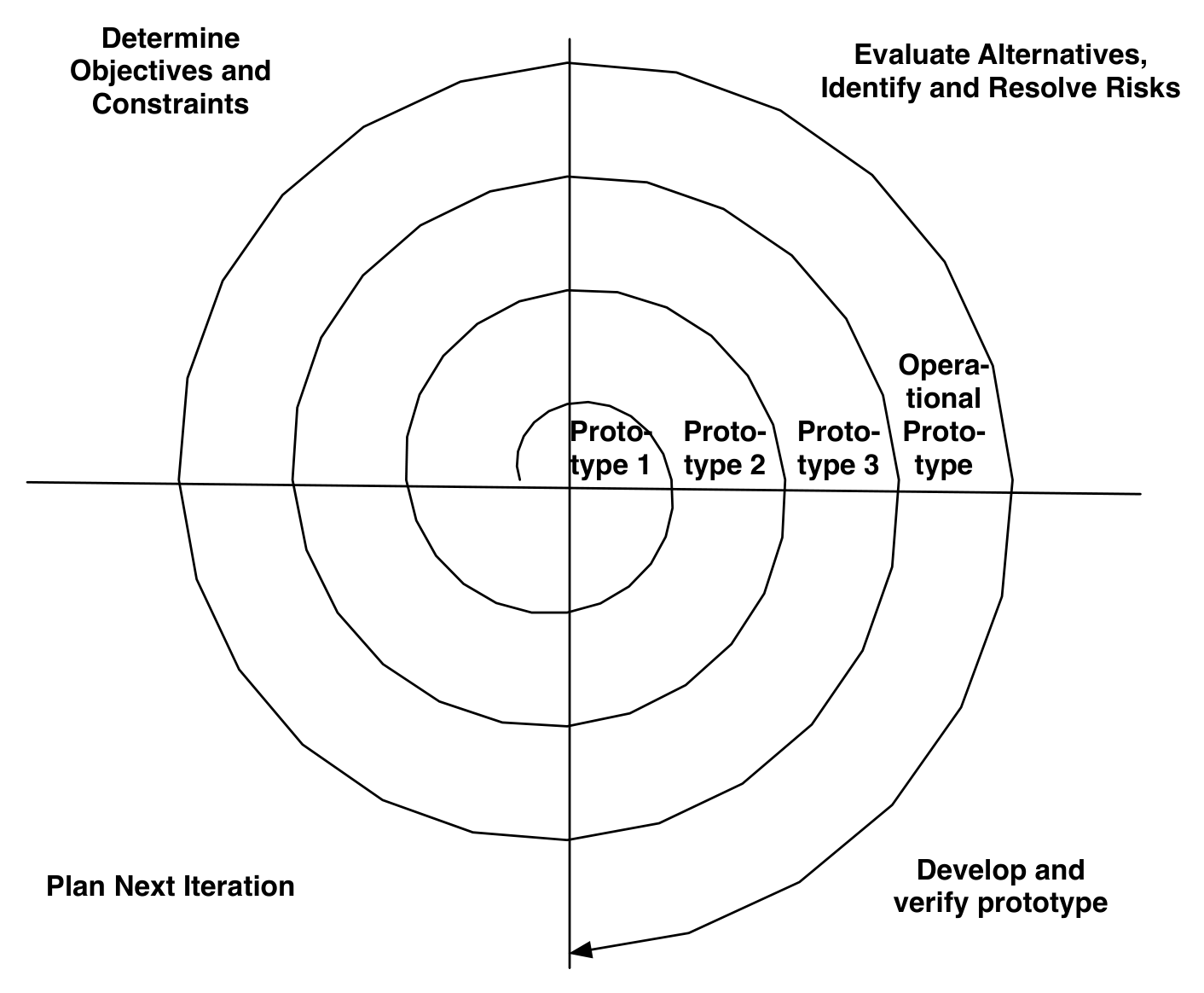
Rather than document all the requirements at the beginning, as in the Waterfall model, the requirement documents are developed across the iteration as they are needed and evolve with the project. Iterations involve the customer before the product is completed, which reduces chances of misunderstandings. However, as originally envisioned, these iterations were 6 to 24 months long, so there is plenty of time for customers to change their minds during an iteration! Thus, Spiral still relies on planning and extensive documentation, but the plan is expected to evolve on each iteration.
Big Design Up Front , abbreviated BDUF, is a name some use for software processes like Waterfall, Spiral, and RUP that depend on extensive planning and documentation. They are also known variously as heavyweight, plan-driven, disciplined, or structured processes.
Given the importance of software development, many variations of Plan-and-Document methodologies were proposed beyond these two. A recent one is called the Rational Unified Process (RUP) ((Kruchten 2003)), developed during the 1990s, which combines features of both Waterfall and Spiral lifecycles as well standards for diagrams and documentation. We’ll use RUP as a representative of the latest thinking in Plan-and-Document lifecycles. Unlike Waterfall and Spiral, it is more closely allied to business issues than to technical issues.
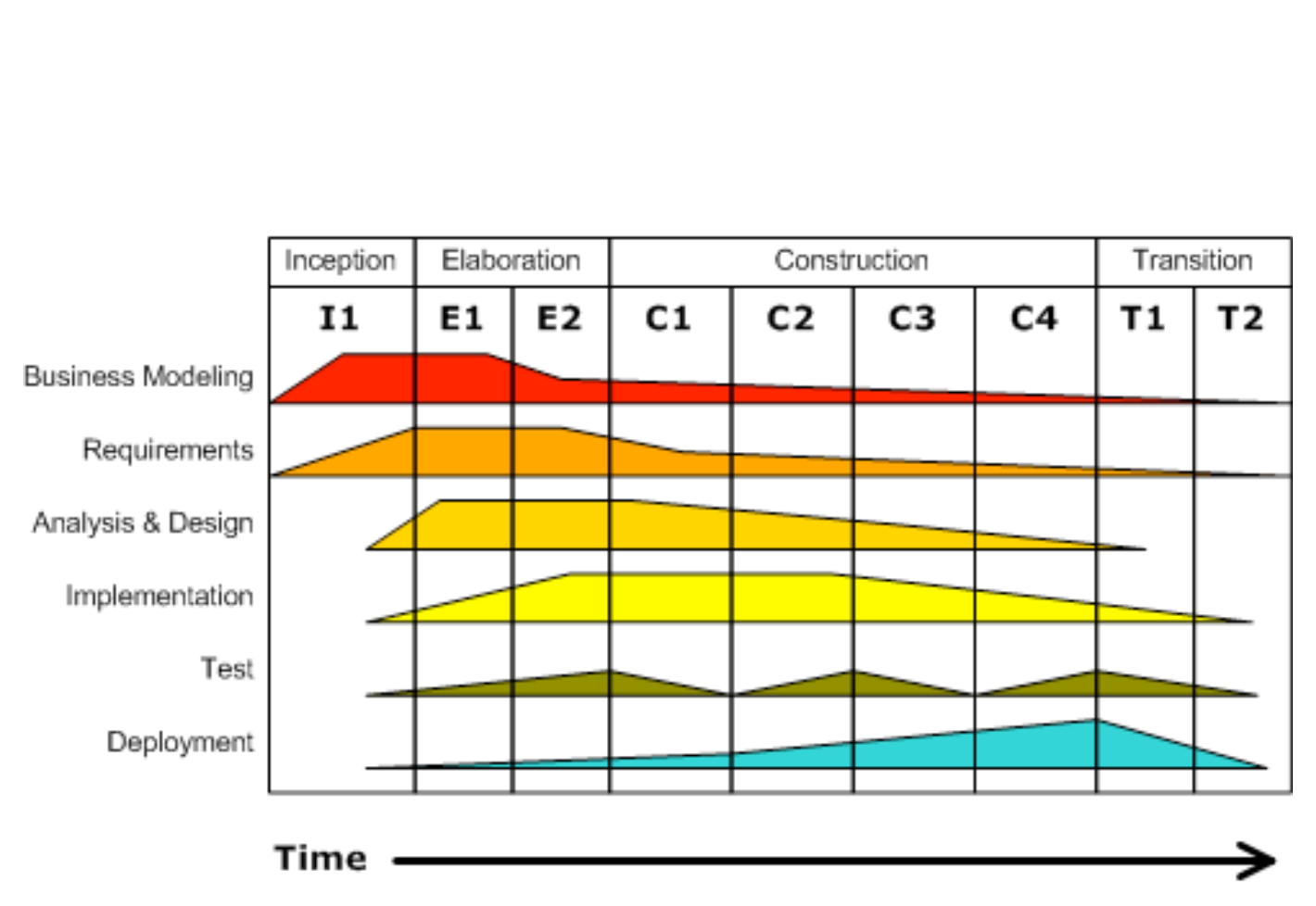
Like Waterfall and Spiral, RUP has phases:
Inception: makes the business case for the software and scopes the project to set the schedule and budget, which is used to judge progress and justify expenditures, and initial assessment of risks to schedule and budget.
Elaboration: works with stakeholders to identify use cases, designs a software architecture, sets the development plan, and builds an initial prototype.
Construction: codes and tests the product, resulting in the first external release.
Transition: moves the product from development to production in the real environment, including customer acceptance testing and user training.
Unlike Waterfall, each phase involves iteration. For example, a project might have one inception phase iteration, two elaboration phase iterations, four construction phase iterations, and two transition phase iterations. Like Spiral, a project could also iterate across all four phases repeatedly.
In addition to the dynamically changing phases of the project, RUP identifies six “engineering disciplines” (also known as workflows) that people working on the project should collectively cover:
Business Modeling
Requirements
Analysis and Design
Implementation
Test
Deployment
These disciplines are more static than the phases, in that they nominally exist over the whole lifetime of the project. However, some disciplines get used more in earlier phases (like business modeling), some periodically throughout the process (like test), and some more towards the end (deployment). Figure 1.3 shows the relationship of the phases and the disciplines, with the area indicating the amount of effort in each discipline over time.
An unfortunate downside to teaching a Plan-and-Document approach is that students may find software development tedious ((Nawrocki et al. 2002; Estler et al. 2012)). Of course, this is hardly a strong enough reason not to teach it; the good news is that there are alternatives that work just as well for many projects that are a better fit to the classroom, as we describe in the next section.
Summary: The basic activities of software engineering are the same in all the software development processes or lifecycles, but their interaction over time relative to product releases differs among the models. The Waterfall lifecycle is characterized by much of the design being done in advance of coding, completing each phase before going on to the next one. The Spiral lifecycle iterates through all the development phases to produce prototypes, but like Waterfall, the customers may only get involved every 6 to 24 months. The more recent Rational Unified Process lifecycle includes phases, iterations, and prototypes, while identifying the people skills needed for the project. All rely on careful planning and thorough documentation, and all measure progress against a plan.
(Elaborations are included for curious readers who want to know more about what is going on behind the curtain. Beginning readers can safely skip them the first time, but we hope as you become more experienced you’ll find them more intriguing!)
The Software Engineering Institute at Carnegie Mellon University proposed the Capability Maturity Model (CMM) ((Paulk et al. 1995)) to evaluate organizations’ software-development processes based on Plan-and-Document methodologies. The idea is that by modeling the software development process, an organization can improve them. SEI studies observed five levels of software practice:
Initial or Chaotic: undocumented, ad hoc, or unstable software development.
Repeatable: not following rigorous discipline, but some processes repeatable with consistent results.
Defined: Defined and documented standard processes that improve over time.
Managed: Management can control software development using process metrics, adapting the process to different projects successfully.
Optimizing: Part of the management process is deliberate quantitative optimization of the development process.
CMM implicitly encourages an organization to move up the CMM levels. While not proposed as a software development methodology, many consider it one. For example, ((Nawrocki et al. 2002)) compares CMM Level 2 to the Agile software methodology (see next section).
Each section includes one or more questions to self-check whether you understood the material. It’s okay to find that you sometimes need to reread a section in order to get the self-check correct.
What are a major similarity and a major difference between processes like Spiral and RUP versus Waterfall?
All rely on planning and documentation, but Spiral and RUP use iteration and prototypes to improve them over time versus a single long path to the product.
What are the differences between the phases of these Plan-and-Document processes?
Waterfall phases separate planning (requirements and architectural design) from implementation. Testing the product before release is next, followed by a separate operations phase. The Spiral phases are aimed at an iteration: set the goals for an iteration; explore alternatives; develop and verify the prototype for this iteration; and plan the next iteration. RUP phases are tied more closely to business objectives: the inception phase makes the business case and sets schedule and budget; the elaboration phase works with customers to build an initial prototype; the construction phase builds and tests the first version; and the transition phase deploys the product.
1.3 Software Development Processes: The Agile Manifesto
If a problem has no solution, it may not be a problem, but a fact—not to be solved, but to be coped with over time.
— Shimon Peres
While Plan-and-Document processes brought discipline to software development, there were still software projects that failed so disastrously that they live in infamy. Programmers have heard these sorry stories of the Ariane 5 rocket explosion, the Therac-25 lethal radiation overdose, Mars Climate Orbiter disintegration, and the FBI Virtual Case File project abandonment so frequently that they are clichés. No software engineer would want these projects on their résumés.
Ariane 5 flight 501. On June 4, 1996, 37 seconds after liftoff, the rocket’s guidance system experienced a math overflow error: a floating point number was converted to a shorter integer, leading to an explosion at liftoff. This exception could not have occurred on the slower Ariane 4 rocket for which the software was originally developed. As this incident shows, reusing software components without thorough system testing can be expensive: satellites worth $370M were lost.
One article even listed a “Software Wall of Shame” with dozens of highly-visible software projects that collectively were responsible for losses of $17B, with the majority of these projects abandoned ((Charette 2005)).
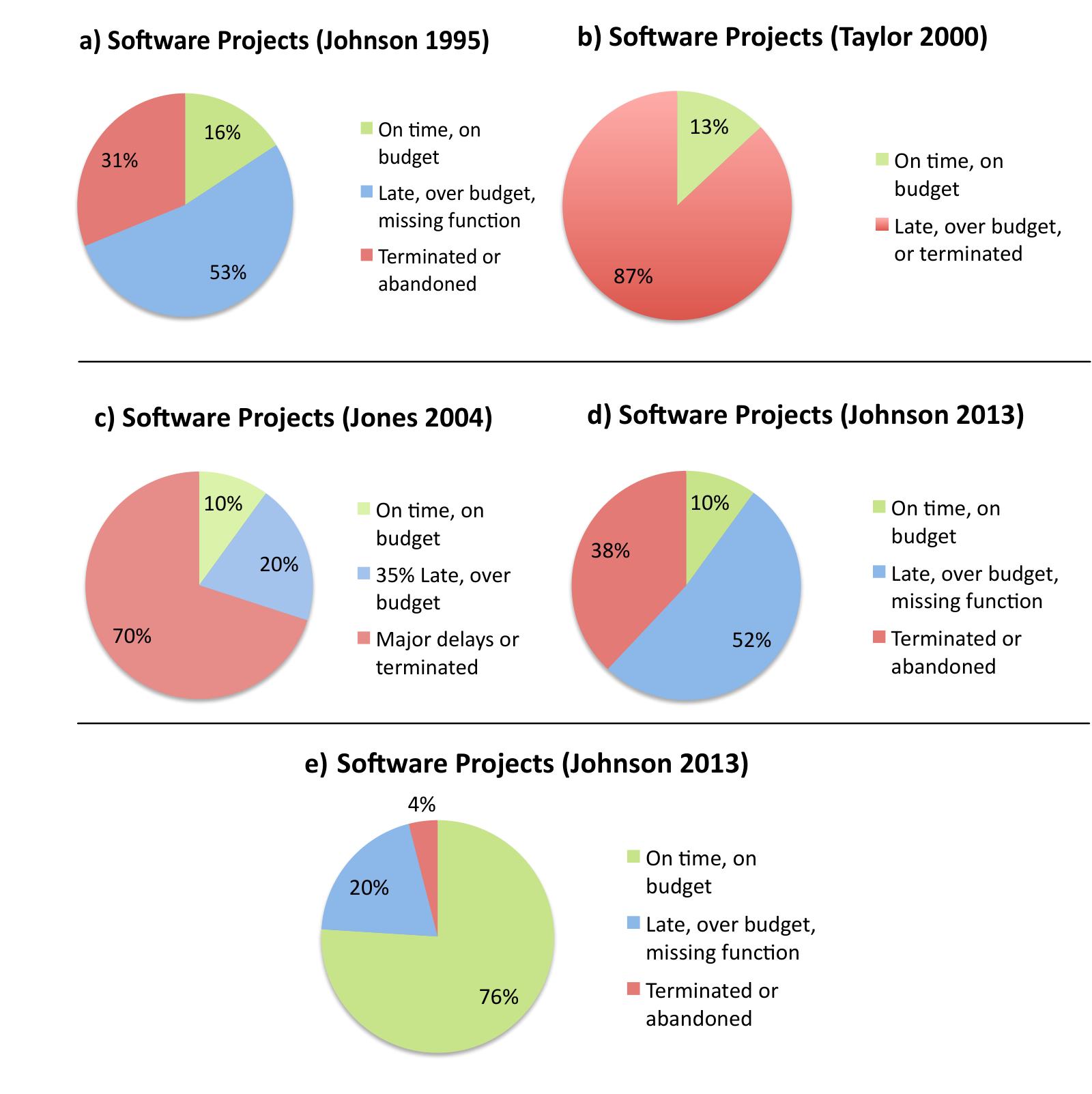
Figure 1.4 summarizes four surveys of software projects. With just 10% to 16% on time and on budget, more projects were cancelled or abandoned than met their mark. A closer look at the 13% of projects in survey (b) that were successful is even more sobering, as fewer than 1% of new development projects met their schedules and budgets. Although the first three surveys are 10 to 25 years old, survey d) is from 2013. Nearly 40% of these large projects were cancelled or abandoned, and 50% were late, over budget, and missing functionality. Using history as our guide, poor President Obama had only a one in ten chance that HealthCare.gov would have a successful debut.
Agile is also known variously as a lightweight or undisciplined process.
Perhaps the “Reformation moment” for software engineering was the Agile Manifesto in February 2001. A group of software developers met to develop a lighter-weight software lifecycle. Here is exactly what the Agile Alliance nailed to the door of the “Church of Plan-and-Document”: “We are uncovering better ways of developing software by doing it and helping others do it. Through this work we have come to value:
Individuals and interactions over processes and tools
Working software over comprehensive documentation
Customer collaboration over contract negotiation
Responding to change over following a plan
That is, while there is value in the items on the right, we value the items on the left more.”
Variants of Agile There are many variants of Agile software development ((Fowler05?)). The one we use in this book is Extreme Programming, which is abbreviated XP, and credited to Kent Beck.
This alternative development model is based on embracing change as a fact of life: developers should continuously refine a working but incomplete prototype until the customer is happy with the result, with the customer offering feedback on each iteration. Agile emphasizes test-driven development (TDD) to reduce mistakes by writing the tests before writing the code, user stories to reach agreement and validate customer requirements, and velocity to measure project progress. We’ll cover these topics in detail in later chapters.
Regarding software lifetimes, the Agile software lifecycle is so quick that new versions are available every week or two—with some even releasing every day—so they are not even special events as in the Plan-and-Document models. The assumption is one of basically continuous improvement over its lifetime.
We mentioned in the prior section that newcomers can find Plan-and-Document processes tedious, but this is not the case for Agile. This perspective is captured by a software engineering instructor’s early review of Agile:
Remember when programming was fun? Is this how you got interested in computers in the first place and later in computer science? Is this why many of our majors enter the discipline—because they like to program computers? Well, there may be promising and respectable software development methodologies that are perfectly suited to these kinds of folks. …[Agile] is fun and effective, because not only do we not bog down the process in mountains of documentation, but also because developers work face-to-face with clients throughout the development process and produce working software early on.
— Renee McCauley, “Agile Development Methods Poised to Upset Status Quo,” SIGCSE Bulletin, 2001
By de-emphasizing planning, documentation, and contractually binding specifications, the Agile Manifesto ran counter to conventional wisdom of the software engineering intelligentsia, so it was not universally welcomed with open arms ((Cormick 2001)):
[The Agile Manifesto] is yet another attempt to undermine the discipline of software engineering…In the software engineering profession, there are engineers and there are hackers…It seems to me that this is nothing more than an attempt to legitimize hacker behavior…The software engineering profession will change for the better only when customers refuse to pay for software that doesn’t do what they contracted for… Changing the culture from one that encourages the hacker mentality to one that is based on predictable software engineering practices will only help transform software engineering into a respected engineering discipline.
— Steven Ratkin, “Manifesto Elicits Cynicism,” IEEE Computer, 2001
One pair of critics even published the case against Agile as a 432-page book! ((Stephens and Rosenberg 2003))
“The battle lines are drawn. Hostilities have broken out between armed camps of the software development community. This time the rallying cry is, “XP!” … What XP uncovered (again) is an ancient, sociological San Andreas fault that runs under the software community–programming versus software engineering (a.k.a. the scruffy hackers versus the tweedy computer scientists).”
The software engineering research community went on to compare Plan-and-Document lifecycles to the Agile lifecycle in the field and found—to the surprise of some cynics—that Agile could indeed work well, depending on the circumstances. Figure 1.5 shows 10 questions from a popular software engineering textbook ((Sommerville 2010)) whose answers suggest when to use Agile and when to use Plan-and-Document methods.
| Question: A no answer suggests Agile; a yes suggests Plan-and-Document | |
|---|---|
| 1 | Is specification required? |
| 2 | Are customers unavailable? |
| 3 | Is the system to be built large? |
| 4 | Is the system to be built complex (e.g., real time)? |
| 5 | Will it have a long product lifetime? |
| 6 | Are you using poor software tools? |
| 7 | Is the project team geographically distributed? |
| 8 | Is team part of a documentation-oriented culture? |
| 9 | Does the team have poor programming skills? |
| 10 | Is the system to be built subject to regulation? |
While Figure 1.4 shows the disappointing results for large software projects, which do not use Agile, Figure 1.4 shows the success of small software projects—defined as costing less than $1M—that typically do use Agile. With three-fourths of these projects on time, on budget, and with full functionality, the results are in stark contrast to the other charts in the figure. Success has fanned Agile’s popularity, and recent surveys peg Agile as the primary development method for 60% to 80% of all programming teams in 2013 ((ET Bureau 2012), (Project Management Institute 2012)). One paper even found Agile was used by the majority of programming teams that are geographically distributed, which is much more difficult to pull off ((Estler et al. 2012)).
Thus, we concentrate on Agile in the six software development chapters in Part II of the book, but each chapter also gives the perspective of the Plan-and-Document methodologies on topics like requirements, testing, project management, and maintenance. This contrast allows readers to decide for themselves when each methodology is appropriate. Part I introduces SaaS and SaaS programming environments, including Ruby, Rails, and Javascript.
Agile is a family of methodologies, not a single methodology. We follow Extreme Programming (XP), which includes one- to two-week iterations, behavior driven design (see Chapter 7), test-driven development (see Chapter 8), and pair programming (Section 2.2). Another popular variant is Scrum (Section 10.1), where self-organizing teams use two- to four-week iterations called sprints, and then regroup to plan the next sprint. A key feature of many Agile methodologies is a daily standup meeting to identify and overcome obstacles. While there are multiple roles in the scrum team, the norm is to rotate the roles over time. The Kanban approach is derived from Toyota’s just-in-time manufacturing process, which in this case treats software development as a pipeline. Here the team members have fixed roles, and the goal is to balance the number of team members so that there are no bottlenecks with tasks stacking up waiting for processing. One common feature is a wall of cards to illustrate the state of all tasks in the pipeline. There are also hybrid lifecycles that try to combine the best of two worlds. For example, ScrumBan uses the daily meetings and sprints of Scrum but replaces the planning phase with the more dynamic pipeline control of the wall of cards from Kanban.
While we now see how to build some software successfully, not all projects are small. We next show how to design software to enable composing smaller pieces into large services like Amazon.com.
Summary: In contrast to the Plan-and-Document lifecycles, the Agile lifecycle works with customers to continuously add features to working prototypes until the customer is satisfied, allowing customers to change what they want as the project develops. Documentation is primarily through user stories and test cases, and it does not measure progress against a predefined plan. Progress is gauged instead by recording velocity, which essentially is the rate that a project completes features.
President Obama belatedly recognized the difficulties of software acquisition. On November 14, 2013, he said in a speech: “…when I do some Monday morning quarterbacking on myself, one of the things that I do recognize is since I know how we purchase technology in the federal government is cumbersome, complicated and outdated …it’s part of the reason why, chronically, federal IT programs are over budget, behind schedule…since I [now] know that the federal government has not been good at this stuff in the past, two years ago as we were thinking about this…we might have done more to make sure that we were breaking the mold on how we were going to be setting this up.”
Indeed, long before the ACA website, there were calls to reform software acquisition, as in this US National Academies study of the Department of Defense (DOD):
“The DOD is hampered by a culture and acquisition-related practices that favor large programs, high-level oversight, and a very deliberate, serial approach to development and testing (the waterfall model). Programs that are expected to deliver complete, nearly perfect solutions and that take years to develop are the norm in the DOD… These approaches run counter to Agile acquisition practices in which the product is the primary focus, end users are engaged early and often, the oversight of incremental product development is delegated to the lowest practical level, and the program management team has the flexibility to adjust the content of the increments in order to meet delivery schedules…Agile approaches have allowed their adopters to outstrip established industrial giants that were beset with ponderous, process-bound, industrial-age management structures. Agile approaches have succeeded because their adopters recognized the issues that contribute to risks in an IT program and changed their management structures and processes to mitigate the risks.” ((National Research Council 2010))
True or False: A big difference between Spiral and Agile development is building prototypes and interacting with customers during the process.
False: Both build working but incomplete prototypes that the customer helps evaluate. The difference is that customers are involved at least every two weeks in Agile, versus up to every two years in Spiral.
True or False: A big difference between Waterfall and Agile development is that Agile does not use requirements.
False: While Agile does not develop extensive requirements documents as does Waterfall, the interactions with customers lead to the creation of requirements as user stories, as we shall see in Chapter 7.
1.4 Software Quality Assurance: Testing
And the users exclaimed with a laugh and a taunt:
“It’s just what we asked for, but not what we want.”— Anonymous
A standard definition of quality for any product is “fitness for use,” which must provide business value for both the customer and the manufacturer ((Juran and Gryna 1998)). For software, quality means both satisfying the customer’s needs—easy to use, gets correct answers, does not crash, and so on—and being easy for the developer to debug and enhance. Quality Assurance (QA) also comes from manufacturing, and refers to processes and standards that lead to manufacture of high-quality products and to the introduction of manufacturing processes that improve quality. Software QA, then, means both ensuring that products under development have high quality and creating processes and standards in an organization that lead to high quality software. As we shall see, some Plan-and-Document software processes even use a separate QA team that tests software quality (Section 8.10).
Determining software quality involves two terms that are commonly interchanged but have subtle distinctions ((Boehm 1979)):
Verification: Did you build the thing right? (Did you meet the specification?)
Validation: Did you build the right thing? (Is this what the customer wants? That is, is the specification correct?)
Software prototypes that are the lifeblood of Agile typically help with validation rather than verification, since customers often change their minds on what they want once they begin to see the product work.
Infeasibility of exhaustive testing Suppose it took just 1 nanosecond to test a program and it had just one 64-bit input that we wanted to test exhaustively. (Obviously, most programs take longer to run and have more inputs.) Just this simple case would take \(2^{64}\) nanoseconds, or 500 years!
The main approach to verification and validation is testing; the motivation for testing is that the earlier developers find mistakes, the cheaper it is to repair them. Given the vast number of different combinations of inputs, testing cannot be exhaustive. One way to reduce the space is to perform different tests at different phases of software development. Starting bottom up, unit testing makes sure that a single procedure or method does what was expected. The next level up is module testing, which tests across individual units. For example, unit testing works within a single class whereas module testing works across classes. Above this level is integration testing, which ensures that the interfaces between the units have consistent assumptions and communicate correctly. This level does not test the functionality of the units. At the top level is system testing or acceptance testing, which tests to see if the integrated program meets its specifications. In Chapter 8, we’ll describe an alternative to testing, called formal methods.
As mentioned briefly in Section 1.3, the approach to testing for the XP version of Agile is to write the tests before you write the code. You then write the minimum code you need to pass the test, which ensures that your code is always tested and reduces the chances of writing code that will be later discarded. XP splits this test-first philosophy into two parts, depending on the level of the testing. For system, acceptance, and integration tests, XP uses Behavior-Driven Design (BDD), which is the topic of Chapter 7. For unit and module tests, XP uses Test-Driven Development (TDD), which is the topic of Chapter 8.
Summary: Testing reduces the risks of errors in designs.
In its many forms, testing helps verify that software meets the specification and validates that the design does what the customer wants.
To attack the infeasibility of exhaustive testing, we divide in order to conquer by focusing on unit testing, module testing, integration testing, and full system testing or acceptance testing. Each higher-level test delegates more detailed testing to lower levels.
Agile attacks testing by writing the tests before writing the code, using either Behavior-Driven Design or Test-Driven Development, depending on the level of the test.
For the Waterfall development process, testing happens after each phase is complete and in a final verification phase that includes acceptance tests. For Spiral, it happens on each iteration, which can last one or two years. Assurance for the XP version of Agile comes from test-driven development, in that the tests are written before the code when coding from scratch. When enhancing existing code, test-driven development means writing the tests before writing the enhancements. The amount of testing depends on whether you are enhancing beautiful code or legacy code, with the latter needing a lot more.
While all of the following help with verification, which form of testing is most likely to help with validation: Unit, Module, Integration, or Acceptance?
Validation is concerned with doing what the customer really wants versus whether code met the specification, so acceptance testing is most likely to point out the difference between doing the thing right and doing the right thing.
1.5 Productivity: Conciseness, Synthesis, Reuse, and Tools
Moore’s Law meant hardware resources have doubled every 18 months for nearly 50 years. These faster computers with much larger memories could run much larger programs. To build bigger applications that could take advantage of the more powerful computers, software engineers needed to improve their productivity.
Engineers developed four fundamental mechanisms to improve their productivity:
Clarity via conciseness
Synthesis
Reuse
Automation via Tools
Clarity via conciseness reflects one of the driving assumptions of improving programmer productivity: if programs are easier to understand, they will have fewer bugs and will be easier to maintain. A closely related corollary is that if the program is smaller, it’s generally easier to understand. We capture this notion with our motto of “clarity via conciseness.”
Programming languages do this in two ways. The first is simply offering a syntax that lets programmers express ideas naturally and in fewer characters. For example, below are two ways to express a simple assertion:
assert_greater_than_or_equal_to(a, b)expect(a).to be >= b
It’s easy to imagine momentary confusion about the order of arguments in the first version in addition to the higher cognitive load of reading twice as many characters. The second version (which happens to be legal Ruby) is shorter and easier to read and understand, and will likely be easier to maintain.
The other way to improve clarity is to raise the level of abstraction. That initially meant the invention of higher-level programming languages such as Fortran and COBOL. This step raised the engineering of software from assembly language for a particular computer to higher-level languages that could target multiple computers simply by changing the compiler.
As computer hardware performance continued to increase, more programmers were willing to delegate tasks to the compiler and runtime system that they formerly performed themselves. For example, Java and similar languages took over memory management from the earlier C and C++ languages. Scripting languages like Python and Ruby have raised the level of abstraction even higher. Examples are reflection, which allows programs to observe themselves, and higher order functions, which allows higher-level behaviors to be reused by passing functions as arguments to other functions. This higher level of abstraction made programs more concise and therefore (usually) easier to read, understand, and maintain. To highlight examples that improve productivity via conciseness, we use the “Concise” icon. 
Synthesis refers to code that is generated automatically rather than created manually. Logic synthesis for hardware engineers meant that they could describe hardware as Boolean functions and receive highly optimized transistors that implemented those functions. The classic software synthesis example is Bit blit. This graphics primitive combines two bitmaps under control of a mask. The straightforward approach would include a conditional statement in the innermost loop to choose the type of mask, but it was slow. The solution was to write a program that could synthesize the appropriate special-purpose code without the conditional statement in the loop. We’ll highlight examples that improve productivity by generating code with this “CodeGen” gears icon.  The Rails framework makes extensive use of the Ruby language’s facilities for metaprogramming, which allows Ruby programs to automatically synthesize code at runtime.
Reuse of portions from past designs, rather than writing everything from scratch, is a third way to improve productivity. As it is easier to make small changes in software than in hardware, software is even more likely than hardware to reuse a component that is almost but not quite a correct fit. We highlight examples that improve productivity via reuse with this “Reuse” recycling icon.  Procedures and functions were invented in the earliest days of software so that different parts of the program could reuse the same code with different parameter values. Standardized libraries for input/output and for mathematical functions soon followed, so that programmers could reuse code developed by others.
Procedures in libraries let you reuse implementations of individual tasks. But more commonly, programmers want to reuse and manage collections of tasks. The next step in software reuse was therefore object-oriented programming (OOP), where you could reuse the same tasks with different objects via the use of inheritance in languages like C++ and Java.
While inheritance supported reuse of implementations, another opportunity for reuse is a general strategy for doing something even if the implementation varies. Design patterns, inspired by work in civil architecture ((Alexander et al. 1977)), arose to address this need. Language support for reuse of design patterns includes dynamic typing, which facilitates composition of abstractions, and mix-ins, which offer ways to collect functionality from multiple methods without some of the pathologies of multiple inheritance found in some OOP languages. Python and Ruby are examples of languages with features that help with reuse of design patterns.
Note that reuse does not mean copying and pasting code so that you have very similar code in many places. The problem with copying and pasting code is that you may not change all the copies when fixing a bug or adding a feature. Here is a software engineering guideline that guards against repetition:
Every piece of knowledge must have a single, unambiguous, authoritative representation within a system.
— Andy Hunt and Dave Thomas, 1999
This guideline has been captured in the motto and acronym: Don’t Repeat Yourself (DRY). We’ll use a towel as the “DRY” icon to show examples of DRY in the following chapters. 
Ruby and JavaScript, which we use in this book, are typical of modern scripting languages in including automatic memory management, dynamic typing, support for higher-order functions, and various mechanisms for code reuse. By including important advances in programming languages, Ruby goes beyond languages like Perl in supporting multiple programming paradigms such as object-oriented and functional programming.
Automation, our fourth and final productivity-enhancing mechanism, reflects another core value of software engineering: replacing tedious manual tasks with tools to save time, improve accuracy, or both. For software development, obvious tools include compilers and interpreters that raise the level of abstraction and generate code as mentioned above, but there are also more subtle productivity tools like Makefiles and version control systems (Section 10.2) that automate tedious tasks.  We highlight tool examples with the hammer icon.
Learning new tools Proverbs 14:4 in the King James Bible discusses improving productivity by taking the time to learn and use tools: Where there are no oxen, the manger is clean; but abundant crops come by the strength of oxen.
The trade-off is always the time it takes to learn a new tool versus the time saved in applying it. Other concerns are the dependability of the tool, the quality of the user experience, and how to decide which one to use if there are many choices. Nevertheless, one of the software engineering tenets of faith is that a new tool can make our lives better.
Your authors embrace the value of automation and tools. That is why we show you several tools in this book to make you more productive. The good news is that any tool we show you will have been vetted to ensure its dependability and that time to learn will be paid back many times over in reduced development time and in the improved quality of the final result. For example, Chapter 7 shows how Cucumber helps automate turning user stories into acceptance tests and how Pivotal Tracker automatically measures Velocity, which is a measure of the rate of adding features to an application. Chapter 8 introduces RSpec, which helps automate the unit testing process. The bad news is that you’ll need to learn several new tools. However, we think the ability to quickly learn and apply new tools is a requirement for success in engineering software, so it’s a good skill to cultivate.
Thus, our fourth productivity enhancer is automation via tools. We highlight examples that use automation with the robot icon, although they are often also associated with tools. 
Summary: Moore’s Law inspired software engineers to improve their productivity by:
Coveting conciseness, in using compact syntax and by raising the level of abstraction by using higher-level languages. Examples include reflection, which allows programs to observe themselves at runtime, and higher-order functions, which allow higher-level behaviors to be reused by passing functions as arguments to other functions.
Synthesizing implementations.
Reusing designs by following the principle of Don’t Repeat Yourself (DRY) and by relying upon innovations that help reuse, such as procedures, libraries, object-oriented programming, and design patterns.
Using (and inventing) tools to automate tedious tasks.
Productivity is measured in the engineer-hours to implement new functionality. The difference is the cycles are much longer in Waterfall and Spiral vs. Agile—on the order of 6 to 24 months vs. 1/2 month. Therefore, much more work is done between customer-visible releases in Plan-and-Document methodologies, and hence the chances are greater that more work will ultimately be rejected by the customer.
Which mechanism is the weakest argument for productivity benefits of compilers for high-level programming languages: Clarity via conciseness, Synthesis, Reuse, or Automation and Tools?
Compilers make high-level programming languages practical, enabling programmers to improve productivity via writing the more concise code in a HLL. Compilers do synthesize lower-level code based on the HLL input. Compilers are definitely tools. While you can argue that HLL makes reuse easier, reuse is the weakest of the four for explaining the benefits of compilers.
1.6 SaaS and Service Oriented Architecture
As the Web started to reach large audiences in the mid 1990s, a new idea started to emerge: rather than relying on users to install software on their computers, why not run the software centrally on Internet-based servers, and allow users to access it via a Web browser? Salesforce was arguably the first large company to fully embrace this new model, which was dubbed Software as a Service (SaaS). Examples of SaaS that many of us now use every day include searching, social networking, and watching videos. But even apps such as word processing, contact management, and calendars, for which the previously dominant software delivery model was for users to install the software on their devices, have largely migrated to SaaS.
SaaP (Software as a Product) is a retronym that appeared around 2015 to describe software that must be installed on each device when it’s released or updated, in contrast to SaaS, in which the user is always using the latest version of a Web-based app.
The advantages of SaaS for both users and developers explain the popularity of SaaS:
Since customers do not need to install the application, they don’t have to worry whether their hardware is the right brand or fast enough, nor whether they have the correct version of the operating system.
The data associated with the service is generally kept with the service, so customers need not worry about backing it up, losing it due to a local hardware malfunction, or even losing the whole device, such as a phone or tablet.
When a group of users wants to collectively interact with the same data, SaaS is a natural vehicle.
When data is large and/or updated frequently, it may make more sense to centralize data and offer remote access via SaaS.
Only a single copy of the server software runs in a uniform, tightly-controlled hardware and operating system environment selected by the developer. Although different Web browsers still have some incompatible behaviors (a topic we address in Chapter 6), developers overwhelmingly avoid the compatibility hassles of distributing binaries that must run on different users’ computers.
Since the only copy of the server software is under the developers’ control, they can upgrade the software and even the hardware as long as they don’t violate the external application program interfaces (API), and they can pre-test new versions of the application on a small fraction of the real customers first, all without pestering users to upgrade their installed applications.
SaaS companies compete regularly on bringing out new features to help ensure that their customers do not abandon them for a competitor who offers a better service.
| SaaS Programming Framework | Programming Language | Introduced |
|---|---|---|
| Active Server Pages (ASP.NET) | C#, VB.NET | 1996 |
| Enterprise Java Beans (EJB) | Java | 1997 |
| JavaServer Pages (JSP) | Java | 1999 |
| Spring | Java | 2002 |
| Rails | Ruby | 2004 |
| Django | Python | 2005 |
| Zend | PHP | 2006 |
| Sinatra | Ruby | 2007 |
Given the popularity of SaaS, Figure 1.6 lists just a few of the many programming frameworks that claim to help create SaaS applications. In this book, we use the Rails framework written in the Ruby language (“Ruby on Rails”), although the ideas we cover will work with other programming frameworks as well. We chose Rails because it came from a community that had already embraced the Agile lifecycle, so the tools support Agile particularly well. If you are not already familiar with Ruby or Rails, this gives you a chance to practice an important software engineering skill: use the right tool for the job, even if it means learning a new tool or new language! Indeed, an attractive feature of the Rails community is that its contributors routinely improve productivity by inventing new tools to automate tasks that were formerly done manually.
Note that frequent upgrades of SaaS—due to only having a single copy of the software—perfectly align with the Agile software lifecycle. Hence, Amazon, eBay, Facebook, Google, and other SaaS providers all rely on the Agile lifecycle, and traditional software companies like Microsoft are increasingly using Agile in their product development. The Agile process is an excellent match to the fast-changing nature of SaaS applications.
Despite all the advantages of SaaS, it was still missing one critical advantage in the area of software reuse. When creating SaaP, developers could make extensive use of software libraries containing code to perform tasks common to many different applications. Because these libraries were often written by others (so-called third-party libraries), they embodied the advantage of software reuse. By the mid 2000s, a similar phenomenon began to take shape in SaaS: the rise of service-oriented architecture (SOA), in which a SaaS service could call upon other services built and maintained by other developers for common tasks. Services that were highly specialized to a narrow range of tasks came to be called microservices; today’s common examples include credit card processing, search, driving directions, and more. As standards solidified for representing and interacting with such external services, the important benefit of reuse finally arrived for SaaS. Chapter 3 delves into more detail about SOA and microservices.
Of course, we have yet to address one major difference between SaaS and SaaP: the underlying hardware on which the apps will run. With SaaP, that hardware consists of the PCs of millions of individual users. In the next section we explore the underlying hardware that makes SaaS possible.
Summary: Software as a Service (SaaS) is attractive to both customers and providers because the universal client (the Web browser) makes it easier for customers to use the service and the single version of the software at a centralized site makes it easier for the provider to deliver and improve the service. Given the ability and desire to frequently upgrade SaaS, the Agile software development process is popular for SaaS, and so there are many frameworks to support Agile and SaaS. This book uses Ruby on Rails.
Some of Google’s most popular SaaS apps are Search, YouTube, Maps, Gmail, Calendar, and Documents. For each of these apps, give one advantage of delivering the app as SaaS rather than SaaP.
Many answers are correct, but here are ours:
No user installation: Documents
Can’t lose data: Gmail, Calendar.
Users cooperating: Documents.
Large/changing datasets: Search, Maps, YouTube.
Software centralized in single environment: Search.
No field upgrades when improve app: Documents.
True or False: If you are using the Agile development process to develop SaaS apps, you could use Python and Django or languages based on the Microsoft’s .NET framework and ASP.NET instead of Ruby and Rails.
True. Programming frameworks for Agile and SaaS include Django and ASP.NET.
1.7 Deploying SaaS: Cloud Computing
If computers of the kind I have advocated become the computers of the future, then computing may someday be organized as a public utility just as the telephone system is a public utility …The computer utility could become the basis of a new and important industry.
— John McCarthy, at MIT centennial celebration in 1961
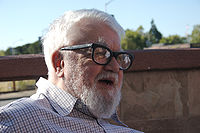
John McCarthy (1927–2011) received the Turing Award in 1971 and was the inventor of Lisp and a pioneer of timesharing large computers. Clusters of commodity hardware and the spread of fast networking have helped make his vision of timeshared “utility computing” a reality.
SaaS places three demands on our information technology (IT) infrastructure:
Communication, to allow any customer to interact with the service.
Scalability, in that the central facility running the service must deal with the fluctuations in demand during the day and during popular times of the year for that service as well as a way for new services to add users rapidly.
Availability, in that both the service and the communication vehicle must be continuously available: every day, 24 hours a day (“24\(\times\)7”). The gold standard for availability, set by the US public phone system, is 99.999% (“five nines”), or about 5 minutes of downtime per year. Amazon.com aims for four nines, which is difficult to achieve even for well-run SaaS.
The Internet and broadband to the home easily resolve the communication demand of SaaS. Although some early web services were deployed on expensive large-scale computers—in part because such computers were more reliable and in part because it was easier to operate a few large computers—a contrarian approach soon overtook the industry. Collections of commodity small-scale computers connected by commodity Ethernet switches, which became known as clusters, offered several advantages over the “big iron” hardware approach:
Because of their reliance on Ethernet switches to interconnect, clusters are much more scalable than conventional servers. Early clusters offered 1000 computers, and today’s datacenters contain 100,000 or more.
Careful selection of the type of hardware to place in the datacenter and careful control of software state made it possible for a very small number of operators to successfully run thousands of servers. In particular, some datacenters rely on virtual machines to simplify operation. A virtual machine monitor is software that imitates a real computer so successfully that you can even run an operating system correctly on top of the virtual machine abstraction that it provides ((Popek and Goldberg 1974)). The goal is to imitate with low overhead, and one popular use is to simplify software distribution within a cluster. In this way, multiple apps can share hardware with each app even believing it has its own copy of the operating system. If the apps are also able to share the operating system, an even more efficient way to share hardware is to use OS-level virtualization; the popular tool Docker, which allows each app to run in its own container on a shared OS, is one example.
Two senior architects at Google showed that the cost of the equivalent amount of processors, memory, and storage is much less for clusters than for “big iron,” perhaps by a factor of 20 ((Barroso and Hoelzle 2009)).
Although the cluster components are less reliable than conventional servers and storage systems, the cluster software infrastructure makes the whole system dependable via extensive use of redundancy in both hardware and software. The low hardware cost makes the redundancy at the software level affordable. Modern service providers also use multiple datacenters that are distributed geographically so that a natural disaster cannot knock a service offline.
As Internet datacenters grew, some service providers realized that their per capita costs were substantially below what it cost others to run their own smaller datacenters, in large part due to economies of scale when purchasing and operating 100,000 computers at a time. They also benefit from higher utilization given that many companies could share these giant datacenters, which ((Barroso and Hoelzle 2009)) call Warehouse Scale Computers, whereas smaller datacenters often run at only 10% to 20% utilization. Thus, these companies realized they could profit from making their datacenter hardware available on a pay-as-you-go basis.
Luiz Barroso, VP of Engineering at Google and winner of the 2020 ACM/IEEE Eckert-Mauchly Award, gives an excellent brief history of warehouse-scale computing at the beginning of his award acceptance speech.
The result is called public cloud services, utility computing, or often simply cloud computing, which offers computing, storage, and communication at pennies per hour ((Armbrust et al. 2010)). Moreover, there is no additional cost for scale: Using 1000 computers for 1 hour costs no more than using 1 computer for 1000 hours. Leading examples of “infinitely scalable” pay-as-you-go computing are Amazon Web Services, Google AppEngine, and Microsoft Azure. The public cloud means that today anyone with a credit card and a good idea can start a SaaS company that can grow to millions of customers without first having to build and operate a datacenter.
From 2010–2020, Cloud Computing and SaaS began a major transformation of the computer industry. The full impact of this revolution will take the rest of this decade to determine. What is clear is that engineering SaaS for Cloud Computing is radically different from engineering shrink-wrap software (SaaP) for PCs and servers, which is why you’re reading this book.
Summary
The Internet supplies the communication for SaaS.
Cloud Computing provides the scalable and dependable hardware computation and storage for SaaS.
Cloud computing consists of clusters of commodity servers that are connected by local area network switches, with a software layer providing sufficient redundancy to make this cost-effective hardware dependable.
These large clusters or Warehouse Scale Computers offer economies of scale.
Taking advantage of economies of scale, some Cloud Computing providers offer this hardware infrastructure as low-cost utility computing that anyone can use on a pay-as-you-go basis, acquiring resources immediately as your customer demand grows and releasing them immediately when it drops.
True or False: Internal datacenters could get the same cost savings as Warehouse Scale Computers (WSCs) if they embraced SOA and purchased the same type of hardware.
False. While imitating best practices of WSC could lower costs, the major cost advantage of WSCs comes from the economies of scale, which today means 100,000 servers, thereby dwarfing most internal datacenters.
1.8 Deploying SaaS: Browsers and Mobile
Beginning around 1994, the stunning success of the Web quickly led to the phasing-out of many SaaP desktop apps. The proprietary client UIs of fee-based services such as AOL and CompuServe were replaced by free Web-based portals such as Yahoo!. Specialized SaaP apps for accessing Internet-based services, such as Eudora for email, were replaced by browser-based email such as Hotmail. Even productivity apps such as Microsoft Word began to feel pressure from browser-based competitors such as Google Docs. The browser thus became a universal client: any site the browser visited could deliver all the information necessary to render that site’s user interface using HTML, the Hypertext Markup Language. As we’ll see, JavaScript entered the picture later as a way to enrich the interactive experience of Web pages, but the actual visible page content always consists of HTML.
As its name implies, HTML is an example of a markup language: it combines text with markup (annotations about the text’s structure) in a way that makes it easy to syntactically distinguish the two. Technically, HTML 5 (the current widely-used version) is really just one type of document that can be expressed in XML, an eXtensible Markup Language that can be used both to represent data and to describe other markup languages.
Separating an HTML document’s logical structure from its appearance confers many benefits. Structure refers to the kind of content each logical component of a page represents, such as a major or minor heading, a bulleted list, a paragraph of text, and so on. Some components are simple, such as a page title or a dropdown menu of choices, and correspond to an HTML element with no children. More often, a component consists of an HTML div element with other elements nested inside it. divs often group together logically-related elements, and may be nested. Appearance refers not only to basic typography such as fonts and colors, but to the layout of elements on a page. For example, a navigation menu that is best displayed as a set of horizontal tabs on a full-size screen may work better if displayed as a drop-down menu on a mobile phone screen, even though the menu choices and their meanings are the same.
ch_intro/code/bootstrap_example.html
<!DOCTYPE html>
<html>
  <head>
    <link rel="stylesheet" href="https://getbootstrap.com/docs/4.0/dist/css/bootstrap.min.css">
    <title>Dietary Preferences of Penguins</title>
  </head>
  <body>
    <div class="container">
      <h1>Introduction</h1>
      <p class="lead">
        This article is a review of the book
        <i>Dietary Preferences of Penguins</i>,
        by Alice Jones and Bill Smith. Jones and Smith's controversial work
        makes three hard-to-swallow claims  about penguins:
      </p>
      <ul class="list-group">
        <li class="list-group-item">
          First, that penguins actually prefer eating tropical foods to fish
        </li>
        <li class="list-group-item">
          Second, that eating tropical foods makes them smell unattractive to predators
        </li>
      </ul>
    </div>
  </body>
</html>html element whose child elements represent the components on the page. The use of angle brackets for HTML tags comes from SGML (Standard Generalized Markup Language), a codified standardization of IBM’s Generalized Markup Language, developed in the 1960s for encoding computer-readable project documents.
The key to separating structure and appearance is the use of Cascading Style Sheets (CSS), introduced in 1996 as a way to associate visual rendering information with HTML elements.
As a reminder, the Concepts & Prerequisites page suggests self-study materials for basic HTML and CSS.
The key concept of CSS is that of a selector—an expression that matches one or more HTML elements in a document. Even if you’re not the developer who will be in charge of visual appearance, understanding CSS selectors is important because, as we will see in Chapter 6, selectors are a key mechanism used by JavaScript frameworks such as jQuery that allow you to create rich interactive Web pages. While there are multiple ways a selector can match an element, by far the most widely used is to associate the selector with an element’s class attribute, since multiple elements of the same or different types on a page can share the same class attribute(s). Figure 1.7 shows a very simple HTML page. The basic mechanism of using CSS to “style” HTML is as follows:
When the browser loads the page, it looks for one or more
linkelements, which should be children of the HTML document’sheadelement, that specify stylesheets to be used in conjunction with this document. In this case, the link’shref(target) refers to the main stylesheet of Bootstrap CSS, which we discuss next.The browser loads each referenced CSS stylesheet. A stylesheet contains a set of selectors and, for each selector, a set of rules for how to display elements matching that selector. These rules can specify typography, layout on the page, colors, and more.
When displaying the page, the browser matches up the CSS rules with the matching elements on each displayed page. In this example, Bootstrap provides basic style rules for each element type (
h1,p,ul, and so on), and theclassattributes on various elements are there to match particular CSS selectors in Bootstrap that further “tweak” the formatting of specific page elements.
The CSS Zen Garden shows how dramatically different the same HTML content can be made to look with different CSS stylesheets.
While CSS syntax is simple, creating visually appealing stylesheets requires graphic design and typography skills. Those of us who lack those skills are better served by using existing stylesheets designed by professionals, collections of which are sometimes referred to as CSS frameworks, or more commonly, front-end frameworks if they also include JavaScript code for visual effects that cannot be achieved using CSS alone, such as animations and fades. A widely-used front-end framework to which we’ll refer throughout the book is Bootstrap, an open source project contributed by Twitter. A good CSS framework provides at least four main benefits:
A set of high-level components that combine multiple HTML elements into a logical unit. For example, a navigation menu with dropdowns can be managed as a single component, even though it includes many HTML elements.
A grid metaphor for specifying the layout of components on a page. In the case of Bootstrap, the page is divided into 12 columns, and any component can be specified to span any number of columns, with the same component having different layout instructions for smaller vs. larger screens.
Responsive behavior on a variety of display sizes. For example, a navigation menu that normally displays as a set of horizontal tabs will be automatically rendered as vertically-stacked choices when the display is too small, even if you haven’t explicitly provided such instructions. The page https://getbootstrap.com/docs/4.0/examples/navbars/ shows examples of how navigation bars in Bootstrap behave as the screen is resized.
Support for accessibility for users with disabilities, such as by providing styles for content that should be visually hidden but remain accessible to assistive technologies such as screen readers.
HTML/CSS frameworks have become particularly important with the dominance of mobile devices. Although Apple’s introduction of the iPhone in 2007 was definitely not the first smartphone to feature installable apps or Web browsing, it was the first to become wildly successful and widely copied. By 2017, just ten years later, about a third of the world’s population had smartphones, which collectively accounted for more visits to Web sites than desktops or laptops ((Enge 2018)). Up to a point, carefully-designed CSS styles can make the same HTML content usable on a wide range of screen sizes. For this reason, while Figure 1.8 shows that there are several approaches to developing client apps, in this book we recommend creating “mobile-first” apps using HTML5, CSS, and JavaScript, and potentially enhancing them to Progressive Web Apps (Section). This approach takes advantage of the extensive existing tooling available in that ecosystem, especially presentation frameworks such as Bootstrap, DOM manipulation libraries such as jQuery (Section), and testing tools such as Jasmine (Section 6.7).
Back to SaaP? The proliferation of installable platform apps has rolled back a major benefit of SaaS: users must once again manually update their apps when security bugs are found or when they upgrade their devices. And updates for mobile apps are far more frequent than they ever were for SWS—in 2014, the Twitter mobile app was updated about every 20 days on average.
Despite the differences among the ways of building mobile or desktop SaaS, all such apps are structurally similar: they provide a local user interface, possibly including local storage, and they use open SaaS standards and protocols to communicate with one or more remote servers.
| Advantages | Disadvantages |
|---|---|
| Mobile-first/responsive Web site (“multi-page app”) | |
| Use same languages/tools/framework as desktop SaaS Portable across devices, so no need to develop/maintain multiple versions User never needs to install updates With some effort, can be made to work even when disconnected from the Internet Icon placement on user’s home screen as Web bookmark |
Not listed in app stores Not subject to malware audit May lack access to advanced platform hardware features Usually works poorly when disconnected from the Internet Depending on app complexity, performance may be noticeably lower than platform-specific app |
| Progressive Web app (PWA) | |
| Same pros and cons as responsive site, but can respond gracefully when disconnected from the Internet | |
| Platform app for Android (Java) or iOS (Objective-C) | |
| Best performance Can be listed in app stores Guaranteed access to all platform hardware features May undergo malware audit (vendor policies vary) |
Must install and learn new platform, development environment, testing framework, and deployment pipeline Must rely on users to download and install updates in a timely way Must support old versions until most users have upgraded Supporting multiple hardware platforms may require maintaining multiple codebases |
Summary
An HTML (HyperText Markup Language) document consists of a hierarchically nested collection of elements. Each element begins with a tag in <angle brackets> that may have optional attributes. Some elements enclose content. In general, the elements describe the logical structure of the parts of the document, but not how the document should appear when rendered on a screen.
Cascading Style Sheets (CSS) is a stylesheet language describing visual attributes of elements on a Web page. A stylesheet associates sets of visual properties with selectors that match one or more page elements. There are many ways to express selectors that match different elements, but the most common is to associate one or more CSS classes with the element and write selectors that match elements based on class.
CSS stylesheets are separate from HTML documents, and
linkelement(s) inside theheadelement of an HTML document associate one or more stylesheets with that document.Mobile devices now account for the majority of visits to SaaS apps. One way to build “mobile-first” client apps that work well on smartphones is to use CSS frameworks such as Bootstrap. These frameworks provide different sets of CSS formatting rules for the same HTML elements depending on the kind of device on which the HTML is being viewed.
Another way to build “mobile-first” client apps is to create platform-specific installable smartphone apps. Platform apps may allow access to some device features unavailable from HTML, but they also negate important SaaS advantages such as eliminating the need to install updates and maintain multiple codebases.
How would you ensure the same CSS stylesheet(s) are used for all pages in your site or your app?
Each individual HTML document must include its own stylesheet links, so you’d ensure that the same <link> element appears within the <head> of each page of your site or app.
1.9 Beautiful vs. Legacy Code
*To me programming is more than an important practical art. It is also a gigantic undertaking in the foundations of knowledge.*
— Grace Murray Hopper
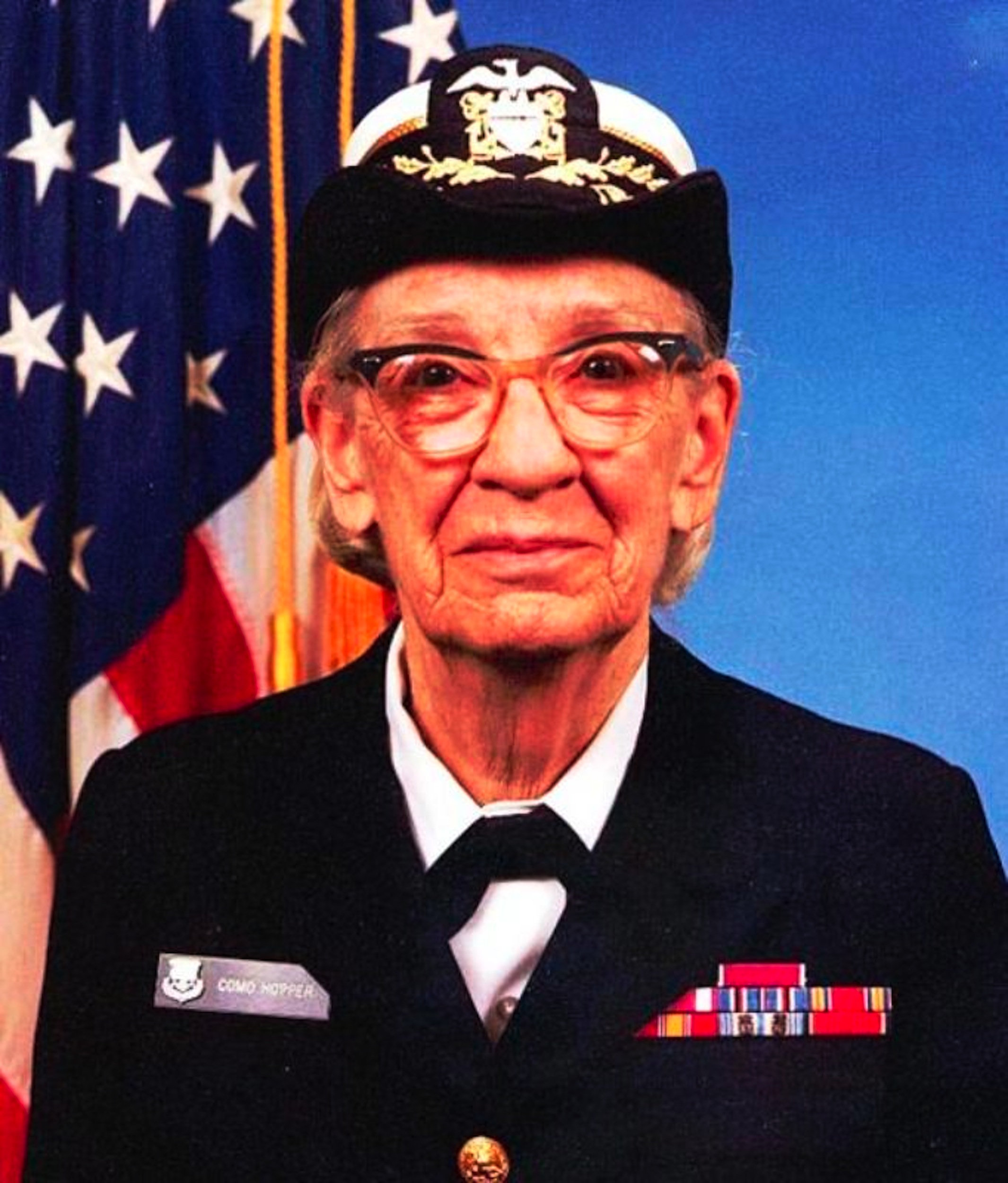
Grace Murray Hopper (1906–1992) was one of the first programmers and developed the first compiler. “Amazing Grace” became a Rear Admiral in the US Navy, and in 1997, a warship was named for her, the USS Hopper.
Unlike hardware, software is expected to grow and evolve over time. Whereas hardware designs must be declared finished before they can be manufactured and shipped, initial software designs can easily be shipped and later upgraded over time. Basically, the cost of upgrade in the field is astronomical for hardware and affordable for software.
Hence, software can achieve a high-tech version of immortality, potentially getting better over time while generations of computer hardware decay into obsolescence. The drivers of software evolution are not only fixing faults, but also adding new features that customers request, adjusting to changing business requirements, improving performance, and adapting to a changed environment. Software customers expect to get notices about and install improved versions of the software over the lifetime that they use it, perhaps even submitting bug reports to help developers fix their code. They may even have to pay an annual maintenance fee for this privilege!
Just as novelists fondly hope that their brainchild will be read long enough to be labeled a classic—which for books is 100 years!—software engineers should hope their creations would also be long lasting. Of course, software has the advantage over books of being able to be improved over time. In fact, a long software life often means that others maintain and enhance it, letting the creators of the original code off the hook.
The Oldest Living Program might be MOCAS (“Mechanization of Contract Administration Services”), which was originally purchased by the US Department of Defense in 1958 and was still in use as of 2005.
This brings us to a few terms we’ll use throughout the book. The term legacy code refers to software that, despite its old age, continues to be used because it meets customers’ needs. Sixty percent of software maintenance costs are for adding new functionality to legacy software, vs. only 17% for fixing bugs, so legacy software is successful software.
The term “legacy” has a negative connotation, however, in that it indicates that the code is difficult to evolve because it has an inelegant design or uses antiquated technology. In contrast to legacy code, we use the term beautiful code to indicate long-lasting code that is easy to evolve. The worst case is not legacy code, however, but unexpectedly short-lived code that is soon discarded because it doesn’t meet customers’ needs. We’ll highlight examples that lead to beautiful code with the Mona Lisa icon. Similarly, we’ll highlight text that deals with legacy code using an abacus icon, which is certainly a long-lasting but little changed calculating device. 
In the following chapters, we show examples of both beautiful code and legacy code that we hope will inspire you to make your designs simpler to evolve.
Abacuses are still in use today in many parts of the world despite being thousands of years old.
Surprisingly, despite the widely accepted importance of enhancing legacy software, this topic is traditionally ignored in college courses and textbooks. We feature such software in this book for three reasons. First, you can reduce the effort to build a program by finding existing code that you can reuse. One supplier is open source software. Second, it’s advantageous to learn how to build code that makes it easier for successors to enhance, since such code is more likely to enjoy a long life. Finally, unlike Plan-and-Document, in Agile you revise code continuously to improve the design and to add functionality starting with the second iteration. Thus, the skills you practice in Agile are exactly the ones you need to evolve legacy code—no matter how it was created—and the dual use of Agile techniques makes it much easier for us to cover legacy code within a single book.
Summary: Successful software can live decades and is expected to evolve and improve, unlike computer hardware that is finalized at time of manufacture and can be considered obsolete within just a few years. One goal of this book is to teach you how to increase the chances of producing beautiful code so that your software lives a long and useful life.
Programmers rarely set out to write bad code. Given the ideas of Section 1.5 about productivity, explain briefly how software written a long time ago that was considered high quality at the time might be viewed as difficult-to-maintain legacy software today.
Because of the continuously increasing level of abstraction of software tools, developers today can often create the same functionality in far fewer (and more beautiful) lines of code than would have been possible a few decades ago, so by comparison the old code is harder to maintain, even though at the time it was written it may have represented the state of the art. Doubtless the code we write today will be viewed as archaic in another few decades!
1.10 Guided Tour and How To Use This Book
As this chapter’s Concepts and Prerequisites described, becoming a skilled software engineer requires both conceptual understanding and plenty of hands-on practice. Therefore, our goal in each chapter is to give you the necessary conceptual foundations to work on the exercises, where the real learning happens.
The rest of the book is divided into two parts. Part I explains Software as a Service, and Part II explains modern software development, with a heavy emphasis on Agile.
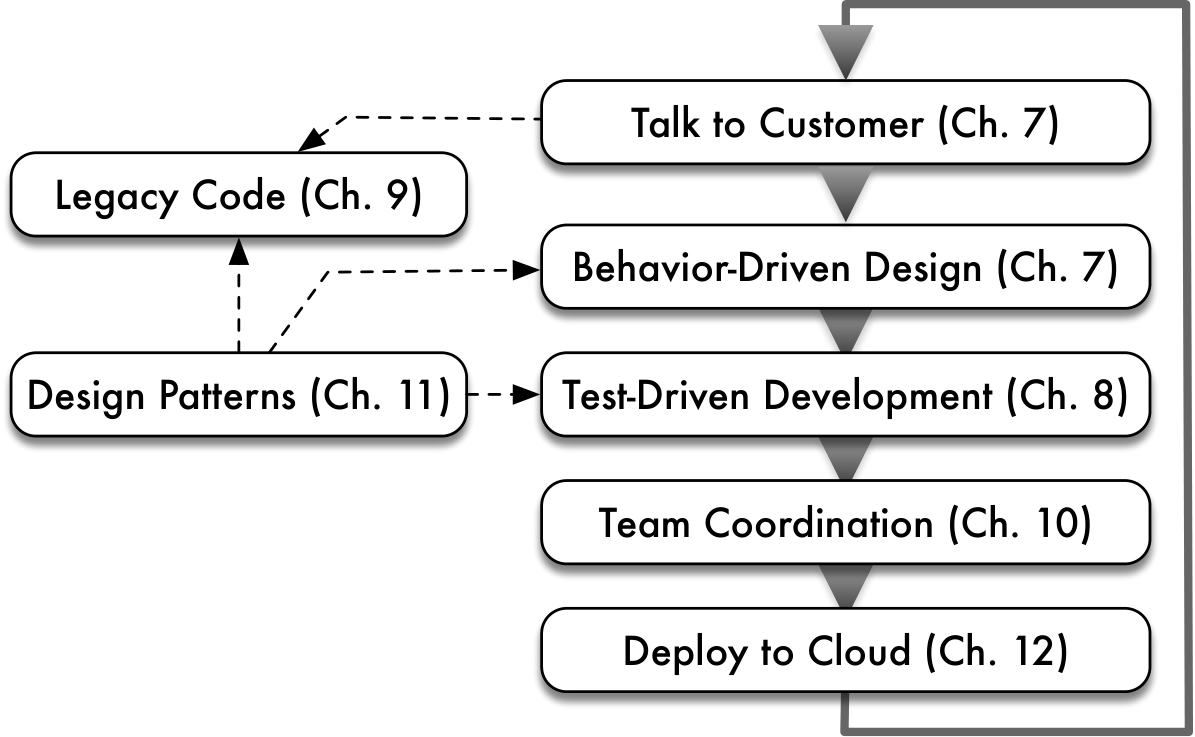
Chapter 3 starts Part I with an explanation of the architecture of a SaaS application, and how the Web went from a collection of static pages to an ecosystem of services characterized by RESTful APIs—that is, Application Programming Interfaces based on the design stance of Representational State Transfer.
Since languages and frameworks evolve rapidly, we believe learning how to learn new languages and frameworks is a more valuable skill than knowing a specific language or framework. Thus, Chapter 2 introduces our methodology for doing so, using Ruby as an example, for programmers already familiar with another modern language such as Java or Python.
Similarly, today the main reason for learning a new language is often the desire to use a framework that relies on that language. A good framework both reifies a particular application architecture and takes advantage of the features of a particular language to make development easy when it conforms to that architecture. Chapter 4 introduces the basics of Rails and its central metaphor of the Model–View–Controller architecture. Chapter 5 covers more advanced Rails features and shows in more depth how Rails takes advantage of Ruby’s language features. Splitting the material this way supports readers who want to get started writing an app as soon as they can, which just requires Chapter 4. Readers already familiar with Ruby and Rails may want to skim or skip these chapters.
Using the same strategy for learning new languages and frameworks, Chapter 6 introduces JavaScript, the jQuery framework, and the Jasmine testing tool. The Jasmine discussion assumes knowledge of testing, so readers may prefer to read that material after Chapter 8. Just as Rails amplifies the power and productivity of Ruby for SaaS servers, jQuery amplifies the power and productivity of JavaScript for the client.
Given this background, the next six chapters of Part II illustrate important software engineering principles using Rails tools to build and deploy a SaaS app. Figure 1.9 shows one iteration of the Agile lifecycle, which we use as a framework on which to hang the next chapters of the book.
Chapter 7 discusses how to work with the customer. Behavior-Driven Design (BDD) advocates writing user stories describing application use cases in terms that nontechnical customers can understand, and Chapter 7 shows how to turn user stories into integration and acceptance tests using the Cucumber tool. The chapter also explains how velocity can be used to measure progress in delivering features, and introduces the Pivotal Tracker tool to track and calculate velocity.
Chapter 8 covers Test-Driven Development (TDD). The chapter demonstrates how to write good, testable code and introduces the RSpec testing tool for writing unit tests and the SimpleCov tool to measure test coverage.
Chapter 9 describes how to deal with existing code, including how to enhance legacy code. Helpfully, it shows how to use BDD and TDD to both understand and refactor code and how to use the Cucumber and RSpec tools to make this task easier.
Chapter 10 gives advice on how to organize and work as part of an effective team using the Scrum principles mentioned above. It also describes how the version control system Git and the corresponding service GitHub can let team members work on different features without interfering with each other or causing chaos in the release process.
To help you practice Don’t Repeat Yourself, Chapter 11 introduces design patterns, which are proven structural solutions to common problems in designing how classes work together, and shows how to exploit Ruby’s language features to adopt and reuse the patterns. The chapter also offers guidelines on how to write good classes. It introduces just enough UML (Unified Modeling Language) notation to help you notate design patterns and to help you make diagrams that show how the classes should work.
Note that Chapter 11 is about software architecture whereas prior chapters in Part II are about the Agile development process. We believe in a college course setting that this order will let you start an Agile iteration sooner, and we think the more iterations you do, the better you will understand the Agile lifecycle. However, as Figure 1.9 suggests, knowing design patterns will be useful when writing or refactoring code, since it is fundamental to the BDD/TDD process.
Chapter 12 offers practical advice on how to first deploy and then improve performance and scalability in the cloud, and briefly introduces some reliability and security techniques that are uniquely relevant to deploying SaaS.
We conclude with an Afterword that reflects on the material in the book and projects what might be next.
CHIPS. As Confucius said: “I hear and I forget, I see and I remember, I do and I understand.” The goal of the book is to give you just enough content to get a conceptual handle on the Coding/Hands-On Integrated Projects (CHIPS) interspersed with the text. Each CHIPS exercise contains significant guidance and hints for the self-learning you’ll have to do to complete it. If you’re using this book in conjunction with online course materials from Codio (either in a classroom setting, in self-learning, or in the edX course sequence), switching between the content-oriented didactic material (COD) and the coding/hands-on integrated projects (CHIPS) is especially easy, and your assignments will be automatically graded for you. Instructors and self-learners, please see www.saasbook.info for more information on all of these options.
Terminology. You will encounter many new technical terms (and buzzwords) as you dive into this rich ecosystem.
To help you learn them, each term is linked to the appropriate Wikipedia article the first time it appears.
Depending on your background, we suspect you’ll need to read some chapters more than once before you get the hang of it.
Each chapter concludes with a section called Fallacies and Pitfalls, which explains common misconceptions or problems that are easy to experience if you’re not vigilant, and Concluding Remarks to provide resources for those who want to dig more deeply into some of the chapter’s concepts.
Summary:
Software engineering can only be learned by doing, and learning by doing is not about following a recipe or cutting and pasting code. The text in this book (COD, or content-oriented didactics) gives you the conceptual foundation to work on the CHIPS (coding/hands-on integrated projects). Both are essential to learning the material.
If you’re using the book in conjunction with the Codio IDE (either in your classroom, on your own, or in the edX courses), the programming assignments are automatically graded for you and all necessary software is preinstalled.
Each chapter begins with a list of the big ideas of that chapter and the prerequisite knowledge for the chapter.
Don’t skip the Fallacies & Pitfalls! Even experts run into them, which is why they get a section to themselves in each chapter.
Which is most important for rapidly learning SaaS development: understanding the conceptual foundations, reading code, or writing code?
All are important. You won’t learn much by copying-and-pasting code if you don’t understand why it works (or doesn’t). On the other hand, just reading about code doesn’t get anything working. Inspecting others’ high-quality code, which we hope your instructors will emphasize, not only shows you good examples but also helps cement your understanding of the conceptual foundations.
1.11 Fallacies and Pitfalls
Lord, give us the wisdom to utter words that are gentle and tender, for tomorrow we may have to eat them.
— Sen. Morris Udall
As mentioned above, this section near the end of a chapter explains ideas of a chapter from another perspective, and gives readers a chance to learn from the mistakes of others. Fallacies are statements that seem plausible (or are actually widely held views) based on the ideas in the chapter, but they are not true. Pitfalls, on the other hand, are common dangers associated with the topics in the chapter that are difficult to avoid even when you are warned.
Agile is a nice match to many types of software, particularly SaaS, which is why we use it in this book. However, Agile is not best for everything. Agile may be ineffective for safety-critical apps, for example.
Our experience is that once you learn the classic steps of software development and have a positive experience in using them via Agile, you will use these important software engineering principles in other projects no matter which methodology is used. Each chapter in Part II concludes with a contrasting Plan-and-Document perspective to help you understand these principles and to help you use other lifecycles should the need arise.
Nor will Agile be the last software lifecycle you will ever see. We believe that new development methodologies develop and become popular in response to new opportunities, so expect to learn new methodologies and frameworks in your future.
Since there is essentially no cost to distribute software, the temptation is to believe there is almost no cost to changing it so that it can be “remanufactured” the way the customer wants. However, this perspective ignores the cost of design and test, which can be a substantial part of the overall costs for software projects. Zero manufacturing cost is also one rationalization used to justify pirating copies of software and other electronic data, since pirates apparently believe no one should pay for the cost of development, just for manufacturing.
Those who cannot remember the past are condemned to repeat it.
— George Santayana
Software engineering is a relatively young engineering field, but a fast-moving one. If you try to learn software technologies while ignoring the historical context in which they arose, you risk making underinformed choices about what tools to use, or worse, “reinventing the wheel” without learning from the experiences of others. For example, if you’re debating with colleagues about the advisability of using Node.js as your application server, but you are unfamiliar with the long-running “threads vs. events” debates in the systems software community, at best you will be having an under-informed discussion, and at worst you will be quickly beset by woe. Similarly, the feature creep of “NoSQL” databases mirrors the progression of events that led to the invention of the relational model and its eventual dominance over the older hierarchical database model, which “baseline” NoSQL databases strongly resemble. Reinventing the wheel isn’t always necessarily a bad thing. Sometimes the existing wheel really isn’t a great fit for your needs—as Douglas Crockford is said to have remarked, “The good thing about reinventing the wheel is that you can get a round one.” Our hope is that learners of this material will choose to take a few extra minutes to gain a broader perspective on why various things are the way they are (or not). We believe this will not only help you decide whether a particular wheel reinvention is a good one, but also help you avoid techno-fetishism—the belief that a new “rockstar” technology is important and worth learning simply because it’s new (or fast, or lean, or whatever), without a well-grounded perspective of its strengths and weaknesses or of how it builds on ideas that have been explored previously.
Possible values of X change so quickly that in any given leap year, the “new hot tech” for building software is probably different from what it was during the previous leap year. Indeed, since the first edition of this book in 2013, “hot tech” for building front-end apps has changed from Prototype.js to jQuery to Angular to Ember to Backbone to React, with Vue now another contender. Therefore, your authors believe that it’s more valuable to learn how to learn new languages and frameworks, by understanding the fundamental principles of software architecture and design on which they’re built, by continuously acquiring fluency in multiple frameworks and tools, and by adopting an ecumenical approach to the question of “which language or framework is best” for a given project.
1.12 Concluding Remarks: Software Engineering Is More Than Programming
The Concluding Remarks at the end of each chapter give the learner some perspective on what the chapter has covered: Where did the technical ideas or innovations come from? What, if anything, can we say about where they are going, given that history? Where can an interested reader learn more about these topics? These sections never contain specific technical skill content, so if you’re in a rush, you can skip them; but if you want to become a seasoned practitioner and a good designer of software and tools, you probably shouldn’t.
But if Extreme Programming is just a new selection of old practices, what’s so extreme about it? Kent’s answer is that it takes obvious, common sense principles and practices to extreme levels. For example:
— If short iterations are good, make them as short as possible—hours or minutes or seconds rather than days or weeks or years.
— If simplicity is good, always do the simplest thing that could possibly work.
— If testing is good, test all the time. Write the test code before you write the code to test.
— If code reviews are good, review code continuously, by programming in pairs, two programmers to a computer, taking turns looking over each other’s shoulders.— Michael Swaine, interview with Kent Beck, ((Swaine 2001))
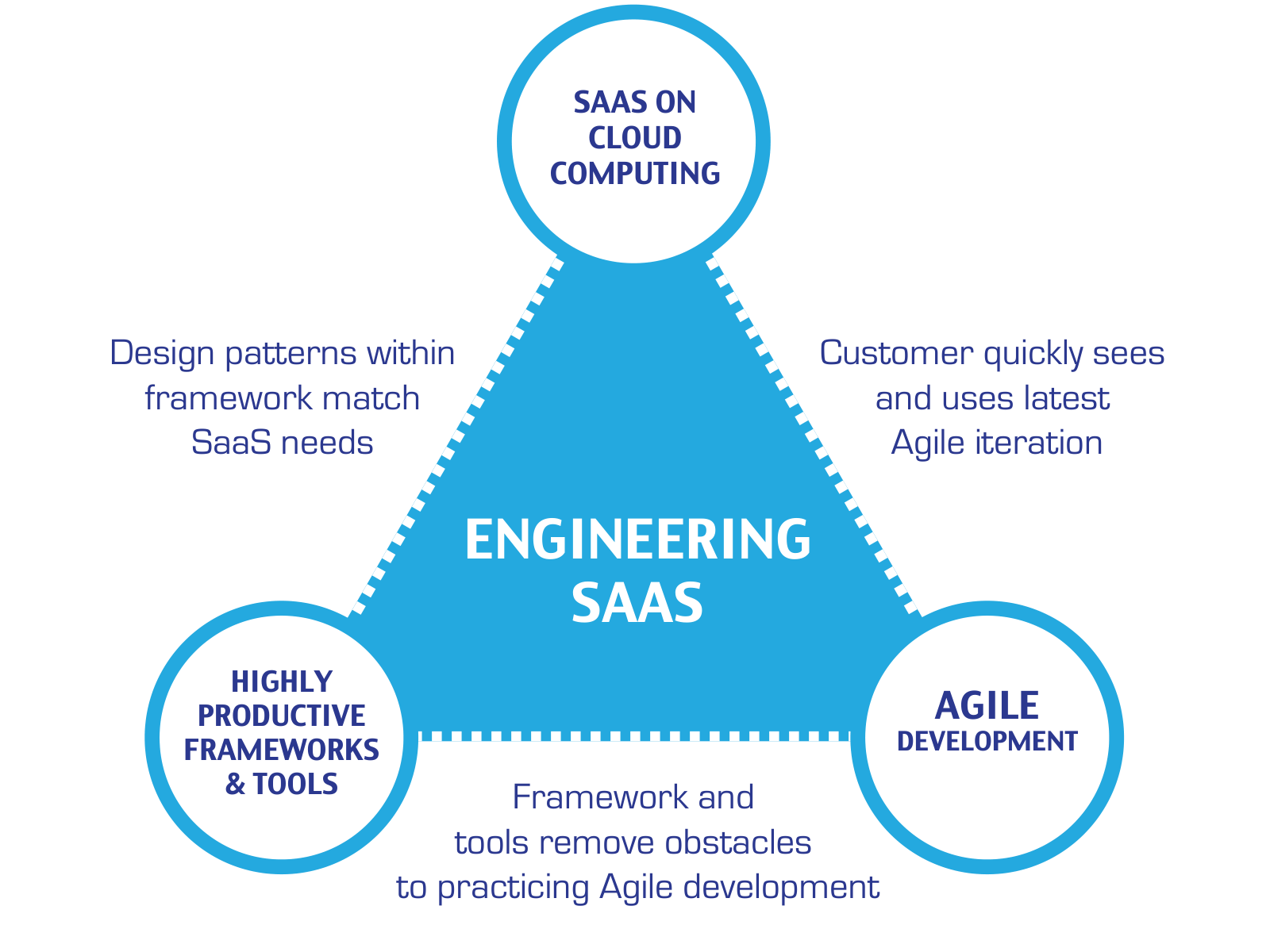
This single quote gives a good deal of the rationale behind the extreme programming (XP) version of Agile that we cover in this book. We keep iterations short, so that the customer sees the next version of the incomplete but working prototype every week or two. You write the tests before you write the code, and then you write the least amount of code it takes to make it pass the test. Pair programming means the code is under continuous review, rather than just on special occasions. Agile went from software methodology heresy to the dominant form of development in just a dozen years, and when combined with service oriented architecture, allows complex services to be built reliably.
While there is no inherent dependency among SaaS, Agile, and highly productive frameworks like Rails, Figure 1.10 suggests there is a synergistic relationship among them. Agile development means continuous progress while working closely with the customer, and SaaS on Cloud Computing enables the customer to use the latest version immediately, thereby closing the feedback loop (see Chapters 7 and 12). SaaS on Cloud Computing matches the Model–View–Controller design pattern (see Chapter 11), which Highly-Productive SaaS Frameworks expose (see Chapters 3, 4, and 5). Highly Productive Frameworks and Tools designed to support Agile development remove obstacles to practicing Agile (see Chapters 7, 8, and 10). We believe these three “crown jewels” form a “virtuous triangle” that leads to on-time and on-budget engineering of beautiful Software as a Service, and they form the foundation of this book.
This virtuous triangle also helps explain the innovative nature of the Rails community, where new important tools are frequently developed that further improve productivity, simply because it’s so easy to do. We fully expect that future editions of this book will include tools not yet invented that are so helpful that we can’t imagine how we got our work done without them!
As teachers, since many students find the Plan-and-Document methods tedious, we are pleased that the answers to the 10 questions in Figure 1.5 strongly recommend using Agile for student team projects. Nevertheless, we believe it is worthwhile for readers to be familiar with the Plan-and-Document methodology, as there are some tasks where it may be a better match, some customers require it, and it helps explain parts of the Agile methodology. Thus, we include sections near the end of all chapters in Part II that offer the Plan-and-Document perspective.
As researchers, we are convinced that software of the future will increasingly be built and rely on services in the Cloud, and thus Agile methodology will continue to increase in popularity in part given the strong synergy between them. Hence, we are at a happy point in technology where the future of software development is more fun both to learn and to teach. Highly productive frameworks like Rails let you understand this valuable technology by doing in a remarkably short time. The main reason we wrote this book is to help more people become aware of and take advantage of this extraordinary opportunity.
Cloud computing had existed for only a few years prior to the First Edition of this book, and has evolved spectacularly since then. Clusters of commodity computers had long been the basis of SaaS, but cloud computing changed how those clusters are used. Until the late 1990s, it was common for a particular computer to be dedicated to a particular SaaS app and have preinstalled all of the software components needed to run it. In contrast, starting in the mid 2000s, virtual machine technology made it possible for a single physical computer to emulate many computers, such that the software running in each virtual computer believed it was running on the real hardware. Like many other SaaS-relevant technologies, virtual machines had been around for decades—in this case, since at least the 1960s—but falling hardware costs and the dominance of the Intel architecture in server computers made high-performance virtual machines a practical tool for hosting many different SaaS apps on a single computer, even those requiring different operating systems and software packages. A typical SaaS app only cares about the type of virtual machine it’s running in, and can remain largely ignorant of the details of the hardware and OS on which that virtual machine is hosted. Since the mid 2000s, further evolution of virtual machine technology led to lightweight container frameworks such as Docker, which isolate software packages from each other while sharing a single operating system kernel image. Frameworks such as Kubernetes can help manage the deployment of containers onto hardware; the popularity of Docker and Kubernetes led to the launch of the Open Container Initiative to standardize the Container Runtime Interface for describing and “orchestrating” container deployments.
As of 2024, Heroku is migrating its internal PaaS infrastructure to be OCI-compliant.
The most recent phase of virtualization is Function as a Service (FaaS), since the developer now specifies only the code of one or more functions and pays per function invocation. An early example is Amazon Lambda.
In the venerable LISP language, functions were called lambda-expressions, since the language was heavily inspired by the lambda calculus formalism.
Although FaaS is also referred to as “serverless computing”, it is of course not truly serverless, as the functions have to run somewhere. The key distinction from SaaS is that developers do not deal with a software stack consisting of an app server, HTTP server, and so on; they write only the functions. Serverless computing is still evolving and has both pros and cons depending on the type of app to be deployed ((Castro et al. 2019)).
We believe if you learn the contents of this book in conjunction with doing the suggested assignments and activities (CHIPS), you can build your own (simplified) version of a popular software service like FarmVille or Twitter while learning and following sound software engineering practices. While being able to imitate currently successful services and deploy them in the cloud in a few months is impressive, we are even more excited to see what you will invent given this new skill set. We look forward to your beautiful code becoming long-lasting, and to becoming some of its passionate fans!