12 Dev/Ops: Deployment, Performance, Reliability, and Practical Security
Ronald Rivest (1947–), Adi Shamir (1952–), and Leonard Adleman (1945–) received the 2002 Turing Award for making public-key cryptography useful in practice. In the eponymous RSA algorithm, the security properties of keypairs are based on the difficulty of factoring large integers and performing modular exponentiation, that is, determining \(m\) such that \(C=m^{E}~\textrm{mod}~{N}\).

My response was “Congratulations, Ron, that should work.”
— Len Adleman, reacting to Ron Rivest’s encryption proposal, 1977
The big concept of this chapter is how to avoid the following headaches when your app is deployed: crashes, becoming unresponsive if it experiences a surge in popularity, or compromising customer data. Such non-functional characteristics can be more important than functional features since such headaches can drive users away. While deploying on a Platform-as-a-Service (PaaS) simplifies addressing these challenges, the techniques you must use to make your app take best advantage of PaaS are essentially the same ones you will need if you abandon PaaS.
Concepts
For SaaS using an Agile lifecycle:
Most SaaS servers follow the three-tier architecture pattern, which separates the responsibilities of different SaaS server components (Web server tier, application server tier, and database or storage tier) and enables horizontal scaling to accommodate millions of users.
Deployment and maintenance headaches are greatly simplified by deploying your app on a Platform as a Service (PaaS), which manages much of the administration and scaling for you, including some aspects of horizontal scaling.
Because the database cannot benefit from horizontal scaling in a 3-tier architecture as readily as the Web server or app server, database capacity is often the reason an app has to abandon the PaaS solution. But you can maximize your benefit from a PaaS-hosted database by using techniques that ease the load on the database, such as caching, creating indices, and avoiding unnecessary and expensive database queries.
Even with PaaS and horizontal scaling, the difficult performance challenge for 3-tier apps is latency, which can be helped by overprovisioning in limited cases. The Apdex metric is a standard measure to see if an app is meeting its Service Level Objective (SLO).
Releases are more challenging in SaaS since you normally need to deploy new versions without first taking down old ones. Feature flags make it easier to quickly deploy and remove new features should the need arise.
Security can be enhanced by following the principles of least privilege and fail-safe defaults, which limit access to assets on a “need-to-know” basis, and the principle of psychological acceptability, which states that the user interface must not be more difficult with protection features than without them.
Defensive programming anticipates flaws before they appear and can lead to systems that are both more reliable and more secure.
For Plan-and-Document lifecycles:
Performance is just a possible non-functional requirement.
Releases are less frequent, larger events than in Agile.
The Mean Time Between Failures (MTBF) is a holistic measure of uptime, including errors by the hardware, the software, and the operators. Reducing Mean Time to Repair (MTTR) can be just as effective in improving uptime as trying to increase MTBF, and MTTR is easier to measure than MTBF.
Security can be enhanced by making the system robust against software flaws that leave it open to attacks, such as buffer overflows, arithmetic overflows, and data races.
12.1 From Development to Deployment
Users are a terrible thing. Systems would be infinitely more stable without them.
— Michael Nygard, Release It! ((Nygard 2007))
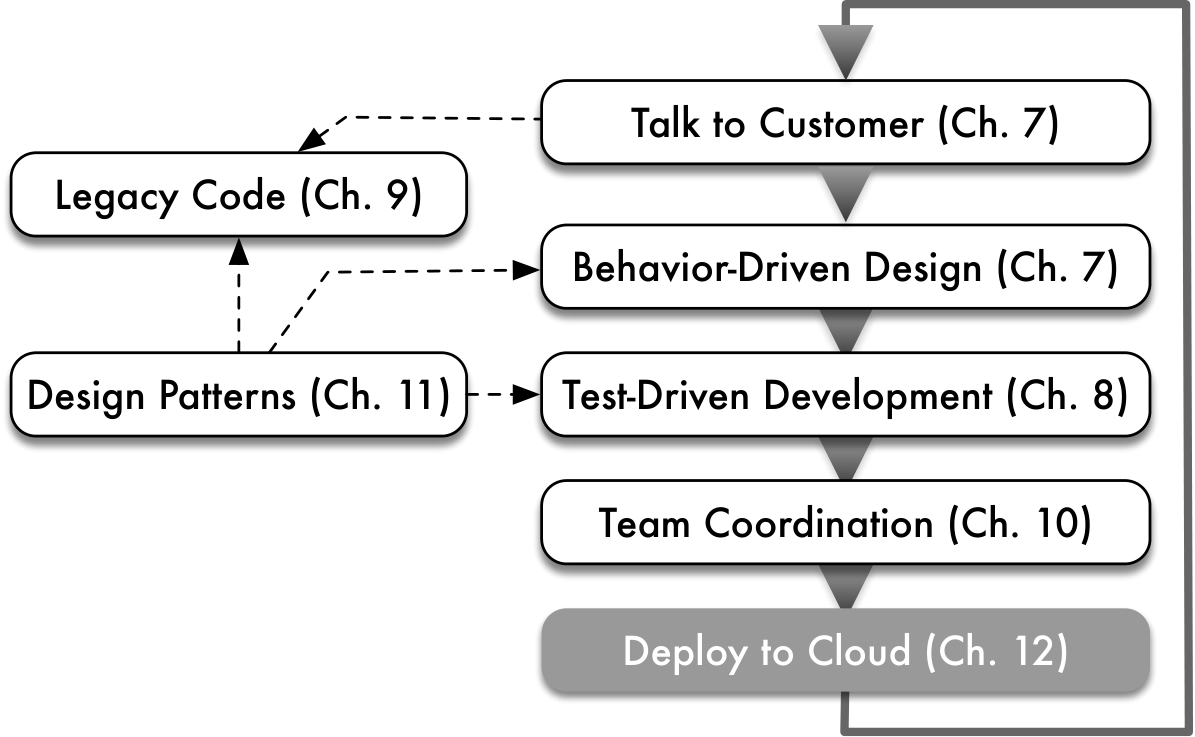
The moment a SaaS app is deployed, its behavior changes because it has actual users. If it is a public-facing app, it is open to malicious attacks as well as unexpected success, but even private apps such as internal billing systems must be designed for deployability and monitorability in order to ensure smooth deployment and operations. In addition, there are necessarily differences between the environment in which you develop and test your app and the environment in which it is deployed, and these differences can sometimes result in unexpected (and usually undesirable) changes in app behavior between development and deployment that your tests didn’t catch. Fortunately, as Figure 12.1 reminds us, deployment is part of every iteration in the Agile lifecycle—indeed, many Agile SaaS companies deploy several times per day—so you will quickly become practiced in “routine” deployments.
SaaS deployment is much easier than it used to be. Just a few years ago, SaaS developers had to learn quite a bit about system administration in order to manage their own production servers. For small sites they were typically hosted on shared Internet Service Providers (“managed-hosting ISP”), on virtual machines running on shared hardware (Virtual Private Server or VPS), or on one or more dedicated computers physically located at the ISP’s datacenter (“hosting service”). Today, the horizontal scaling enabled by cloud computing (Section 12.2) has given rise to companies like Heroku that provide a Platform as a Service (PaaS): a curated software stack ready for you to deploy your app, with much of the administration and scaling responsibility managed for you, making deployment much more developer-friendly. PaaS providers may either run their own datacenters or, increasingly, rely on lower-level Infrastructure as a Service (IaaS) providers such as the Amazon public cloud, as Heroku does.
For early-stage and many mature SaaS apps, PaaS is now the preferred way to deploy: basic scaling issues and performance tuning are handled for you by professional SaaS administrators who are more experienced at operations than most developers. Of course, when a site becomes large enough or popular enough, its technical needs may outgrow what PaaS can provide, or economics may suggest bringing operations “in-house”, which as we will see is a major undertaking. Therefore one goal of this chapter is to help your app stay within the PaaS-friendly usage tier for as long as possible. Indeed, if your app is internally-facing, so that its maximum user base is bounded and it runs in a more protected and less hostile environment than public-facing apps, you may have the good fortune to stay in that tier indefinitely.
In general, though, performance, reliability, and security are systemwide concerns that must be constantly reviewed, rather than problems to be solved once and then set aside. While PaaS helps address some of these concerns, others must be confronted directly by the app developers, or PaaS cannot help you. For example, as we will see, a key to managing the growth of your app is controlling the demands placed on the database, which is harder to scale horizontally. One insight of this chapter is that the performance and security problems you face are the same for both small- and large-scale SaaS apps, but the solutions differ because PaaS providers can be very helpful in solving some of the problems, saving you the work of a custom-built solution.
Notwithstanding the title of this chapter, the terms performance and security are often overused and ill-defined. Here is a more focused list of key operational criteria we will address.
Responsiveness: how long do most users wait before the app delivers a useful response? (Section 12.3)
Release management: how can you deploy or upgrade your app “in place” without reducing availability and responsiveness? (Section 12.4)
Availability: what percentage of the time is your app correctly serving requests? (Section 12.3)
Scalability: as the number of users increases, either gradually and permanently or as a one-time surge of popularity, can your app maintain its steady-state availability and responsiveness without increasing the operational cost per user? As Section 12.2 explains, three-tier SaaS apps on cloud computing have excellent potential horizontal scalability, but good design alone doesn’t guarantee that your app will scale (though poor design guarantees that it won’t). Caching (Section 12.6) and avoiding abuse of the database (Section 12.7) can help.
Privacy: is important customer data accessible only to authorized parties, such as the data’s owner and perhaps the app’s administrators?
Authentication: can the app ensure that a given user is who they claim to be, by verifying a password or using third-party authentication such as Facebook Login or OpenID in such a way that an impostor cannot successfully impersonate another user without having obtained the user’s credentials?
Data integrity: can the app prevent customer data from being tampered with, or at least detect that tampering has occurred or that data may have been compromised?
The first three items in the above list might be collectively referred to as performance stability, while the last three collectively address security, which Section 12.9 discusses.
Lastly, the opening of this section warned about unexpected problems due to differences between development and production environments, or a lack of so-called development–production parity. Because it is impossible to foresee and test every such possibility before deployment, the alternative is to make deployment itself as agile as possible by relying heavily on automation.  If deployment of a new version of the software causes unexpected problems, how easily can you “roll back” to the previous version? If a schema migration or data migration causes unexpected problems, can you easily restore a database snapshot taken immediately before the migration was run? A good rule of thumb for managing your production environment is to assume that any task you need to do in that environment will fail the first time and will have to be repeated from scratch. If the task was automated, you just type one line to rerun the script. If the task consisted of manual steps, you must repeat the steps, which takes longer and is particularly error-prone when you’re operating under the psychological pressure caused by having broken the production server. More so than with any other aspect of SaaS, when it comes to deployment, automate everything.
rake is the Rails tool designed to automate deployment tasks that require access to the app’s classes, schema, and so on.
Summary
High availability and responsiveness, release management without downtime, and scalability without increasing per-user costs are three key performance stability concerns of SaaS apps, and defending your customers’ data is the app’s key security concern.
Good PaaS providers can provide infrastructure mechanisms to automatically handle some of the details of maintaining performance stability and security, but as a developer you must also address these concerns in various aspects of your app’s design and implementation, using mechanisms we will discuss in this chapter.
Compared to shrink-wrapped software, SaaS developer-operators are typically much more involved with deploying, releasing, and upgrading their apps and monitoring them for problems with performance or security.
Which aspects of application scalability are not automatically handled for you in a PaaS environment?
If your app “outgrows” the capacity of the largest database offered by the PaaS provider, you will need to manually build a solution to split it into multiple distinct databases. This task is highly app-specific so PaaS providers cannot provide a generic mechanism to do it.
12.2 Three-Tier Architecture
So far we have treated the overall SaaS server as a “black box”: whereas Chapter 3 considered the software architecture of SaaS and SOA generally, and Chapter 4 examined the software architecture of SaaS applications using patterns such as Model–View–Controller, we have been oblivious to how the other parts of the server are organized. For example, SaaS apps use HTTP to communicate, yet you haven’t had to write any of the code that handles the details of such communication. We also have largely ignored how SaaS software components are deployed on actual hardware in production. While PaaS hides much of the hardware details from you, a high-level understanding of the hardware architecture is key to making good decisions about scalability in your software architecture. To that end, this section explains how SaaS servers typically follow a three-tier architecture, how the logical boundaries separating those tiers are in place whether you run a development server on your own computer or deploy on a public cloud facility such as Heroku, how the components in the three-tier architecture typically map onto the cloud hardware, and what the resulting implications are for scaling up a SaaS app, that is, allowing it to serve more and more users.
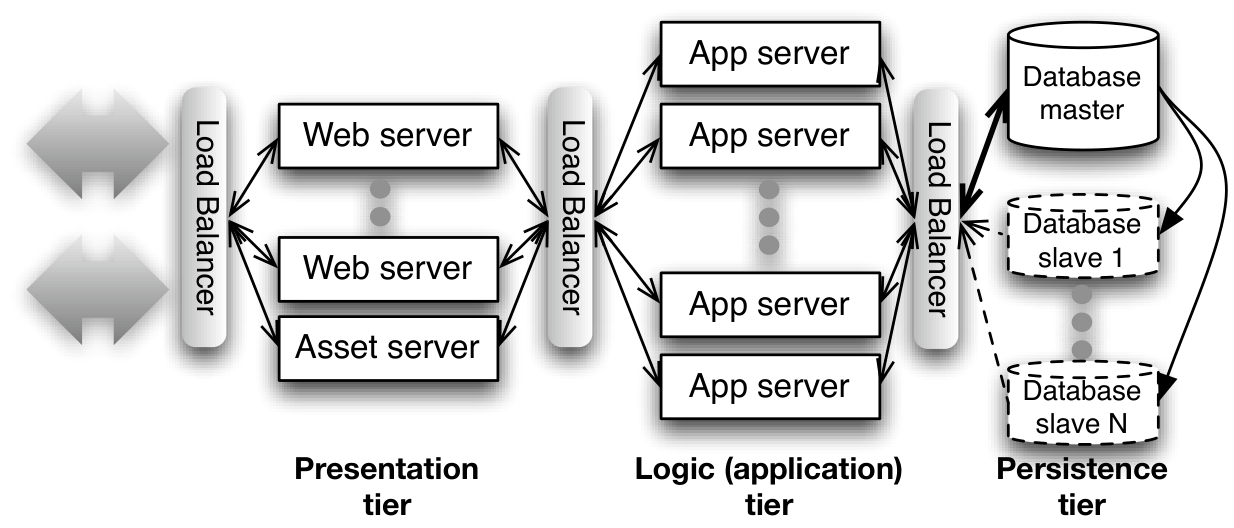
Figure 12.2 shows the canonical three-tier architecture. The presentation tier usually consists of an HTTP server (or simply “Web server”), which accepts HTTP requests from the outside world (i.e. users) and handles the serving of static assets such as images, stylesheets, files of JavaScript code, and so on.
The web server forwards requests for dynamic content to the logic tier, where your actual application runs. The application is typically supported by an application server whose job is to hide the low-level mechanics of these HTTP interactions from the app writer. We’ve been using the Rack application server, which ships with the Rails framework. If you were writing in PHP, Python, or Java, you would use an application server that handles code written in frameworks that use those languages, such as Django for Python or Node.js for JavaScript.
Finally, since HTTP is stateless (Chapter 3), application data that must remain stored across HTTP requests, such as users’ login and profile information, is stored in the persistence tier. Popular choices for the persistence tier have traditionally been databases such as the open-source MySQL or PostgreSQL, although prior to their proliferation, commercial databases such as Oracle or IBM DB2 were also popular choices.
LAMP. Early SaaS sites were created using the Perl or PHP scripting languages, whose availability coincided with the early success of Linux, an open-source operating system, and MySQL, an open-source database. Thousands of sites are still powered by the LAMP Stack—Linux, Apache, MySQL, and PHP or Perl.
The “tiers” in the three-tier model are logical tiers. On a site with little content and low traffic, the software in all three tiers might run on a single physical computer: when you run rails server to do local development, the simple single-user WEBrick Web server fulfills the role of the presentation tier, and a single-user database called SQLite, which stores its information directly in files on your local computer, serves for persistence. In production, it’s more common for each tier to span one or more physical computers and to use highly specialized software. As Figure 12.2 shows, in a typical site, incoming HTTP requests are directed to one of several Web servers, possibly Apache or Microsoft Internet Information Server, either of which can be deployed on hundreds of computers efficiently serving many copies of the same site to millions of users.
Cowboy, Heroku’s custom-built web server, is written in Erlang, a language optimized for “event driven” apps such as serving Web content. Separate tiers mean that each tier’s software can use the best tool for the job.
When a Web server receives a request for you app, it selects one of several available application servers to handle dynamic-content generation, allowing computers to be added or removed from each tier as needed to handle demand.
However, as the Fallacies and Pitfalls section explains, making the persistence tier “shared-nothing” is much more complicated. Figure 12.2 shows one approach: a primary/replica or primary/secondary configuration, used when the database is read much more frequently than it is written. In this approach, any replica can perform reads, only the primary can perform writes, and the primary updates the replicas with the results of writes as quickly as possible. However, in the end, this and other techniques only postpone the scaling problem rather than solving it. As one of Heroku’s founders wrote:
A question I’m often asked about Heroku is: “How do you scale the SQL database?” There’s a lot of things I can say about using caching, sharding, and other techniques to take load off the database. But the actual answer is: we don’t. SQL databases are fundamentally non-scalable, and there is no magical pixie dust that we, or anyone, can sprinkle on them to suddenly make them scale.
— Adam Wiggins, Heroku, in 2009
Summary
The three-tier architecture includes a presentation tier, which renders views and interacts with the user; a logic tier, which runs SaaS app code; and a persistence tier, which stores app data.
HTTP’s statelessness allows the presentation and logic tiers to be shared-nothing, so cloud computing can be used to add more computers to each tier as demand requires. However, the persistence tier is harder to scale.
Depending on the scale (size) of the deployment, more than 1 tier may be hosted on a single computer, or a single tier may require many computers.
While the earliest Web apps sometimes manipulated files directly for storing data, there are two reasons why databases overwhelmingly took over this role very early. First, databases have historically provided high durability for stored information—the guarantee that once something has been stored, unexpected events such as system crashes or transient data corruption won’t cause data loss. For a Web app storing millions of users’ data, this guarantee is critical. Second, databases store information in a structured format—in the case of relational databases, by far the most popular type, each kind of object is stored in a table whose rows represent object instances and whose columns represent object properties. This organization is a good fit for the structured data that many Web apps manipulate. Interestingly, today’s largest Web apps, such as Facebook, have grown so far beyond the scale for which relational databases were designed that they are being forced to look at alternatives to the long-reigning relational database.
Explain why cloud computing might have had a lesser impact on SaaS if most SaaS apps didn’t follow the shared-nothing architecture.
Cloud computing allows easily adding and removing computers while paying only for what you use. The shared-nothing architecture takes advantage of this ability to rapidly “absorb” new computers into a running app and “release” them when no longer needed.
Which tier(s) of three-tier SaaS apps can be scaled just by adding more computers and why?
The presentation and logic tiers. Because neither HTTP (Web) servers nor app servers maintain any of the state associated with user sessions, any computer in those tiers can in principle satisfy any user’s request.
12.3 Responsiveness, Service Level Objectives, and Apdex
Speed is a feature.
— Adam De Boor, Gmail software engineer, Google
Performance is a feature.
— Jeff Atwood, co-founder of StackOverflow
The best performance improvement is the transition from the nonworking state to the working state.
— John Ousterhout, designer of magic and Tcl/Tk
As we learned in Section 1.7, availability refers to the fraction of time your site is available and working correctly. For example, Gmail guarantees an availability of “three nines” or 99.9% during any given month for its enterprise customers. (Nygard wryly notes ((Nygard 2007)) that less-disciplined sites provide closer to “two eights” or 88.0%.)
Why might your app be unavailable? For one thing, it may have crashed because of an unexpected error. While most PaaS services automatically restart a crashed app, restarting can induce delays and harm availability. One way to improve the reliability of software is to make it more robust. Defensive programming is a philosophy that tries to anticipate potential software flaws and write code to handle them. Here are three examples:
Check input values. A common cause of problems is for the user to input values that the developer doesn’t expect. Checking that the input is in a reasonable range for individual values, that it is not too big for a series of data, and that the collection of inputs are logically consistent can reduce the chances of outages.
Check input data type. Another mistake users can make is to enter an unexpected type of data in response to a query. Making sure the user enters a valid type of data increases the chances of success for the app.

Catch exceptions. Modern programming languages offer the ability to execute code when exceptions occur, such as arithmetic overflow. Offering code that can catch any exception increases the chances of the app continuing to run well even when unexpected events occur.
Another availability challenge is a bug that leads to outages but only appears after a long time or under heavy load. A classic example is a resource leak: a long-running process eventually runs out of a resource, such as memory, because it cannot reclaim 100% of the unused resource due to either an application bug or the inherent design of a language or framework. Software rejuvenation is a long-established way to alleviate a resource leak: the Apache web server runs a number of identical worker processes, and when a given worker process has “aged” enough, that process stops accepting requests and dies, to be replaced by a fresh worker. Since only one worker (\(1/n\) of total capacity) is “rejuvenated” at a time, this process is sometimes called rolling reboot, and most PaaS platforms employ some variant of it.
Overprovisioning is often used in anticipation of crash recovery and rolling reboot. The idea is to provide more servers in a tier at any given time than you think you’ll need. For example, by deploying \(n+1\) servers in a tier, temporarily losing one server degrades performance by only \(1/n\). Good values for \(n\) can sometimes be determined empirically by monitoring, as the rest of this chapter describes. However, at large scale, systematic overprovisioning is both economically unattractive and may be insufficient by itself. For example, in an app whose database queries are poorly constructed, the database will quickly become the bottleneck, and as Section 12.2 reminds us, databases are generally not amenable to shared-nothing horizontal scaling. In such a situation, overprovisioning the other tiers won’t help. The lesson is that in the end, there’s no substitute for a design that is free of gratuitous bottlenecks to scalability. Later in this chapter we identify some common bottlenecks and how to avoid them.
Of course, it’s not much good if your app is technically “available” but so sluggish that users don’t want to use it. Responsiveness is the perceived delay between when a user takes an action such as clicking on a link and when the user perceives a response, such as new content appearing on the page. Technically, responsiveness has two components: latency, the initial delay to start receiving new content, and throughput, the time it takes for all the content to be delivered. As recently as the mid-1990s, many home users connected to the Internet using telephone modems that took 100 ms (milliseconds) to deliver the first packet of information and show part of the Web page. Telephone modems could sustain at most 56 Kbps (\(56\times{}10^{3}\) bits per second), so loading a complete Web page or image 50 KBytes (400 KBits) in size could take more than eight seconds. Since today’s home customers increasingly use broadband connections whose throughput is 1–50 Mbps, responsiveness for Web pages is dominated by latency rather than throughput.
Since responsiveness has such a large effect on user behavior, SaaS operators carefully monitor the responsiveness of their sites. Of course, in practice, not every user interaction with the site takes the same amount of time, so evaluating performance requires appropriately characterizing a distribution of response times. Consider a site on which 8 out of 10 requests complete in 100 ms, 1 out of 10 completes in 250 ms, and the remaining 1 out of 10 completes in 850 ms. If the user satisfaction threshold \(T\) for the latency of this site is 200 ms, it is true that the average response time of \((8(100)+1(250)+1(850))/10 = 190\) ms is below the satisfaction threshold. But on the other hand, 20% of requests (and therefore, up to 20% of users) are receiving unsatisfactory service. Two definitions are used to measure latency in a way that makes it impossible to ignore the bad experience of even a small number of users:
A service level objective (SLO) usually takes the form of a quantitative statement about the quantiles of the latency distribution over a time window of a given width. For example, “95% of requests within any 5-minute window should have a latency below 100 ms.” In statistical terms, the 95th quantile of the latency distribution must not exceed 100 ms.
The Apdex score (Application Performance Index) is an open standard that computes a simplified SLO as a number between 0 and 1 inclusive representing the fraction of satisfied users. Given a user satisfaction threshold latency \(T\) selected by the application operator, a request is satisfactory if it completes within time \(T\), tolerable if it takes longer than \(T\) but less than \(4T\), and unsatisfactory otherwise. The Apdex score is then (Satisfactory \(+\)0.5(Tolerable)) / (Number of samples). In the example above, the Apdex score would be \((8+0.5(1))/10 = 0.85\).
SLA vs. SLO: A service level agreement (SLA) is a contract between a service provider and its customers that provides for customer consideration if the SLO is not met.
Of course, the total response time perceived by the users includes many factors beyond your SaaS app’s control. It includes DNS lookup, time to set up the TCP connection and send the HTTP request to the server, and Internet-induced latency in receiving a response containing enough content that the browser can start to draw something (so-called “time to glass,” a term that will soon seem as quaint as “counterclockwise”). Especially when using curated PaaS, SaaS developer/operators have the most control over the code paths in their own apps: routing and dispatch, controller actions, model methods, and database access. We will therefore focus on measuring and improving responsiveness in those components.
Google believes that because many aspects of time-to-glass are independent of the specific service, it is even more important for the service to be responsive, so that getting a response from any Google service is no slower than contacting the service to begin with.
For small sites, a perfectly reasonable way to mitigate latency is to overprovision (provide excess resources relative to steady-state) at one or more tiers, as Section 12.2 describes for the presentation and logic tiers. A few years ago, overprovisioning meant purchasing additional hardware that might sit idle, but pay-as-you-go cloud computing lets you “rent” the extra servers for pennies per hour only when needed. Indeed, technologies like RightScale offer just this service on top of Amazon EC2.
As we will see, a key insight that helps us is that the same problems that push us out of the “PaaS-friendly” tier are the ones that will hinder scalability of our post-PaaS solutions, so understanding what kinds of problems they are and how to solve them will serve you well in either situation.
What are the thresholds for user satisfaction on responsiveness? A classic 1968 study from the human-computer interaction literature ((Miller 1968)) found three interesting thresholds: if a computer system responds to a user action within 100 ms, it’s perceived as instantaneous; within 1 second, the user will still perceive a cause-and-effect connection between their action and the response, but will perceive the system as sluggish; and after about 8 seconds, the user’s attention drifts away from the task while waiting for a response. Surprisingly, more than thirty years later, a scholarly study in 2000 ((Bhatti et al. 2000)) and another by independent firm Zona Research in 2001 affirmed the “eight second rule.” While many believe that a faster Internet and faster computers have raised users’ expectations, the eight-second rule is still used as a general guideline. New Relic, whose monitoring service we introduce later, reported in March 2012 that the average page load for all pages they monitor worldwide is 5.3 seconds and the average Apdex score is 0.86.
Summary
Availability measures the percentage of time over a specified window that your app is correctly responding to user requests. Availability is usually measured in “nines” with the gold standard of 99.999% (“five nines”, corresponding to five minutes of downtime per year) set by the US telephone network and rarely matched by SaaS apps.
While PaaS services usually restart crashed SaaS apps, the time required to do so can harm availability. App developers can mitigate this harm using defensive programming, which adds code to handle common classes of potential flaws before they cause the app to crash. PaaS providers can mitigate it using software rejuvenation, which proactively restarts members of a set of identical processes on a rotating schedule to neutralize resource leaks.
Responsiveness measures how “snappy” an interactive app feels to users. Given today’s high-speed Internet connections and fast computers, responsiveness is dominated by latency. Service Level Objectives (SLOs) quantify responsiveness goals with statements such as “99% of requests within any 5-minute window should have a latency below 100 ms.”
Overprovisioning helps improve latency by making more computers available to handle requests in a given tier and helps with availability by dealing gracefully with server crashes. However, at large scale, systematic overprovisioning is both economically unattractive and insufficient by itself.
The Apdex score is a simple SLO measure between 0.0 and 1.0 in which a site gets “full credit” for requests that complete within a site-specific latency threshold \(T\), “half credit” for requests that complete within \(4T\), and no credit for requests taking longer than that.
The problems that threaten availability and responsiveness are the same whether we use PaaS or not, but it’s worth trying to stay within the PaaS tier because it provides machinery to help mitigate those problems. Part of “scaling gracefully” is avoiding problems that lead to intrinsic scalability bottlenecks, some of which we discuss in the rest of this chapter.
For a SaaS app to scale to large numbers of users, it must maintain its ____ and ____ as the number of users increases, without increasing the ____.
Availability; responsiveness; cost per user
True or False: From the perspective of responsiveness, faster is always better.
False. Faster than 100 ms is not perceptible to people, and people abandon sites only when responsiveness slows to 8 seconds or worse.
12.4 Releases and Feature Flags
As we discussed way back in Section 1.2, prior to SaaS, software releases were major and infrequent milestones after which product maintenance responsibility passed largely to the Quality Assurance or Customer Service department. In contrast, Many Agile companies deploy new versions frequently (sometimes several times per day) and the developers stay close to operations and to customer needs.
In Agile development, making deployment a non-event requires complete automation, so that typing one command triggers all the actions to deploy a new version of the software, including cleanly aborting the deploy without modifying the released version if anything goes wrong. As with iteration-based TDD and BDD, by deploying frequently you become good at it, and by automating deployment you ensure that it’s done consistently every time.
Although deployment is a non-event, there is still a role for release milestones: they reassure the customer that new work is being deployed. For example, a customer-requested feature may require multiple commits to implement, each of which may include a deployment, but the overall feature remains “hidden” in the user interface until all changes are completed. “Turning on” the feature would be a useful release milestone. For this reason, many continuous-deployment workflows assign distinct and often whimsical labels to specific release points (such as “Bamboo” and “Cedar” for Heroku’s software stacks), but just use the Git commit-id to identify deployments that don’t include customer-visible changes.
Of course, deployment can only be successful if the app is well tested and stable in development. Although we’ve already focused heavily on testing in this book, making deployment a true non-event requires meeting two additional challenges: deployment testing and incremental feature rollout.
Beyond traditional CI, deployment testing must account for differences between the development and production environments, such as the type of database used or the need for JavaScript-intensive apps to work correctly on a variety of browser versions. Deployment testing should also test the app in ways it was never meant to be used—users submitting nonsensical input, browsers disabling cookies or JavaScript, miscreants trying to turn your site into a distributor of malware (as we describe further in Section 12.9)—and ensuring that it survives those conditions without compromising customer data or responsiveness.
The second challenge is the rollout of complex features that may require several code pushes, especially features that require database schema changes. In particular, a challenge arises when the new code does not work with the old schema and vice-versa. To make the example concrete, suppose RottenPotatoes currently has a moviegoers table with a name column, but we want to change the schema to have separate first_name and last_name columns instead. If we change the schema before changing the code, the app will break because methods that expect to find the name column will fail. If we change the code before changing the schema, the app will break because the new methods will look for first_name and last_name columns that don’t exist yet.
We could try to solve this problem by deploying the code and migration atomically: take the service offline, apply the migration to perform the schema change and copy the data from the existing name column into the two new columns, and bring the service back online. This is the simplest solution, but may cause unacceptable unavailability: a complex migration on a database of hundreds of thousands of rows can take tens of minutes or even hours to run.
ch_operations/code/feature_flag.txt
/* in code paths for functionality that searches the database: */
if (featureflag is on)
  results = union(query using old schema, query using new schema)
else /* featureflag is off */
  results = (query using old schema)
end

/* in code paths that write to the database */
if (featureflag is on)
  if (data to be written is still using old schema)
    (convert existing record from old to new schema)
    (mark record as converted)
  end
  (update data according to new schema)
else
  (update data according to old schema)
endThe second option is to split the change across multiple deployments using a feature flag—a configuration variable whose value can be changed while the app is running to control which code paths in the app are executed. Notice that each step in Figure 12.3 is nondestructive: as we did with refactoring in Chapter 9, if something goes wrong at a given step, the app is still left in a working intermediate state. Figure 12.3 illustrates schematically how to do this:
Create a migration that makes only those changes to the schema that add new tables or columns, including a column indicating whether the current record has been migrated to the new schema or not.
Create version \(n+1\) of the app in which every code path affected by the schema change is split into two code paths, of which one or the other is executed based on the value of a feature flag. Critical to this step is that correct code will be executed regardless of the feature flag’s value at any time, so the feature flag’s value can be changed without stopping and restarting the app; typically this is done by storing the feature flag in a special database table.
Deploy version \(n+1\), which may require pushing the code to multiple servers, a process that can take several minutes.
Once deployment is complete (all servers have been updated to version \(n+1\) of the code), while the app is running set the feature flag’s value to True. Essentially, each record will be migrated to the new schema the next time it’s modified for any reason. If you wanted to speed things up, you could also run a low-traffic background job that opportunistically migrates a few records at a time to minimize the additional load on the app, or migrates many records at a time during hours when the app is lightly loaded, if any. If something goes wrong at this step, turn off the feature flag; the code will revert to the behavior of version \(n\), since the new schema is a proper superset of the old schema and the
before_savecallback is nondestructive (that is, it correctly updates the user’s name in both the old and new schemata).If all goes well, once all records have been migrated, deploy code version \(n+2\), in which the feature flag is removed and only the code path associated with the new schema remains.
Finally, apply a new migration that removes the old
namecolumn and the temporarymigratedcolumn (and therefore the index on that column).
What about a schema change that modifies a column’s name or format rather than adding or removing columns? The strategy is the same: add a new column, remove the old column, and if necessary rename the new column, using feature flags during each transition so that every deployed version of the code works with both versions of the schema.
Besides handling destructive migrations, feature flags have other uses as well:
Preflight checking: roll out a feature to a small percentage of users only, in order to make sure the feature doesn’t break anything or have a negative effect on overall site performance.
A/B testing: roll out two different versions of a feature to two different sets of users to see which version most improves user retention, purchases, and so on.
Complex feature: sometimes the complete functionality associated with a feature may require multiple incremental deployment cycles such as the one described above. In this case, a separate feature flag can be used to keep the feature hidden from the user interface until 100% of the new feature code has been deployed.
The rollout gem supports the use of feature flags for all these cases.
Summary
In general, SaaS deployment should be so automated and straightforward that it can be done frequently, up to several times a day, while remaining a non-event.
One way to ensure a smooth deployment is to include additional deployment tests that must run before a deploy is attempted, to test differences between the development and production environments and to stress the app by deliberately simulating user misbehaviors.
To perform a complex upgrade that changes both the app code and the schema, use a feature flag whose value can be changed while the app is running. The feature flag’s value selectively enables certain code paths at runtime, and can be immediately turned off if a bug is observed after deployment. Otherwise, once all data has been incrementally migrated as a result of changing the feature flag’s value, you can deploy a new migration and code push that eliminate the old code paths and schema elements.
The extreme version of making deployment a non-event is continuous deployment, in which every successful CI run (continuous integration, discussed in Section 10.4) automatically triggers a deployment to staging or production. CD can result in multiple deployments per day, many of which include changes not visible to the customer that “build towards” a feature that will be unveiled at a release milestone.
Which of the following are appropriate places to store the value of a simple Boolean feature flag and why: (a) a YAML file in the app’s config directory, (b) a column in an existing database table, (c) a separate database table?
The point of a feature flag is to allow its value to be changed at runtime without modifying the app. Therefore (a) is a poor choice because a YAML file cannot be changed without touching the production servers while the app is running.
12.5 Monitoring and Finding Bottlenecks
If you’re not monitoring it, it’s probably broken.
— variously attributed
Given the importance of responsiveness and availability, how can we measure them, and if they’re unsatisfactory, how can we identify what parts of our app need attention? Monitoring consists of collecting app performance data for analysis and visualization. In the case of SaaS, application performance monitoring (APM) refers to monitoring the Key Performance Indicators (KPIs) that directly impact business value. KPIs are by nature app-specific—for example, an e-tailer’s KPIs might include responsiveness of adding an item to a shopping cart and percentage of user searches in which the user selects an item that is in the top 5 search results.
There are various techniques for monitoring SaaS apps, and we can characterize them in terms of three axes:
Is the monitoring active or passive? In active monitoring, an external stimulus is deliberately applied to the app (even if the app would be otherwise idle) in order to ensure it’s working. In passive monitoring, no monitoring data is collected until some external user asks the app to do something.
Is the monitoring external or internal? External monitoring can only report on the behavior of an app as seen from the outside—for example, reporting that some types of requests take longer than other types. Internal monitoring can “hook” into the code of the app server or the app itself, so it can provide better attribution—how long did a request spend in each tier of the SaaS stack and in different parts of your app (for example, the controllers, the models, the database, or the view rendering)?
Is the monitoring focused on app performance or user behavior? For example, you might want to know what fraction of users who added an item to their shopping cart ended up purchasing the item, and what actions were taken instead by the users who didn’t end up completing the purchase. Such questions can be critical for a business even though they have little to do with performance. (Of course, performance monitoring might reveal the reasons some users don’t complete the purchase flow!)
Regardless of which combination of the above axes is provided by a particular monitoring solution, we must also address the issue of how the collected monitoring data is stored and how it is presented or reported to the app’s dev/ops team.
Before cloud computing and the prominence of SaaS and highly-productive frameworks, internal monitoring required installing programs that collected metrics periodically, manually inserting extra code into your app, or both. Today, the combination of hosted PaaS, Ruby’s dynamic language features, and well-factored frameworks such as Rails allows internal monitoring without modifying your app’s source code or installing software. For example, New Relic unobtrusively collects instrumentation about your app’s controller actions, database queries, and so on, making use of metaprogramming in Rails to do this without requiring changes to your app’s code. Because the data is sent back to New Relic’s SaaS site where you can view and analyze it, this architecture is sometimes called RPM for Remote Performance Monitoring. New Relic provides both internal passive monitoring and external active monitoring, in which you can set up HTTP “probe” requests with fixed URIs and test for the presence of particular strings in the apps’ responses.
Internal monitoring can also occur during development, when it is often called profiling. New Relic and other monitoring solutions can be installed in development mode as well. How much profiling should you do? If you’ve followed best practices in writing and testing your app, it may be most productive to just deploy and see how the app behaves under load, especially given the unavoidable differences between the development and production environments, such as the lack of real user activity and the use of a development-only database such as SQLite rather than a highly tuned production database such as PostgreSQL. After all, with agile development, it’s easy to deploy incremental fixes such as implementing basic caching (Section 12.6) and fixing abuses of the database (Sections 12.7).
In external monitoring (sometimes called probing or active monitoring), a separate site makes live requests to your app to check availability and response time. Why would you need external monitoring given the detailed information available from internal monitoring that has access to your code? Internal monitoring may be unable to reveal that your app is sluggish or unavailable if the problem is due to factors other than your app’s code—for example, performance problems in the presentation tier or other parts of the software stack beyond your app’s boundaries. External monitoring, like an integration test, is a true end-to-end test of a limited subset of your app’s code paths as seen by actual users “from the outside.”
Once a monitoring tool has identified the slowest or most expensive requests, stress testing or longevity testing on a staging server can quantify the level of demand at which those requests become bottlenecks. The free and widely-used command line tool httperf, maintained by Hewlett-Packard Laboratories, can simulate a specified number of users requesting simple sequences of URIs from an app and while recording metrics about the response times. Whereas tools like Cucumber let you write expressive scenarios and check arbitrarily complex conditions, httperf can only follow simple sequences of URIs and only checks whether a successful HTTP response was received from the server. In a typical stress test, the test engineer will set up several computers running httperf against the staging site and gradually increase the number of simulated users until some resource becomes the bottleneck.
Finally, monitoring can also help you understand your customers’ behavior:
Clickstreams: what are the most popular sequences of pages your users visit?
Think times/dwell times: how long does a typical user stay on a given page?
Abandonment: if your site contains a flow that has a well-defined termination, such as making a sale, what percentage of users “abandon” the flow rather than completing it and how far do they get?
Google Analytics provides free basic analytics-as-a-service: you embed a small piece of JavaScript in every page on your site (for example, by embedding it on the default layout template) that sends Google Analytics information each time a page is loaded. To help you use this information, Google’s “Speed is a Feature” site links to a breathtakingly comprehensive collection of articles about all the different ways you can speed up your SaaS apps, including many optimizations to reduce the overall size of your pages and improve the speed at which Web browsers can render them.
Summary
As with testing, no single type of monitoring will alert you of all performance problems: use a combination of internal and external (end-to-end) monitoring.
Hosted monitoring such as Pingdom and PaaS-integrated monitoring such as New Relic greatly simplify monitoring compared to the early days of SaaS.
Stress testing and longevity testing can reveal the bottlenecks in your SaaS app and frequently expose bugs that would otherwise remain hidden.
User-centric analytics can provide information about the behavior of users as they navigate your site, which can be extremely valuable business data even though unrelated to performance per se.
A finer-grained approach to internal monitoring is request tracing, which is used in conjunction with metric aggregation to pinpoint and diagnose slow requests. Request tracing follows a request through every software component in every tier and timestamping it along the way, often at every function call entry. Google has used request tracing to identify obstacles to keeping their massively-parallel systems highly responsive ((Barroso and Dean 2012)).
Which of the following key performance indicators (KPIs) would be relevant for Application Performance Monitoring: CPU utilization of a particular computer; completion time of slow database queries; view rendering time of 5 slowest views.
Query completion times and view rendering times are relevant because they have a direct impact on responsiveness, which is generally a Key Performance Indicator tied to business value delivered to the customer. CPU utilization, while useful to know, does not directly tell us about the customer experience.
12.6 Improving Rendering and Database Performance With Caching
There are only two hard things in computer science: cache invalidation and naming things.
— Phil Karlton
The idea behind caching is simple: information that hasn’t changed since the last time it was requested can simply be regurgitated rather than recomputed. In SaaS, caching can help two kinds of computation. First, if information needed from the database to complete an action hasn’t changed, we can avoid querying the database at all. Second, if the information underlying a particular view or view fragment hasn’t changed, we can avoid re-rendering the view (recall that rendering is the process of transforming Erb with embedded Ruby code and variables into HTML). In any caching scenario, we must address two issues:
Naming: how do we specify that the result of some computation should be cached for later reuse, and name it in a way that ensures it will be used only when that exact same computation is called for?
Expiration: how do we detect when the cached version is out of date (stale) because the information on which it depends has changed, and how do we remove it from the cache? The variant of this problem that arises in microprocessor design is often referred to as cache invalidation.
Movie.all.
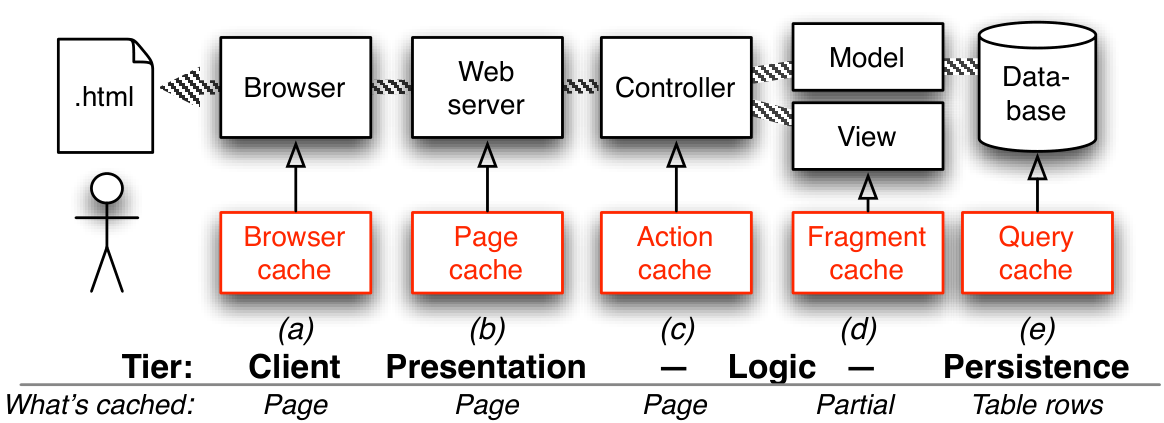
Figure 12.4 shows how caching can be used at each tier in the 3-tier SaaS architecture and what Rails entities are cached at each level. The simplest thing we could do is cache the entire HTML page resulting from rendering a particular controller action. For example, the MoviesController#show action and its corresponding view depend only on the attributes of the particular movie being displayed (the @movie variable in the controller method and view template). Figure 12.5 shows how to cache the entire HTML page for a movie, so that future requests to that page neither access the database nor re-render the HTML, as in Figure 12.4.
Of course, this is unsuitable for controller actions protected by before-filters, such as pages that require the user to be logged in and therefore require executing the controller filter. In such cases, changing caches_page to caches_action will still execute any filters but allow Rails to deliver a cached page without consulting the database or re-rendering views, as in Figure 12.4. Figure 12.7 shows the benefits of page and action caching for this simple example. Note that in Rails page caching, the name of the cached object ignores embedded parameters in URIs such as /movies?ratings=PG+G, so parameters that affect how the page would be displayed should instead be part of the RESTful route, as in /movies/ratings/PG+G.
An in-between case involves action caching in which the main page content doesn’t change, but the layout does. For example, your app/views/layouts/application.html.erb may include a message such as “Welcome, Alice” containing the name of the logged-in user. To allow action caching to work properly in this case, passing :layout=>false to caches_action will result in the layout getting fully re-rendered but the action (content part of the page) taking advantage of the action cache. Keep in mind that since the controller action won’t be run, any such dynamic content appearing in the layout must be set up in a before-filter.
ch_operations/code/caching_gems.rb
ch_operations/code/action_caching.rb
ch_operations/code/movie_sweeper.rb
class MovieSweeper < ActionController::Caching::Sweeper
  observe Movie
  # if a movie is created or deleted, movie list becomes invalid
  #   and rendered partials become invalid
  def after_save(movie)    ; invalidate ; end
  def after_destroy(movie) ; invalidate ; end
  private
  def invalidate
    expire_action :action => ['index', 'show']
    expire_fragment 'movie'
  end
endGemfile. (Middle) Line 2 specifies that Rails should cache the result of the show action. Action caching is implemented as a before-filter that checks whether a cached version should be used and an around-filter that captures and caches the rendered output, making it an example of the Decorator design pattern (Section 11.4). (Bottom) This “sweeper,” referenced by line 3 of the controller, uses the Observer design pattern (Section 11.7) to add ActiveRecord lifecycle hooks (Section 5.1) to expire any objects that might become stale as a result of updating a particular movie.
Page-level caching isn’t useful for pages whose content changes dynamically. For example, the list of movies page (MoviesController#index action) changes when new movies are added or when the user filters the list by MPAA rating. But we can still benefit from caching by observing that the index page consists largely of a collection of table rows, each of which depends only on the attributes of one specific movie. Indeed, that observation allowed us to factor out the code for one row into a partial, as Figure 5.1 (Section 5.1) showed. Figure 12.6 shows how a trivial change to that partial caches the rendered HTML fragment corresponding to each movie.
ch_operations/code/fragment_caching.html.erb
cache. Rails will generate a name for the cached fragment based on the pluralized resource name and primary key, for example, movies/23.
A convenient shortcut provided by Rails is that if the argument to cache is an ActiveRecord object whose table includes an updated_at or updated_on column, the cache will auto-expire a fragment if its table row has been updated since the fragment was first cached. Nonetheless, for clarity, line 10 of the sweeper in Figure 12.5 shows how to explicitly expire a fragment whose name matches the argument of cache whenever the underlying movie object is saved or destroyed. 
Unlike action caching, which avoids running the controller action at all, checking the fragment cache occurs after the controller action has run. Given this fact, you may already be wondering how fragment caching helps reduce the load on the database. For example, suppose we add a partial to the list of movies page to display the @top_5 movies based on average review scores, and we add a line to the index controller action to set up the variable:
ch_operations/code/topmovies.html.erb
ch_operations/code/topmovies.rb
Action caching is now less useful, because the index view may change when a new movie is added or when a review is added (which might change what the top 5 reviewed movies are). If the controller action is run before the fragment cache is checked, aren’t we negating the benefit of caching, since setting @top_5 in lines 4–5 of the controller method causes a database query?
Surprisingly, no. In fact, lines 4–5 don’t cause a query to happen: they construct an object that can do the query if it’s ever asked for the result! This is called lazy evaluation, an enormously powerful programming-language technique that comes from the lambda calculus underlying functional programming. Lazy evaluation is used in Rails’ ActiveRelation (ARel) subsystem, which is used by ActiveRecord. The actual database query doesn’t happen until each is called in line 4 of the partial, because that’s the first time the ActiveRelation object is asked to produce a value. But since that line is inside the cache block starting on line 2, if the fragment cache hits, the line will never be executed and therefore the database will never be queried. Of course, you must still include logic in your cache sweeper to correctly expire the top-5-movies fragment when a new review is added.
Earlier versions of Rails lacked lazy query evaluation, so controller actions had to explicitly check the fragment cache to avoid needless queries— very non-DRY.
 In summary, both page- and fragment-level caching reward our ability to separate things that change (non-cacheable units) from those that stay the same (cacheable units). In page or action caching, split controller actions protected by before-filters into an “unprotected” action that can use page caching and a filtered action that can use action caching. (In an extreme case, you can even enlist a content delivery network (CDN) such as Amazon CloudFront to replicate the page at hundreds of servers around the world.) In fragment caching, use partials to isolate each cacheable entity, such as a single model instance, into its own partial that can be fragment-cached.
| No cache | Action cache | Speedup vs. no cache | Page cache | Speedup vs. no cache | Speedup vs. action cache |
|---|---|---|---|---|---|
| 449 ms | 57 ms | 8x | 21ms | 21x | 3x |
heroku logs.
Summary:
To maximize the benefits of caching, separate cacheable from non-cacheable units: controller actions can be split into cacheable and non-cacheable versions depending on whether a before-filter must be run, and partials can be used to break up views into cacheable fragments.
In development, cached objects are generally stored in the local file system. Heroku offers add-ons such as Memcachier that store cached content in the in-memory database memcached (pronounced mem-cash-dee; the suffix -d reflects the Unix convention for naming daemon processes that run constantly in the background). Rails cache stores must implement a common API so that different stores can be used in different environments—a great example of Dependency Injection, which we encountered in Section 11.6.
We mentioned that passing :layout=>false to caches_action provides most of the benefit of action caching even when the page layout contains dynamic elements such as the logged-in user’s name. Why doesn’t the caches_page method also allow this option?
Since page caching is handled by the presentation tier, not the logic tier, a hit in the page cache means that Rails is bypassed entirely. The presentation tier has a copy of the whole page, but only the logic tier knows what part of the page came from the layout and what part came from rendering the action.
12.7 Avoiding Abusive Database Queries
As we saw in Section 12.2, the database will ultimately limit horizontal scaling—not because you run out of space to store tables, but more likely because a single computer can no longer sustain the necessary number of queries per second while remaining responsive. When that happens, you will need to turn to techniques such as sharding and replication, which are beyond the scope of this book (but see To Learn More for some suggestions).
Even on a single computer, database performance tuning is enormously complicated. The widely-used open source database MySQL has dozens of configuration parameters, and most database administrators (DBAs) will tell you that at least half a dozen of these are “critical” to getting good performance. Therefore, we focus on how to keep your database usage within the limit that will allow it to be hosted by a PaaS provider: Heroku, Amazon Web Services, Microsoft Azure, and others all offer hosted relational databases managed by professional DBAs responsible for baseline tuning. Many useful SaaS apps can be built at this scale: relational databases enhanced with techniques that their administrators know how to deploy, such as primary-secondary replication and sharding, and with good database design and hygiene, can scale from hundreds of gigabytes to over ten terabytes.
One way to relieve pressure on your database is to avoid needlessly expensive queries. Two common mistakes for less-experienced SaaS authors arise in the presence of associations:
The n+1 queries problem occurs when traversing an association performs more queries than necessary.
The full table scan problem occurs when your tables lack the proper indices to speed up certain queries. (This problem can occur even in the absence of associations, but is extremely common when associations are used.)
ch_operations/code/database_abuses.rb
# assumes class Moviegoer with has_many :movies, :through => :reviews

# in controller method:
@fans = Moviegoer.where("zip = ?", code) # table scan if no index!

# in view:
- @fans.each do |fan|
  - fan.movies.each do |movie|
    // BAD: each time thru this loop causes a new database query!
    %p= movie.title

# better: eager loading of the association in controller.
# Rails automatically traverses the through-association between
# Moviegoers and Movies through Reviews
@fans = Moviegoer.where("zip = ?", code).includes(:movies)
# GOOD: preloading movies reviewed by fans avoids N queries in view.

# BAD: preload association but don't use it in view:
- @fans.each do |fan|
  %p= @fan.name
// BAD: we never used the :movies that were preloaded!@fans, but each pass through the loop in lines 8–10 causes another separate database access, resulting in \(n+1\) accesses for a fan who has reviewed \(n\) movies. Line 15, in contrast, performs a single eager load query that also retrieves all the movies, which is nearly as fast as line 4 since most of the overhead of small queries is in performing the database access.
Lines 1–17 of Figure 12.8 illustrate the so-called n+1 queries problem when traversing associations, and also show why the problem is more likely to arise when code creeps into your views: there would be no way for the view to know the damage it was causing. Of course, just as bad is eager loading of information you won’t use, as in lines 18–21 of Figure 12.8. The bullet gem helps detect both problems.
ch_operations/code/add_index.rb
:unique, which is a promise you make that no two rows will have the same value for the indexed attribute; to avoid errors in case of a duplicate value, use this in conjunction with a uniqueness validation as described in Section 5.1.
Another database abuse to avoid is queries that result in a full table scan. Consider line 4 of Figure 12.8: in the worst case, the database would have to examine every row of the moviegoers table to find a match on the zip column, so the query will run more and more slowly as the table grows, taking time \(O(n)\) for a table with \(n\) rows. The solution is to add a database index on the moviegoers.zip column, as Figure 12.9 shows. An index is a separate data structure maintained by the database that uses hashing techniques over the column values to allow constant-time access to any row when that column is used as the constraint. You can have more than one index on a given table and even have indices based on the values of multiple columns. Besides obvious attributes named explicitly in where queries, foreign keys (the subject of the association) should usually be indexed. For example, in Figure 12.8, the moviegoer_id field in the reviews table would need an index in order to speed up the query implied by fan.movies.
Of course, indices aren’t free: each index takes up space proportional to the number of table rows, and since every index on a table must be updated when table rows are added or modified, updates to heavily-indexed tables may be slowed down. However, because of the read-mostly behavior of typical SaaS apps and their relatively simple queries compared to other database-backed systems such as Online Transaction Processing (OLTP), your app will likely run into many other bottlenecks before indices begin to limit its performance. Figure 12.10 shows an example of the dramatic performance improvement provided by indices.
| # of reviews: | 2000 | 20,000 | 200,000 |
|---|---|---|---|
| Read 100, no indices | 0.94 | 1.33 | 5.28 |
| Read 100, FK indices | 0.57 | 0.63 | 0.65 |
| Performance | 166% | 212% | 808% |
| Create 1000, no indices | 9.69 | ||
| Create 1000, all indices | 11.30 | ||
| Performance | –17% | ||
movie_id and moviegoer_id in the reviews table. The second part compares the time to create 1,000 reviews in the absence of indices and in the presence of indices over every possible pair of reviews columns, showing that even in this pathological case, the penalty for using indices is slight.
Summary:
The \(n+1\) queries problem, in which traversing a 1-to-n association results in \(n+1\) short queries rather than a single large query, can be avoided by judicious use of eager loading.
Full-table scans in queries can be avoided by judicious use of database indices, but each index takes up space and slows down update performance. A good starting point is to create indices for all foreign key columns and all columns referenced in the
whereclause of frequent queries.
Many SQL databases, including MySQL and PostgreSQL (but not SQLite), support an EXPLAIN command that describes the query plan: which tables will be accessed to perform a query and which of those tables have indices that will speed up the query. Unfortunately, the output format of EXPLAIN is database-specific. Starting with Rails 3.2, EXPLAIN is automatically run on queries that take longer than a developer-specified threshold in development mode, and the query plan is written to development.log. The query_reviewer gem, which currently works only with MySQL, runs EXPLAIN on all queries generated by ActiveRecord and inserts the results into a div at the top of every page view in development mode.
An index on a database table usually speeds up ____ at the expense of ____ and ____.
Query performance at the expense of space and table-update performance
12.8 CHIPS: Exploiting Caching and Indices
 https://github.com/saasbook/hw-indices-performance
Enhance RottenPotatoes’ performance by adding caching and database indices as appropriate, and measure the performance improvement from each enhancement.
12.9 Security: Defending Customer Data in Your App
As security is its own field in computing, there is no shortage of material to review or topics to study. Perhaps as a result, security experts have boiled down their advice into principles that developers can follow. Here are three:
The principle of least privilege states that a user or software component should be given no more privilege—that is, no further access information and resources—than what is necessary to perform its assigned task. This is analogous to the “need-to-know” principle for classified information. One example of this principle in the Rails world is that the Unix processes corresponding to your Rails app, your database, and the Web server (presentation tier) should run with low privilege and in an environment where they cannot even create new files in the file system. Good PaaS providers, including Heroku, offer a deployment environment configured in just this way.
The principle of fail-safe defaults states that unless a user or software component is given explicit access to an object, it should be denied access to the object. That is, the default should be denial of access. Proper use of strong parameters as described in Section 5.2 follows this principle.
The principle of psychological acceptability states that the protection mechanism should not make the app harder to use than if there were no protection. That is, the user interface needs to be easy to use so that the security mechanisms are routinely followed.
The rest of this section covers six specific security vulnerabilities that are particularly relevant for SaaS applications: protecting data using encryption, cross-site request forgery, SQL injection and cross-site scripting, clickjacking, prohibiting calls to private controller methods, and self-denial-of-service.
Protecting Data Using Encryption. Since competent PaaS providers make it their business to stay abreast of security-related issues in the infrastructure itself, developers who use PaaS can focus primarily on attacks that can be thwarted by good coding practices. Data-related attacks on SaaS attempt to compromise one or more of the three basic elements of security: privacy, authenticity, and data integrity. The goal of Transport Layer Security (TLS) and its predecessor Secure Sockets Layer (SSL) is to encrypt all HTTP traffic by transforming it using cryptographic techniques driven by a secret (such as a password) known only to the two communicating parties. Running HTTP over such a secure connection is called HTTPS.
Establishing a shared secret with a site you’ve never visited before is a challenging problem whose practical solution, public key cryptography, is credited to Ron Rivest, Adi Shamir and Len Adleman (hence RSA). A principal or communicating entity generates a keypair consisting of two matched parts, one of which is made public (accessible to everyone in the world) and the other of which is kept secret.
A keypair has two important properties:
A message encrypted using the private key can only be decrypted using the public key, and vice-versa.
The private key cannot be deduced from the public key, and vice-versa.
Property 1 provides the foundation of public-key encryption: if you receive a message that is decryptable with Bob’s public key, only someone possessing Bob’s private key could have created it. A variation is the digital signature: to attest to a message, Bob generates a one-way digest of the message (a short “fingerprint” that would change if the message were altered) and encrypts the digest using his private key as a way of attesting “I, Bob, vouch for the information in the message represented by this digest.”
Alice and Bob are the archetypal principals who appear in security scenarios, along with eavesdropper Eve, malicious Mallory, and other colorful characters.
To offer secure access to his site rottenpotatoes.com, Bob generates a keypair consisting of a public part KU and a private part KP. He proves his identity using conventional means such as government-issued IDs to a certificate authority (CA) such as VeriSign. The CA then uses its own private key CP to sign a public key certificate that states, in effect, “rottenpotatoes.com has public key KU.” Bob installs the certificate on his server and enables his SaaS stack to accept secure connections—usually trivial in a PaaS environment. Finally, he enables secure connections in his Rails app by adding config.force_ssl=true to his config/environments/production.rb, which turns on secure connections in production but not for development or testing.
force_ssl is implemented as a top-level before-action that causes an immediate redirect from http://site/route to https://site/route.
The CA’s public key CU is built into most Web browsers, so when Alice’s browser first connects to https://rottenpotatoes.com and requests the certificate, it can verify the CA’s signature and obtain Bob’s public key KU from the certificate. Alice’s browser then chooses a random string as the secret, encrypts it using KU, and sends it to rottenpotatoes.com, which alone can decrypt it using KP. This shared secret is then used to encrypt HTTP traffic using much faster symmetric-key cryptography for the duration of the session. At this point, any content sent via HTTPS is reasonably secure from eavesdroppers, and Alice’s browser believes the server it’s talking to is the genuine RottenPotatoes server, since only a server possessing KP could have completed the key exchange step.
It’s important to recognize that this is the limit of what a secure HTTP connection can do. In particular, the server knows nothing about Alice’s identity, and no guarantees can be made about Alice’s data other than its privacy during transmission to RottenPotatoes.
Cross-site request forgery. A CSRF attack (sometimes pronounced “sea-surf”) involves tricking the user’s browser into visiting a different web site for which the user has a valid cookie, and performing an illicit action on that site as the user. For example, suppose Alice has recently logged into her MyBank.com account, so her browser now has a valid cookie for MyBank.com showing that she is logged in. Now Alice visits a chat forum where malicious Mallory has posted a message with the following embedded “image”:
ch_operations/code/csrf.html
When Alice views the chat message, or if she receives an email with the “image” link embedded in it, her browser will try to fetch the image from this RESTful URI, which happens to transfer $5000 into Mallory’s account. Alice will see a “broken image” icon without realizing the damage. CSRF is often combined with Cross-site Scripting (see below) to perform more sophisticated attacks.
There are two steps to thwarting such attacks. The first is to ensure that RESTful actions performed using the GET HTTP method have no side effects. An action such as bank withdrawal or completing a purchase should be handled by a POST. This makes it harder for the attacker to deliver the “payload” using embedded asset tags like IMG, which browsers always handle using GET. The second step is to insert a randomly-generated string based on the current session into every page view and arrange to include its value as a hidden form field on every form. This string will look different for Alice than it will for Bob, since their sessions are distinct. When a form is submitted without the correct random string, the submission is rejected. Rails automates this defense: all you need to do is render csrf_meta_tags in every such view and add protect_from_forgery to any controller that might handle a form submission. Indeed, when you use rails new to generate a new app, these defenses are included in app/views/layouts/application.html.erb and app/controllers/application_controller.rb respectively.
ch_operations/code/sql_injection.rb
params[:title] |
SQL statement |
|---|---|
Aladdin |
SELECT "movies".* FROM "movies" WHERE (title=’Aladdin’) |
’); DROP TABLE "movies"; -- |
SELECT "movies".* FROM "movies" WHERE (title=’’); DROP TABLE "movies"; -- |
--, the SQL comment character, avoids executing any SQL code that might have come after DROP TABLE.) SQL injection was often successful against early frameworks such as PHP, in which queries were hand-coded by programmers.
SQL injection and cross-site scripting. Both of these attacks exploit SaaS apps that handle attacker-provided content unsafely. Defending against both can be summarized by the same advice: sanitize any content coming from the user. In SQL injection, Mallory enters form data that she hopes will be interpolated directly into a SQL query statement executed by the app. Figure 12.11 shows an example and its defense: using prepared statements, in which “dangerous” characters in parts of the SQL statement are properly escaped. In cross-site scripting (XSS), Mallory prepares a fragment of JavaScript code that performs a harmful action. Her goal is to get RottenPotatoes to render that fragment as part of a displayed HTML page, triggering execution of the script. Figure 12.13 shows how Mallory might try to do this, by creating a movie whose title attribute is a simple piece of JavaScript that will display an alert; real examples often include JavaScript code that steals Alice’s valid cookie and transmits it to Mallory, who can now “hijack” Alice’s session by passing Alice’s cookie as her own. Worse, even if the XSS attack only succeeds in reading the page content from another site and not the cookie, the page content might contain the CSRF-prevention token generated by csrf_meta_tags corresponding to Alice’s session, so XSS is often used to enable CSRF. Fortunately, the Rails Erb renderer always escapes “dangerous” HTML characters by default, as the figure shows; to prevent Erb from escaping a string s, you must render raw(s), and if you do so, you’d better have a good reason for believing it is safe, such as having separately sanitized s when it was first received from Mallory.
ch_operations/code/xss_erb.html
ch_operations/code/xss.html
ch_operations/code/xss_defense.html
<script>alert("Danger!");</script>, hoping that RottenPotatoes will send an HTML page that causes the JavaScript code to be executed. Bottom: What RottenPotatoes actually sends; the Erb renderer automatically sanitizes any strings interpolated into HTML, thwarting Mallory’s attack.
Clickjacking or UI redress attacks are aimed at getting the user to take a UI action they normally wouldn’t take, by obfuscating that action in the UI. Like XSS, they rely on deceiving the user regarding which site is actually displaying what they’re seeing. For example, suppose you want to get many people to buy your widget on Amazon.
Amazon is well protected against clickbait attacks; we use it only as an example.
First, create an unrelated page that has a “bait button” on it, such as “Click here for a free gift card.” Craft that page so that it loads the Amazon product page for your widget into an HTTP iframe, and uses CSS to make the framed Amazon page transparent (invisible) but layered logically on top of the bait page, so that the “invisible” page is actually the one whose UI elements receive click events. Then position the framed page (more CSS) such that the Amazon “Buy Now With 1-Click” button is positioned directly over the bait button. The user thinks they’re clicking the bait button, but in fact it’s the Amazon button that receives the event and is activated. Of course, the user must be signed into Amazon for this to work, but there are many sites on which users have selected “remember me” so they don’t have to login every time. Clickjacking was famously used in 2010 to garner many illegitimate Likes for a particular Facebook page.
The most effective defense against clickjacking is to ensure your site’s pages cannot be framed on another site. All modern browsers observe the X-Frame-Options HTTP header; if the value is SAMEORIGIN, framing of a page is only allowed by other pages from the same site. Rails 4 and later set this header by default, but in earlier versions, the secure_headers gem was necessary to set it explicitly.
Prohibiting calls to private controller methods. It’s not unusual for controllers to include “sensitive” helper methods that aren’t intended to be called by end-user actions, but only from inside an action. Use protected for any controller method that isn’t the target of a user-initiated action and check rake routes to make sure no routes include wildcards that could match a nonpublic controller action.
Self-denial-of-service. A malicious denial-of-service attack seeks to keep a server busy doing useless work, preventing access by legitimate users. You can inadvertently leave yourself open to these attacks if you allow arbitrary users to perform actions that result in a lot of work for the server, such as allowing the upload of a large file or generating an expensive report. For this reason, “expensive” actions are usually handled by a separate background process. For example, with Heroku, your app can queue the action using a simple queue system such as Redis, and a Heroku background worker can be triggered to pull jobs off the queue and run them while the main app server remains available to respond to interactive requests. Uploading files also carries other risks, so you should “outsource” that responsibility to other services; for example, many PaaS providers provide plugins for SaaS apps in popular languages facilitate the safe upload of files to external cloud-based storage such as Amazon Simple Storage Service (S3).
| Attack | Rails Defenses |
|---|---|
| Eavesdropping | Install SSL certificate and configure SaaS app to redirect all insecure HTTP connections to HTTPS |
| Cross-site request forgery (CSRF) | Render csrf_meta_tags in all views (for example, by including it in main layout) and specify protect_from_forgery in ApplicationController |
| Cross-site scripting (XSS) | Sanitize HTML during rendering (many modern view-rendering systems do this automatically) |
| SQL injection | Use prepared queries with placeholders, rather than interpolating strings directly into queries |
| Executing protected actions | Use before-filters to guard sensitive public methods in controllers |
| Self-denial-of-service, pathologically slow clients | Use separate background workers to perform long-running tasks, rather than tying up the app server |
A final warning about security is in order. The “arms race” between SaaS developers and evildoers is ongoing, so even a carefully maintained site isn’t 100% safe. In addition to defending against attacks on customer data, you should also be careful about handling sensitive data. Don’t store passwords in cleartext; store them encrypted, or better yet, rely on third-party authentication as described in Section 5.2, to avoid embarrassing incidents of password theft. Don’t even think of storing credit card numbers, even encrypted. The Payment Card Industry association imposes an audit burden costing tens of thousands of dollars per year to any site that does this (to prevent credit card fraud), and the burden is only slightly less severe if your code ever manipulates a credit card number even if you don’t store it. Instead, offload this responsibility to sites like PayPal or Stripe that specialize in meeting these heavy burdens.
Summary of defending customer data:
Following the principles of least privilege, fail-safe defaults, and psychological acceptability can lead to more secure systems.
Secure HTTP connections using TLS (formerly SSL) keep data private as it travels between the browser and server, and assure the browser of the server’s identity, but provide no other guarantees. If the Certificate Authority that originally issued the certificate for the server’s identity has been compromised, all bets are off, since it becomes possible to create counterfeit certificates that allow a rogue server to impersonate the legitimate server.
Developers who deploy on a well-curated PaaS should focus primarily on attacks that can be thwarted by good coding practices. Figure 12.14 summarizes some common attacks on SaaS apps and the Rails mechanisms that thwart them.
In addition to deploying app-level defenses, particularly sensitive customer data should either be stored in encrypted form or not at all, by outsourcing its handling to specialized services.
If your SaaS app’s data is particularly sensitive, some PaaS providers offer encryption at rest, which encrypts the database file itself in a way that is transparent to any legitimate connection to the database. For truly end-to-end encryption, you can also encrypt specific data by using a strong symmetric encryption algorithm with a large key size, such as AES-128, and make the encryption key available only as an environment variable. (Each PaaS provider has a way to set environment variables whose values are available to a running app, so that the key value appears nowhere in the program text.) While end-to-end encryption for conventional databases prevents search queries from working, recent research such as the work of Dr. Raluca Ada Popa at UC Berkeley has made great strides in computing on encrypted data, especially in encrypted-at-rest databases.
True or false: If a site has a valid public key certificate, Cross-Site Request Forgery (CSRF) and SQL Injection attacks are harder to mount against it.
False. The security of the HTTP channel is irrelevant to both attacks. CSRF relies only on a site erroneously accepting a request that has a valid cookie but originated elsewhere. SQL injection relies only on the SaaS server code unsafely interpolating user-entered strings into a SQL query.
Why can’t CSRF attacks be thwarted by checking the Referer: header of an HTTP request?
The header can be trivially forged.
12.10 The Plan-And-Document Perspective on Operations
Non-functional requirements can be more important than adding new features, as violations can cause loss of millions of dollars, millions of users, or both. For example, sales for Amazon.com in the fourth quarter of 2012 was $23.3B, so the loss of income due to Amazon being down just one hour would average $10M. That same year a break-in of the Nebraska Student Information System revealed social security numbers of anyone who applied to the University of Nebraska since 1985, estimated as 650,000 people. If customers can’t trust a SaaS app, they will stop using it no matter what the set of features.
Performance. Performance is not a topic of focus in conventional software engineering, in part because it has been the excuse for bad practices and in part because it is well covered elsewhere. Performance can be part of the non-functional requirements and then later in acceptance-level testing to ensure the performance requirement is met.
Release Management. Plan-and-Document processes often produce software products that have major releases and minor releases. Using the Rails as an example, the last number of version 3.2.12 is a minor release, the middle number is a major release, and the first number is such a large change that it breaks APIs so that apps need to be ported again to this version. A release includes everything: code, configuration files, any data, and documentation. Release management includes picking dates for the release, information on how it will be distributed, and documenting everything so that you know what exactly is in the release and how to make it again so that it is easy to change when you have to make the next release. Release management is considered a case of configuration management in Plan-and-Document processes, which we review in Section 10.7.
Reliability. The main tool in our bag to make a system dependable is redundancy. By having more hardware than the absolute minimum needed to run the app and store the data, the system has the potential to continue even if a component fails. As all physical hardware has a non-zero failure rate, one redundancy guideline is to make sure there is no single point of failure, as it can be the Achilles’ Heel of a system. Generally, the more redundancy the lower the chance of failure. As highly redundant systems can be expensive, it is important to have an adult conversation with the customer to see how dependable the app must be.
Dependability is holistic, involving the software and the operators as well as the hardware. No matter how dependable the hardware is, errors in the software and mistakes by the operators can lead to outages that reduce the mean time between failures (MTBF). As dependency is a function of the weakest link in the chain, it may be more effective to train operators how to run the app or to reduce the flaws in the software than to buy more redundant hardware to run the app. Since “to err is human,” systems should include safeguards to tolerate and prevent operator errors as well as hardware failures.
A foundational assumption of Plan-and-Document processes is that an organization can make the production of software predictable and repeatable by honing its process of software development, which should also lead to more reliable software. Hence, organizations commonly record everything they can from projects to learn what they can do to improve their process. For example, the ISO 9001 standard is granted if companies have processes in place, a method to see if the process is being followed, and record the results for each project so as to make improvements in their process. Surprisingly, standardization approval is not about the quality of the resulting code, it is just about the development process.
Finally, like performance, reliability can be measured. We can improve availability either taking longer between failures (MTBF) or by making the app reboot faster—the mean time to repair (MTTR)—as this equation shows:
\[\begin{equation} unavailability \approx \frac{MTTR}{MTBF} \end{equation}\]
While it is hard to measure improvements in MTBF, as it can take a long time to record failures, we can easily measure MTTR. We just crash a computer and see how long it takes the app to reboot. And what we can measure, we can improve. Hence, it may be much more cost-effective to try to improve MTTR than to improve MTBF since it is easier to measure progress. However, they are not mutually exclusive, so developers can try to increase dependability by following both paths.
Security. While reliability can depend on probability to calculate availability—it is unlikely that several disks will fail simultaneously if the storage system is designed without hidden dependencies—this is not the case for security. Here there is a human adversary who is probing the corner cases of your design for weaknesses and then taking advantage of them to break into your system. The Common Vulnerabilities and Exposures database lists common attacks to help developers understand the difficulty of security challenges.
Fortunately, defensive programming to make your system more robust against failures can also help make your system more secure. For example, in a buffer overflow attack, the adversary sends too much data to a buffer to overwrite nearby memory with their own code hidden inside the data. Checking the inputs to ensure that the user is not sending too much data can prevent such attacks. Similarly, the basis of arithmetic overflow attack might be to supply such an unexpectedly large number that when added to another number it will look small due to the wraparound nature of overflow with 32-bit arithmetic. Checking input values or catching exceptions might prevent this attack. As computers today normally have multiple processors (“multicore”), an increasingly common attack is a data race attack where the program has non-deterministic behavior depending on the input. These concurrent programming flaws are much harder to detect and correct.
Testing security is much more challenging, but one approach is to use a tiger team as the adversaries who perform penetration tests. The team reports back to the developers the uncovered vulnerabilities.
Summary
Given the importance of keeping users’ trust, non-functional features can be more important than functional features, especially for SaaS apps.
The Plan-and-Document processes speak little about performance, except as a potential piece of the Software Requirements Specification that is later validated as part of the Top-Level Test Plan.
Releases, considered part of Configuration Management, are significant events in Plan-and-Document processes. A release wraps up everything about the project at that time, including documentation about how the release was made as well as the code, configuration files, data, and product documentation.
Redundancy is the key to dependable systems, with highly available systems aiming to have no single point of failure. The Mean Time Between Failures (MTBF) is a function of the whole system, including hardware and operators along with the software. Another way to improve availability that is easier to measure than MTBF is to concentrate on reducing Mean Time to Repair (MTTR).
Unlike the probabilistic basis for failures in dependability analysis, security is based on an intelligent adversary who is purposely exploiting unexpected events, such as buffer overflows.
Besides buffer overflows, arithmetic overflows, and data races, list another potential bug that can lead to security problems by violating one of the three security principles listed above.
One example is improper initialization, which could violate the principle of fail-safe defaults.
12.11 Fallacies and Pitfalls
At 1 million hits per day, a “rare” one-in-a-million event is statistically likely every day. 1 million hits per day was Slashdot’s volume in 2010. At 8 billion (\(8\times10^9\)) hits per day, which was Facebook’s volume in 2010, 8,000 “one-in-a-million” events can be expected per day. This is why code reviews at companies such as Google often focus on corner cases: at large scale, astronomically-unlikely events happen all the time ((Brewer 2012)). The extra resilience provided by error-handling code will help you sleep better at night.
Section 2.6 explained how Bundler and the Gemfile automate the management of your app’s dependencies on external libraries, and Section 4.2 explained how migrations automate making changes to your database. Heroku relies on these mechanisms for successful deployment of your app. If you manually install gems rather than listing them in your Gemfile, those gems will be missing or have the wrong version on Heroku. If you change your database manually rather than using migrations, Heroku won’t be able to make the production database match your development database. Other dependencies of your app include the type of database (Heroku uses PostgreSQL), the versions of Ruby and Rails, the specific Web server used as the presentation tier, and more. While frameworks like Rails and deployment platforms like Heroku go to great lengths to shield your app from variation in these areas, using automation tools like migrations and Bundler, rather than making manual changes to your development environment, maximizes the likelihood that you’ve documented your dependencies so you can keep your development and production environments in sync. If it can be automated and recorded in a file, it should be!
If you’re using well-curated PaaS, and following the advice in this chapter for being kind to your database and leveraging caching, there is some truth to this statement up to a point. However, if your app “outgrows” PaaS, the fundamental problems of scalability and load balancing are now passed on to you. In other words, with PaaS you are not spared having to understand and avoid such problems, but you are temporarily spared from rolling your own solutions to them. When you start to set up your own system from scratch, it doesn’t take long to appreciate the value of PaaS.
In Chapter 1 we argued for trading today’s extra compute power for more productive tools and languages. However, it’s easy to take this argument too far. In 2008, performance engineer Nicole Sullivan reported on experiments conducted by various large SaaS operators about how additional latency affected their sites. Figure 12.15 clearly shows that when extra processor time becomes extra latency (and therefore reduced responsiveness) for the end user, processor cycles aren’t free at all.
| Activity | Added latency | Measured effect |
|---|---|---|
| Amazon.com page view | 100 ms | 1% drop in sales |
| Yahoo.com page view | 400 ms | 5–9% drop in full-page traffic |
| Google.com search results | 500 ms | 20% fewer searches performed |
| Bing.com search results | 2000 ms | 4.3% lower revenue per user |
Knuth has said that premature optimization is the root of all evil “…about 97% of the time.” But the quote continues: “Yet we should not pass up our opportunities in that critical 3%.” Blindly ignoring design issues such as lack of indices or needless repeated queries at design time is just as bad as focusing myopically on performance at design time. Being alert for, and avoiding, truly egregious performance mistakes will enable you to steer a happy path between two extremes.
Some customers are surprised that Heroku doesn’t automatically add Web server capacity when a customer app is slow ((Hardenberg 2012)). The reason is that without instrumenting and measuring your app, you don’t know why it’s slow, and the risk is that adding Web servers will make the problem worse. For example, if your app suffers from a database problem such as lack of indices or \(n+1\) queries, or if it relies on a separate service like Google Maps that is temporarily slow, adding servers to accept requests from more users will only make things worse. Without measuring, you won’t know what to fix.
As we have already seen, evolving apps may grow to a point where a design change or architectural change would be the cleanest way to support new functionality. Since continuous deployment focuses on small incremental steps and tells us to avoid worrying about any functionality we don’t need immediately, the app has the potential to accumulate a lot of cruft as more code is bolted onto an obsolete design. The increasing presence of code smells (Chapter 9) is often an early symptom of this pitfall, which can be avoided by periodic design and architecture reviews when smells start to creep in.
As we noted, the two problems you must tackle with any kind of caching are naming and expiration. If you inadvertently reuse the same name for different objects—for example, a non-RESTful action that delivers different content depending on the logged-in user, but is always named using the same URI—then a cached object will be erroneously served when it shouldn’t be. If your sweepers don’t capture all the conditions under which a set of cached objects could become invalid, users could see stale data that doesn’t reflect the results of recent changes, such as a movie list that doesn’t contain the most recently added movies. Unit tests should cover such cases (“Caching system when new movie is added should immediately reflect new movie on the home page list”). Follow the steps in the Rails Caching Guide to turn on caching in the testing and development environments, where it’s off by default to simplify debugging.
If your app communicates with external servers in an SOA, you should be prepared for the possibility that those external servers are slow or unresponsive. The easy case is handling an unresponsive server, since a refused HTTP connection will result in a Ruby exception that you can catch. The hard case is a server that is functioning but very slow: by default, the call to the server will block (wait until the operation is complete or the TCP “slow timeout” expires, which can take up to three minutes), making your app slow down as well. Even if you are using a multi-threaded Rails app server such as unicorn, if each of \(N\) Web servers (“dynos” in Heroku’s terminology) is feeding requests to an app server with \(T\) threads, it takes only \(N \times T\) simultaneous requests to hang your application completely. The solution is to use Ruby’s timeout library to “protect” the call, as the code in Figure 12.16 shows. Most modern app servers have some version of this mechanism built in, and allow it to be configured as part of the app server setup.
ch_operations/code/soa_timeout.rb
There’s no such thing as a “secure platform.” There are certainly insecure platforms, but no platform by itself can assure the security of your app. Security is a systemwide and ongoing concern: Every system has a weakest link, and as new exploits and software bugs are found, the weakest link may move from one part of the system to the other. The “arms race” between evildoers and legitimate developers makes it increasingly compelling to use professionally-curated PaaS infrastructure, so you can focus on securing your app code.
Malicious attackers aren’t necessarily after your app; they may be seeking to compromise it as a vehicle to a further end. For example, if your app accepts blog-style comments, it will become the target of blog spam, in which automated agents (bots) post spammy comments containing links the spammer hopes users will follow, either to buy something or cause malware to be installed. If your app is open to SQL injection attacks, one motive for such an attack might be to influence the code that is displayed by your views so as to incorporate a cross-site scripting attack, for example to cause malware to be downloaded onto an unsuspecting user’s machine. Even without malicious attackers, if any aspect of your app goes “viral” and becomes suddenly popular, you’ll be suddenly inundated with traffic. The lesson is: If your app is publicly deployed, it is a target.
With the shared-nothing 3-tier architecture depicted in Figure 12.2, the Web server and app server tiers (where Rails apps would run) can be scaled almost arbitrarily far by adding computers in each tier using cloud computing. The challenge lies in scaling the database, as the next Pitfall explains.
The power of RDBMSs is a double-edged sword. It’s easy to create database structures prone to scalability problems that might not emerge until a service grows to hundreds of thousands of users. Some developers feel that Rails compounds this problem because its Model abstractions are so productive that it is tempting to use them without thinking of the scalability consequences. Unfortunately, unlike with the presentation and logic tiers, we cannot “scale our way out” of this problem by simply deploying many copies of the database, because this might result in different values for different copies of the same item (the data consistency problem). Although techniques such as primary/replica and database sharding help make the database tier more like the shared-nothing presentation and logic tiers, extreme database scalability remains an area of both research and engineering effort.
Although the shared-nothing architecture makes horizontal scaling easy, we still need physical computers to do it. Adding a computer used to be expensive (buy the computer), time-consuming (configure and install the computer), and permanent (if demand subsides later, you’ll be paying for an idle computer). With cloud computing, all three problems are alleviated, since we can add computers instantly for pennies per hour and release them when we don’t need them anymore. Hence, until a SaaS app becomes large enough to require hundreds of computers, SaaS developers should focus on horizontal scalability rather than per-computer performance.
12.12 Concluding Remarks: Beyond PaaS Basics
The database abuses described in Section 12.7 reveal that object-relational mapping layers such as ActiveRecord, like most abstractions, are leaky: they try to hide implementation details for the sake of productivity, but concerns about security and performance sometimes require the developer to have some understanding of how the abstractions are implemented. For example, the \(n+1\) queries problem is not obvious from looking at ActiveRecord queries, nor are queries that would be speeded up by eager loading of associations.
In Chapter 4 we emphasized the importance of keeping your development and production environments as similar as possible. This is still good advice, but obviously if your production environment involves multiple servers and a huge database, it may be impractical to replicate in your development environment. So should you keep track of database performance in development if your production environment will be different? Absolutely. Heroku and other PaaS sites do a great job at tuning the baseline performance of their databases and software stack, but no amount of tuning can compensate for an app that forces the database to do inefficient queries or fails to use caching to ease the load on the database.
Given limited space, we focused on aspects of operations that every SaaS developer should know, even given the availability of PaaS. An excellent and more detailed book that focuses on challenges specific to SaaS and is laced with real customer stories is Michael Nygard’s Release It! ((Nygard 2007)), which focuses more on the problems of “unexpected success” (sudden traffic surges, stability issues, and so on) than on repelling malicious attacks.
Understanding what happens during deployment and operations (especially automated deployment) is a prerequisite to debugging more complex performance problems. The vast majority of SaaS apps today, including those hosted on Windows servers, run in an environment based on the original Unix model of processes and input/output, so an understanding of this environment is crucial for debugging any nontrivial performance problems. The Unix Programming Environment ((Kernighan and Pike 1984)), coauthored by one of Unix’s creators, offers a high-bandwidth, learn-by-doing tour (using C!) of the Unix architecture and philosophy.
Sharding and replication are powerful techniques for scaling a database that require a great deal of design thinking up front. While most frameworks have libraries to help with both, these techniques usually also require database-level configuration changes, which many PaaS providers do not support. Sharding and replication have become particularly important with the emergence of “NoSQL” databases, which trade the expressiveness and data format independence of SQL for better scalability. The NoSQL Ecosystem, a chapter contributed by Adam Marcus to The Architecture of Open Source Applications ((Marcus 2012)), has a good treatment of these topics.
Security is an extremely broad topic; our goal has been to help you avoid basic mistakes by using built-in mechanisms to thwart common attacks against your app and your customers’ data. Of course, an attacker who can’t compromise your app’s internal data can still cause harm by attacking the infrastructure on which your app relies. Distributed denial of service (DDoS) floods a site with so much traffic that it becomes unresponsive for its intended users. A malicious client can leave your app server or Web server “hanging on the line” as it consumes output pathologically slowly, unless your Web server (presentation tier) has built-in timeouts. DNS spoofing tries to steer you to an impostor site by supplying an incorrect IP address when a browser looks up a host name, and is often combined with a person-in-the-middle attack (formerly “man-in-the-middle”) that falsifies the certificate attesting to the server’s identity. The impostor site then looks and behaves like the real site, and can “prove” its falsified identity to your browser, but can now collect sensitive information from users. Nonetheless, despite occasional vulnerabilities, curated PaaS sites are more likely to employ experienced professional system administrators who stay abreast of the latest techniques for avoiding such vulnerabilities, making them the best first line of defense for your SaaS apps.
Today’s best practices in SaaS security call for thinking in terms of DevSecOps, in which security is a consideration throughout the entire process of development rather than a “safety fence” around an existing app. Indeed, DevSecOps is the approach we advocate in this book; its key recommendations include encapsulation of microservices, automated tests for security-related features (input validation, login/authentication, and so on) in your test suite, and automated patching of security vulnerabilities arising from libraries or other app dependencies. This last service is provided by the free GitHub Dependabot, which scans your code for dependency vulnerabilities on each push and can even open pull requests automatically to update the vulnerable dependencies to a patched version.
Finally, at some point the unthinkable will happen: your production system will enter a state where some or all users receive no service. Whether the app has crashed or is “hung” (unable to make forward progress), from a business perspective the two conditions look the same, because the app is not generating revenue. In this scenario, the top priority is to restore service, which may require rebooting servers or doing other operations that destroy the postmortem state you want to examine to determine what caused the problem in the first place. Generous logging can help, as the logs provide a semi-permanent record you can examine closely after service is restored.