9 Software Maintenance: Enhancing Legacy Software Using Refactoring and Agile Methods
Butler Lampson (1943–) was the intellectual leader of the legendary Xerox Palo Alto Research Center (Xerox PARC), which during its heyday in the 1970s invented graphical user interfaces, object-oriented programming, laser printing, and Ethernet. Three PARC researchers eventually won Turing Awards for their work there. Lampson received the 1994 Turing Award for contributions to the development and implementation of distributed personal computing environments: workstations, networks, operating systems, programming systems, displays, security, and document publishing.

There probably isn’t a “best” way to build the system, or even any major part of it; much more important is to avoid choosing a terrible way, and to have clear division of responsibilities among the parts.
— Butler Lampson, Hints for Computer System Design, 1983
Like a shark that must keep moving to live, software must change to remain viable. The big concepts in this chapter are that Agile development is a good approach to both maintain software and to enhance legacy code, and that refactoring is necessary on all development processes to keep code maintainable.
Concepts
Agile and Plan-and-Document processes have the same maintenance goals and many of the same techniques, but Agile suggests getting there by constant incremental refactoring rather than recoding all up front.
To enhance legacy code using the Agile lifecycle:
Understand the code at the change points, where you can plausibly make changes. Reading and enhancing comments is one way to understand the code.
Explore how it works from all stakeholders’ perspectives, which involves reading tests, design documents, and inspecting code.
Write characterization tests to beef up test coverage before making changes to the code.
For the Plan-and-Document lifecycle:
A maintenance manager runs the project during maintenance and estimates cost of change requests.
Using cost-benefit analysis, a Change Control Committee triages change requests.
Like Agile, maintenance relies on regression testing to ensure new releases work well and refactoring to make the code easier to maintain.
Surprisingly, the Agile process matches many needs of the maintenance phase of Plan-and-Document lifecycle.
In both cases, when writing or revising code, software metrics and code smells can identify code that is hard to read. Transforming the code by refactoring should improve software metrics and eliminate code smells.
9.1 What Makes Code “Legacy” and How Can Agile Help?
1. Continuing Change: [software] systems must be continually adapted or they become progressively less satisfactory
— Lehman’s first law of software evolution.
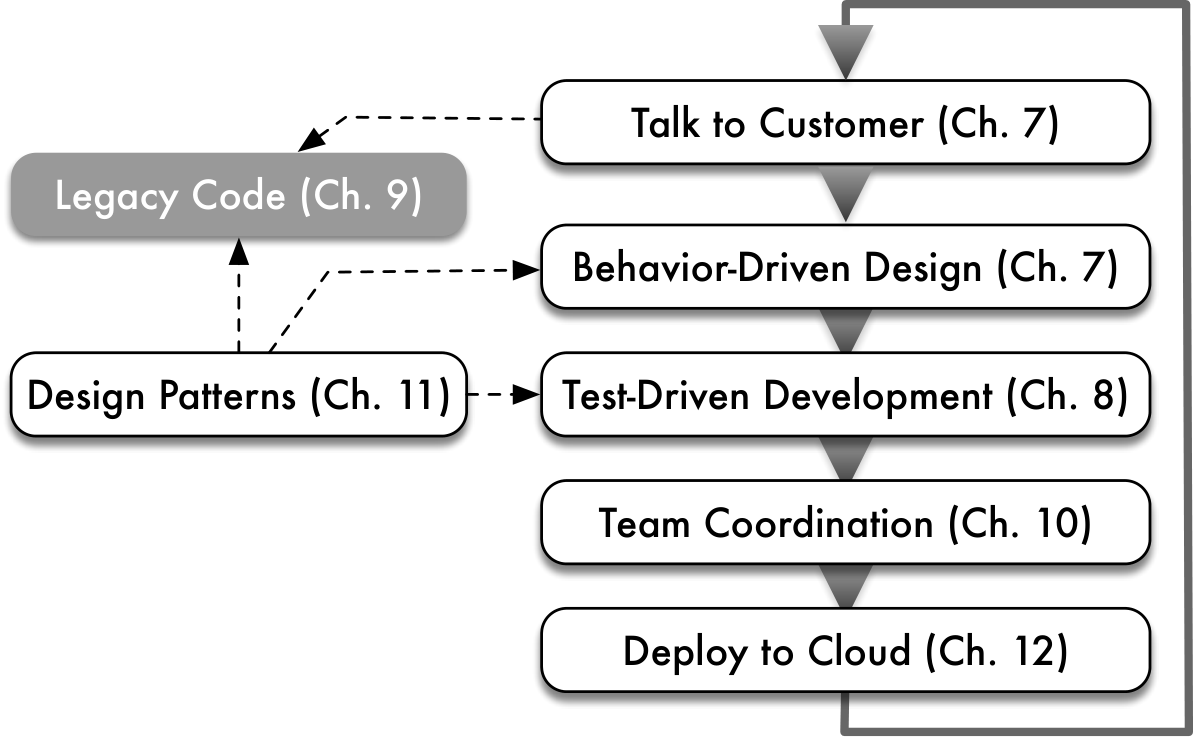
 As Chapter 1 explained, legacy code stays in use because it still meets a customer need, even though its design or implementation may be outdated or poorly understood. In this chapter we will show not only how to explore and come to understand a legacy codebase, but also how to apply Agile techniques to enhance and modify legacy code. Figure 9.1 highlights this topic in the context of the overall Agile lifecycle.
Maintainability is the ease with which a product can be improved. In software engineering, maintenance consists of four categories ((Lientz et al. 1978)):
Corrective maintenance: repairing defects and bugs
Perfective maintenance: expanding the software’s functionality to meet new customer requirements
Adaptive maintenance: coping with a changing operational environment even if no new functionality is added; for example, adapting to changes in the production hosting environment
Preventive maintenance: improving the software’s structure to increase future maintainability
Practicing these kinds of maintenance on legacy code is a skill learned by doing: we will provide a variety of techniques you can use, but there is no substitute for mileage. That said, a key component of all these maintenance activities is refactoring, a process that changes the structure of code (hopefully improving it) without changing the code’s functionality. The message of this chapter is that continuous refactoring improves maintainability. Therefore, a large part of this chapter will focus on refactoring.
Any piece of software, however well-designed, can eventually evolve beyond what its original design can accommodate. This process leads to maintainability challenges, one of which is the challenge of working with legacy code. Some developers use the term “legacy” when the resulting code is poorly understood because the original designers are long gone and the software has accumulated many patches not explained by any current design documents. A more jaded view, shared by some experienced practitioners ((Glass 2002)), is that such documents wouldn’t be very useful anyway. Once development starts, necessary design changes cause the system to drift away from the original design documents, which don’t get updated. In such cases developers must rely on informal design documents such as those that Figure 9.2 lists.
| Highly-readable unit, functional and integration tests (Chapter 8) | Git commit log messages (Chapter 10) |
|---|---|
| Lo-fi UI mockups and Cucumber-style user stories (Chapter 7) | Comments and RDoc-style documentation embedded in the code (Section 9.4) |
| Photos of whiteboard sketches about the application architecture, class relationships, etc. (Section 9.2) | Archived email, wiki/blog, notes, or video recordings of code and design reviews, for example in Campfire or Basecamp (Chapter 10) |
How can we enhance legacy software without good documentation? As Michael Feathers writes in Working Effectively With Legacy Code ((Feathers 2004)), there are two ways to make changes to existing software: Edit and Pray or Cover and Modify. The first method is sadly all too common: familiarize yourself with some small part of the software where you have to make your changes, edit the code, poke around manually to see if you broke anything (though it’s hard to be certain), then deploy and pray for the best.
In contrast, Cover and Modify calls for creating tests (if they don’t already exist) that cover the code you’re going to modify and using them as a “safety net” to detect unintended behavioral changes caused by your modifications, just as regression tests detect failures in code that used to work. The cover and modify point of view leads to Feathers’s more precise definition of “legacy code”, which we will use: code that lacks sufficient tests to modify with confidence, regardless of who wrote it and when. In other words, code that you wrote three months ago on a different project and must now revisit and modify might as well be legacy code.
Happily, the Agile techniques we’ve already learned for developing new software can also help with legacy code. Indeed, the task of understanding and evolving legacy software can be seen as an example of “embracing change” over longer timescales. If we inherit well-structured software with thorough tests, we can use BDD and TDD to drive addition of functionality in small but confident steps. If we inherit poorly-structured or undertested code, we need to “bootstrap” ourselves into the desired situation in four steps:
Identify the change points, or places where you will need to make changes in the legacy system. Section 9.2 describes some exploration techniques that can help, and introduces one type of Unified Modeling Language (UML) diagram for representing the relationships among the main classes in an application.
If necessary, add characterization tests that capture how the code works now, to establish a baseline “ground truth” before making any changes. Section 9.3 explains what these tests are and how to create them using tools you’re already familiar with.
Determine whether the change points require refactoring to make the existing code more testable or to accommodate the required changes, for example, by breaking dependencies that make the code hard to test. Section 9.6 introduces a few of the most widely-used techniques from the many catalogs of refactorings that have evolved as part of the Agile movement.
Once the code around the change points is well factored and well covered by tests, make the required changes, using your newly-created tests as regressions and adding tests for your new code as in Chapters 7 and 8.
Summary of how Agile can help legacy code:
Maintainability is the ease with which software can be enhanced, adapted to a changing operating environment, repaired, or improved to facilitate future maintenance. A key part of software maintenance is refactoring, a central part of the Agile process that improves the structure of software to make it more maintainable. Continuous refactoring therefore improves software maintainability.
Working with legacy code begins with exploration to understand the code base, and in particular to understand the code at the change points where we expect to make changes.
Without good test coverage, we lack confidence that refactoring or enhancing the code will preserve its existing behavior. Therefore, we adopt Feathers’s definition—“Legacy code is code without tests”—and create characterization tests where necessary to beef up test coverage before refactoring or enhancing legacy code.
RDoc is a documentation system that looks for specially formatted comments in Ruby code and generates programmer documentation from them. It is similar to and inspired by JavaDoc. RDoc syntax is easily learned by example and from the Ruby Programming wikibook. The default HTML output from RDoc can be seen, for example, in the Rails documentation. Consider adding RDoc documentation as you explore and understand legacy code; running rdoc . (that’s a dot) in the root directory of a Rails app generates RDoc documentation from every .rb file in the current directory, rdoc --help shows other options, and rake -T doc in a Rails app directory lists other documentation-related Rake tasks.

Distinguish good versus bad reasons to refactor code, based on what problem(s) refactoring can help solve.
Explain why many software engineers believe that when modifying legacy code, good test coverage is more important than detailed design documents or well-structured code.
9.2 Exploring a Legacy Codebase
If you’ve chosen the right data structures and organized things well, the algorithms will almost always be self-evident. Data structures, not algorithms, are central to programming.
— Rob Pike
Show me your flowchart and conceal your tables, and I shall continue to be mystified. Show me your tables, and I won’t usually need your flowchart; it’ll be obvious.
— Fred Brooks, The Mythical Man Month (1975) (Brooks 1995)
The goal of exploration is to understand the app from both the customers’ and the developers’ point of view. The specific techniques you use may depend on your immediate aims:
You’re brand new to the project and need to understand the app’s overall architecture, documenting as you go so others don’t have to repeat your discovery process.
You need to understand just the moving parts that would be affected by a specific change you’ve been asked to make.
You’re looking for areas that need beautification because you’re in the process of porting or otherwise updating a legacy codebase.
We can follow some “outside-in” steps to understand the structure of a legacy app at various levels:
Check out a scratch branch to run the app in a development environment
Learn and replicate the user stories, working with other stakeholders if necessary
Examine the database schema and the relationships among the most important classes
Skim all the code to quantify code quality and test coverage
Since operating on the live app could endanger customer data or the user experience, the first step is to get the application running in a development or staging environment in which perturbing its operation causes no inconvenience to users. Create a scratch branch of the repo that will never be merged with the mainline code and can therefore be used for experimentation. Create a development database if there isn’t an existing one used for development. An easy way to do this is to clone the production database if it isn’t too large, thereby sidestepping numerous pitfalls:
The app may have relationships such as has-many or belongs-to that are reflected in the table rows. Without knowing the details of these relationships, you might create an invalid subset of data. Using RottenPotatoes as an example, you might inadvertently end up with a
reviewwhosemovie_idandmoviegoer_idrefer to nonexistent movies or moviegoers.Cloning the database eliminates possible differences in behavior between production and development resulting from differences in database implementations, differences in how certain data types such as dates are represented in different databases, and so on.
Cloning gives you realistic valid data to work with in development.
If you can’t clone the production database, or you have successfully cloned it but it’s too unwieldy to use in development all the time, you can create a development database by extracting fixture data from the real database using the steps in Figure 9.3.
ch_legacy/code/setup_development_db.txt
# on production computer:
RAILS_ENV=production rake db:schema:dump
RAILS_ENV=production rake db:fixtures:extract
# copy db/schema.rb and test/fixtures/*.yml to development computer
# then, on development computer:
rake db:create        # uses RAILS_ENV=development by default
rake db:schema:load
rake db:fixtures:loadOnce the app is running in development, have one or two experienced customers demonstrate how they use the app, indicating during the demo what changes they have in mind ((Nierstrasz et al. 2009)). Ask them to talk through the demo as they go; although their comments will often be in terms of the user experience (“Now I’m adding Mona as an admin user”), if the app was created using BDD, the comments may reflect examples of the original user stories and therefore the app’s architecture. Ask frequent questions during the demo, and if the maintainers of the app are available, have them observe the demo as well. In Section 9.3 we will see how these demos can form the basis of “ground truth” tests to underpin your changes.
Once you have an idea of how the app works, take a look at the database schema; Fred Brooks, Rob Pike, and others have all acknowledged the importance of understanding the data structures as a key to understanding the app logic. You can use an interactive database GUI to explore the schema, but you might find it more efficient to run rake db:schema:dump, which creates a file db/schema.rb containing the database schema in the migrations DSL introduced in Section 4.2. The goal is to match up the schema with the app’s overall architecture.
Figure 9.4 shows a simplified Unified Modeling Language (UML) class diagram generated by the railroady gem that captures the relationships among the most important classes and the most important attributes of those classes. While the diagram may look overwhelming initially, since not all classes play an equally important structural role, you can identify “highly connected” classes that are probably central to the application’s functions. For example, in Figure 9.4, the Customer and Voucher classes are connected to each other and to many other classes. You can then identify the tables corresponding to these classes in the database schema.
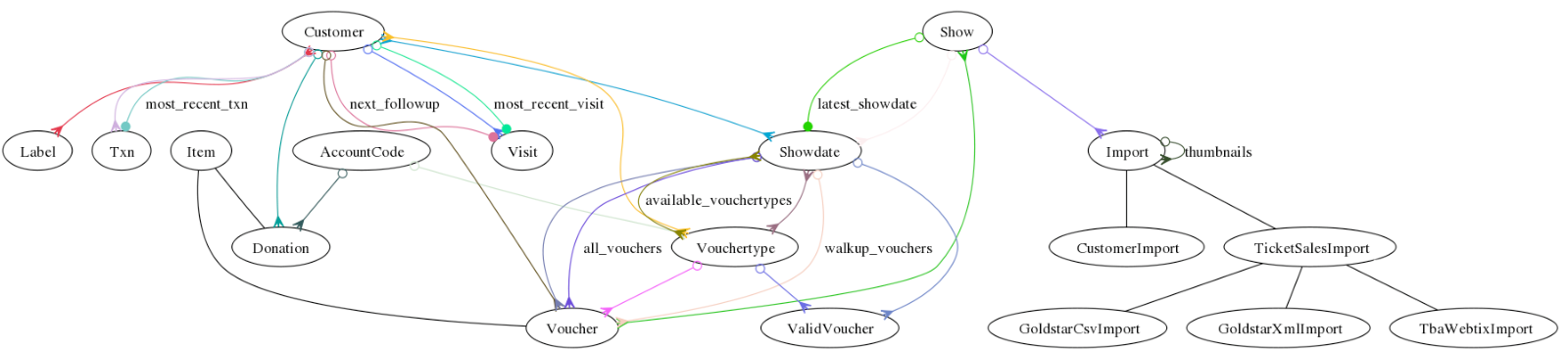
railroady gem, shows the models in a Rails app that manages ticket sales, donations, and performance attendance for a small theater. Edges with arrowheads or circles show relationships between classes: a Customer has many Visits and Vouchers (open circle to arrowhead), has one most_recent_visit (solid circle to arrowhead), and has and belongs to many Labels (arrowhead to arrowhead). Plain edges show inheritance: Donation and Voucher are subclasses of Item. (All of the important classes here inherit from ActiveRecord::Base, but railroady draws only the app’s classes.) We will see other types of UML diagrams in Chapter 11.
Having familiarized yourself with the app’s architecture, most important data structures, and major classes, you are ready to look at the code. The goal of inspecting the code is to get a sense of its overall quality, test coverage, and other statistics that serve as a proxy for how painful it may be to understand and modify. Therefore, before diving into any specific file, run rake stats to get the total number of lines of code and lines of tests for each file; this information can tell you which classes are most complex and therefore probably most important (highest LOC), best tested (best code-to-test ratio), simple “helper” classes (low LOC), and so on, deepening the understanding you bootstrapped from the class diagram and database schema. (Later in this chapter we’ll show how to evaluate code with some additional quality metrics to give you a heads up of where the hairiest efforts might be.) If test suites exist, run them; assuming most tests pass, read the tests to help understand the original developers’ intentions. Then spend one hour ((Nierstrasz et al. 2009)) inspecting the code in the most important classes as well as those you believe you’ll need to modify (the change points), which by now you should be getting a good sense of.
Finally, as you inspect the code, you can also create CRC cards (see the Elaboration in Section 7.4) to provide more concrete and detailed documentation for the classes that will be affected by your maintenance activities.
Summary of legacy code exploration:
The goal of exploration is to understand how the app works from multiple stakeholders’ points of view, including the customer requesting the changes and the designers and developers who created the original code.
Exploration can be aided by reading tests, reading design documents if available, inspecting the code, and drawing or generating UML class diagrams to identify relationships among important entities (classes) in the app.
Once you have successfully seen the app demonstrated in production, the next steps are to get it running in development by either cloning or fixturing the database and to get the test suite running in development.
What are some reasons it is important to get the app running in development even if you don’t plan to make any code changes right away?
A few reasons include:
For SaaS, the existing tests may need access to a test database, which may not be accessible in production.
Part of your exploration might involve the use of an interactive debugger or other tools that could slow down execution, which would be disruptive on the live site.
For part of your exploration you might want to modify data in the database, which you can’t do with live customer data.
Identify and execute each of the steps needed to get a codebase safely running in a development or staging environment, including creating a scratch branch, creating a test or development database populated with any necessary configuration or seed data, and satisfy any external configuration dependencies such as the use of external service APIs.
For database-centric applications, generate and inspect some representation of the database schema, such as an entity-relationship diagram representing the tables or a class diagram representing the classes that wrap the tables, to identify the most important models and their relationships. This step helps identify the potential change points for modifying the application.
Run the application’s test suite and identify weak areas of test coverage, especially those potentially relevant to your change points.
Given a simple UML class diagram, identify the relationships among the entities; for example, in Figure 9.4, “Showdate has and belongs to many Vouchertypes,” “Donation belongs to Account Code,” “Account Code has many Donations,” and so on.
9.3 Establishing Ground Truth With Characterization Tests
If there are no tests (or too few tests) covering the parts of the code affected by your planned changes, you’ll need to create some tests. How do you do this given limited understanding of how the code works now? One way to start is to establish a baseline for “ground truth” by creating characterization tests: tests written after the fact that capture and describe the actual, current behavior of a piece of software, even if that behavior has bugs. By creating a Repeatable automatic test (see Section 8.1) that mimics what the code does right now, you can ensure that those behaviors stay the same as you modify and enhance the code, like a high-level regression test.
CHIPS 7.7 was an example of writing a characterization test for one user story of RottenPotatoes.
It’s often easiest to start with an integration-level characterization test such as a Cucumber scenario, since these make the fewest assumptions about how the app works and focus only on the user experience. Indeed, while good scenarios ultimately make use of a “domain language” rather than describing detailed user interactions in imperative steps (Section 7.8), at this point it’s fine to start with imperative scenarios, since the goal is to increase coverage and provide ground truth from which to create more detailed tests. Once you have some green integration tests, you can turn your attention to unit- or functional-level tests, just as TDD follows BDD in the outside-in Agile cycle.
Whereas integration-level characterization tests just capture behaviors that we observe without requiring us to understand how those behaviors happen, a unit-level characterization test seems to require us to understand the implementation. For example, consider the code in Figure 9.5. As we’ll discuss in detail in the next section, it has many problems, not least of which is that it contains a bug. The method convert calculates the current year given a starting year (in this case 1980) and the number of days elapsed since January 1 of that year. If 0 days have elapsed, then it is January 1, 1980; if 365 days have elapsed, it is December 31, 1980, since 1980 was a leap year; if 366 days have elapsed, it is January 1, 1981; and so on. How would we create unit tests for convert without understanding the method’s logic in detail?
ch_legacy/code/date_calculator_bad.rb
ch_legacy/code/spec/date_calculator_characterization_spec.rb
Feathers describes a useful technique for “reverse engineering” specs from a piece of code we don’t yet understand: create a spec with an assertion that we know will probably fail, run the spec, and use the information in the error message to change the spec to match actual behavior. Essentially, we create specs that assert incorrect results, then fix the specs based on the actual test behavior. Our goal is to capture the current behavior as completely as possible so that we’ll immediately know if code changes break the current behavior, so we aim for 100% C0 coverage (even though that’s no guarantee of bug-freedom!), which is challenging because the code as presented has no seams. Doing this for convert results in the specs in Figure 9.6 and even finds a bug in the process!
We create specs that assert incorrect results, then fix them based on the actual test behavior. Our goal is to capture the current behavior as completely as possible so that we’ll immediately know if code changes break the current behavior, so we aim for 100% C0 coverage (even though that’s no guarantee of bug-freedom!), which is challenging because the code as presented has no seams. Our effort results in finding a bug that crippled thousands of Microsoft Zune players on December 31, 2008.
Summary of characterization tests:
To Cover and Modify when we lack tests, we first create characterization tests that capture how the code works now.
Integration-level characterization tests, such as Cucumber scenarios, are often easier to start with since they only capture externally visible app behavior.
To create unit- and functional-level characterization tests for code we don’t fully understand, we can write a spec that asserts an incorrect result, fix the assertion based on the error message, and repeat until we have sufficient coverage.
If the test suite is out-of-date, some tests may be failing red. Rather than trying to fix the tests before you understand the code, mark them as “pending” (for example, using RSpec’s pending method) with a comment that reminds you to come back to them later to find out why they fail. Stick to the current task of preserving existing functionality while improving coverage, and don’t get distracted trying to fix bugs along the way.
State whether each of the following is a goal of unit and functional testing, a goal of characterization testing, or both:
Improve coverage
Test boundary conditions and corner cases
Document intent and behavior of app code
Prevent regressions (reintroduction of earlier bugs)
(i) and (iii) are goals of unit, functional, and characterization testing. (ii) and (iv) are goals of unit and functional testing, but non-goals of characterization testing.
Distinguish the goals of characterization testing from those of unit and functional testing.
Create an integration-level characterization test, such as a Cucumber scenario, for a specific feature or workflow.
Create a unit-level or module-level characterization test for a specific behavior that captures an existing behavior of some part of the codebase by arranging the necessary doubles for collaborator objects to make the test pass.
9.4 Comments and Commits: Documenting Code
Not only does legacy code often lack tests and good documentation, but its comments are often missing or inconsistent with the code. We now offer a brief sermon on comments, so that once you write successful characterization tests you can capture what you’ve learned by adding comments to the legacy code. Good comments have two properties:
They document things that aren’t obvious from the code.
They are expressed at a higher level of abstraction than the code.
Figure 9.7 shows examples of comments that violate both properties, and Figure 9.8 shows a better example.
ch_legacy/code/badcomments.rb
ch_legacy/code/goodcomments.rb
First, if you write comments as you code, much of what your code does is surely obvious to you, since you just wrote it. (Alas, not commenting as you go is a common defect of legacy code.) But if you or someone else reads your code later, long after you’ve forgotten those design ideas, comments should help you remember the non-obvious reasons you wrote the code the way you did. Examples of non-obvious things include the units for variables, code invariants, subtle problems that required a particular implementation, or unusual code that is there solely to work around some bug or account for a non-obvious boundary condition or corner case. In the case of legacy code, you are trying to add comments to document what went through another programmer’s mind; once you figure it out, be sure to write it down before you forget!
Second, comments should raise the level of abstraction from the code. The programmer’s goal is to write classes and other code that hides complexity; that is, to make it easier for others to use this existing code rather than re-create it themselves. Comments should therefore address concerns such as: What do I need to know to invoke this method? Are there preconditions, assumptions, or caveats? Among other jobs, a comment should provide enough of this information that someone who wants to call an existing class or method doesn’t have to read its source code to figure these things out.
These guidelines are also generally true for commit messages, which you supply whenever you commit a set of code changes. However, one important principle is that you shouldn’t put information in a commit message that a future developer will need to know while working on the code. Historical information—why a certain function was deleted or refactored, for example—is appropriate for including in a commit message. But information that a developer would need to know to use the code as it exists now should be in a comment, where the developer cannot fail to see it when they go to edit the code.
As with many other elements of Agile, when a process isn’t working smoothly, it’s trying to tell you something about your code. For example, we saw in Chapter 8 that when a test is hard to write due to the need for extensive mocking and stubbing, the test is trying to tell you that your code is not testable because it’s poorly factored. Similarly here: if following the above guideline about comments vs. commits means you find yourself writing lots of cautionary caveats in the comments, your code is telling you that it might benefit from a refactoring cleanup so that you wouldn’t need to post so many warning signs for the next developer who comes along with the intention of modifying it.
While virtually every other software engineering sermon in this book is paired with a tool that makes it easy for you to stay on the true path and for others to check if you have strayed, this is not the case for comments and commit messages. The only enforcement mechanism beyond self-discipline is inspection, which we discuss in Sections 10.4 and 10.7.
Summary of comments:
Comments are best written at the same time as the code, not as an afterthought.
Comments should not repeat what is obvious from the code. They should explain why the code is written the way it is, rather than simply repeating what it does.
Comments should raise the level of abstraction from the code, describing what a logical block of code does rather than providing line-by-line details.
Commits should include historical information about why the code is the way it is, but information that developers need while using the current code belongs in comments. If this leads to too many comments, your code may need cleanup.
True or False: One reason legacy code is long lasting is because it typically has good comments.
False. We wish it were true. Comments are often missing or inconsistent with the code, which is one reason it is called legacy code rather than beautiful code.
Given a particular piece of information that describes something about the code that can’t easily be inferred from the code itself, determine whether it is more appropriate to put that information into a comment or into a commit message.
9.5 Metrics, Code Smells, and SOFA
7. Declining Quality - The quality of [software] systems will appear to be declining unless they are rigorously maintained and adapted to operational environment changes.
— Lehman’s seventh law of software evolution
 A key theme of this book is that engineering software is about creating not just working code, but beautiful working code. This chapter should make clear why we believe this: beautiful code is easier and less expensive to maintain. Given that software can live much longer than hardware, even engineers whose aesthetic sensibilities aren’t moved by the idea of beautiful code can appreciate the practical economic advantage of reducing lifetime maintenance costs.
How can you tell when code is less than beautiful, and how do you improve it? We’ve all seen examples of code that’s less than beautiful, even if we can’t always pin down the specific problems. We can identify problems in two ways: quantitatively using software metrics and qualitatively using code smells. Both are useful and tell us different things about the code, and we apply both to the ugly code in Figure 9.5.
Software metrics are quantitative measurements of code complexity, which is often an estimate of the difficulty of thoroughly testing a piece of code. Dozens of metrics exist, and opinion varies widely on their usefulness, effectiveness, and “normal range” of values. Most metrics are based on the control flow graph of the program, in which each graph node represents a basic block (a set of statements that are always executed together), and an edge from node A to node B means that there is some code path in which B’s basic block is executed immediately after A’s.
Plan-and-Document software projects sometimes include specific contractual requirements based on software metrics.
Figure 9.9 shows the control flow graph corresponding to Figure 9.5, which we can use to compute two widely-used indicators of method-level complexity:
Cyclomatic complexity measures the number of linearly-independent paths through a piece of code.
-
is a weighted sum of the number of Assignments, Branches and Conditionals in a piece of code.
Software engineer Frank McCabe Sr. invented the cyclomatic complexity metric in 1976.
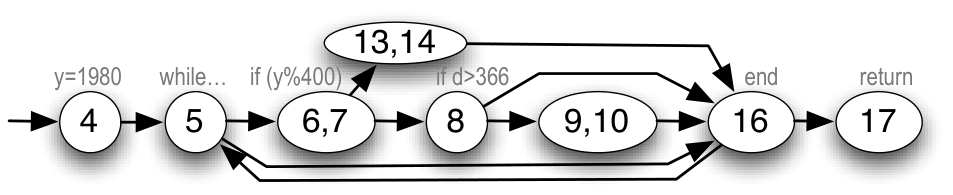
convert scores a cyclomatic complexity of 4 as measured by saikuro and an ABC score (Assignments, Branches, Conditionals) of 23 as measured by flog. Figure 9.10 puts these scores in context.
These analyses are usually performed on source code and were originally developed for statically-typed languages. In dynamic languages, the analyses are complicated by metaprogramming and other mechanisms that may cause changes to the control flow graph at runtime. Nonetheless, they are useful first-order metrics, and as you might expect, the Ruby community has developed tools to measure them. saikuro computes a simplified version of cyclomatic complexity and flog computes a variant of the ABC score that is weighted in a way appropriate for Ruby idioms. Both of these and more are included in the metric_fu gem (part of the courseware). Running rake metrics on a Rails app computes various metrics including these, and highlights parts of the code in which multiple metrics are outside their recommended ranges.
Increasingly, however, a convenient way to get these metrics is to incorporate code-analysis tools into a continuous integration workflow, which we discuss in Chapter 10. Such tools operate directly on your code repository and can be configured to run automatically when code changes occur. For example, CodeClimate Maintainability runs many analyses on your code to find design and code smells, identify possible stylistic problems, and even flag potential security issues such as those we describe in Chapter 12—for example, passing untrusted user input to sensitive methods or interpolating them into database queries.
as a service: by creating an account there and linking your GitHub repository to it, you can view a “report card” of your code metrics anytime, and the report is automatically updated when you push new code to GitHub. Figure 9.10 summarizes useful metrics we’ve seen so far that speak to testability and therefore to code beauty.
| Metric | Tool | Target score | Book Reference |
|---|---|---|---|
| Code-to-test ratio | rake stats |
\(\leq 1:2\) | Section 8.7 |
| C0 coverage | SimpleCov |
\(\geq 90\%\) | Section 8.7 |
| ABC score | flog (rake metrics) |
\(< 20\)/method | Section 9.5 |
| Cyclomatic | saikuro (rake metrics) |
\(< 10\)/method | Section 9.5 |
metric_fu gem includes flog, saikuro, and additional tools for computing metrics we’ll meet in Chapter 11.
The second way to spot code problems is by looking for code smells, which are structural characteristics of source code not readily captured by metrics. Like real smells, code smells call our attention to places that may be problematic. Martin Fowler’s classic book on refactoring ((Fowler et al. 1999)) lists 22 code smells, four of which we show in Figure 9.11, and Robert C. Martin’s Clean Code ((Martin 2008)) has one of the more comprehensive catalogs with an amazing 63 code smells, of which three are specific to Java, nine are about testing, and the remainder are more general.
Design smells (see Chapter 11) tell us when something’s wrong in the way classes interact, rather than within the methods of a specific class.
| Name | Symptom | Possible refactorings |
|---|---|---|
| Shotgun Surgery | Making a small change to a class or method results in lots of little changes rippling to other classes or methods. | Use Move Method or Move Field to bring all the data or behaviors into a single place. |
| Data Clump | The same three or four data items seem to often be passed as arguments together or manipulated together. | Use Extract Class or Preserve Whole Object to create a class that groups the data together, and pass around instances of that class. |
| Inappropriate Intimacy | One class exploits too much knowledge about the implementation (methods or attributes) of another. | Use Move Method or Move Field if the methods really need to be somewhere else, use Extract Class if there is true overlap between two classes, or introduce a Delegate to hide the implementation. |
| Repetitive Boilerplate | You have bits of code that are the same or nearly the same in various different places (non-DRY). | Use Extract Method to pull redundant code into its own method that the repetitive places can call. In Ruby, you can even use yield to extract the “enclosing” code and having it yield back to the non-repetitive code. |
Four particular smells that appear in Martin’s Clean Code are worth emphasizing, because they are symptoms of other problems that you can often fix by simple refactorings. These four are identified by the acronym SOFA, which states that a well-written method should:
be Short, so that its main purpose is quickly grasped;
do only One thing, so testing can focus on thoroughly exercising that one thing;
take Few arguments, so that all important combinations of argument values can be tested;
maintain a consistent level of Abstraction, so that it doesn’t jump back and forth between saying what to do and saying how to do it.
Figure 9.5 violates at least the first and last of these, and exhibits other smells as well, as we can see by running reek on it:
ch_legacy/code/reek_output.txt
time_setter.rb -- 5 warnings:
 TimeSetter#self.convert calls (y + 1) twice (Duplication)
 TimeSetter#self.convert has approx 6 statements (LongMethod)
 TimeSetter#self.convert has the parameter name 'd' (UncommunicativeName)
 TimeSetter#self.convert has the variable name 'd' (UncommunicativeName)
TimeSetter#self.convert has the variable name 'y' (UncommunicativeName)Not DRY (line 2). Admittedly this is only a minor duplication, but as with any smell, it’s worth asking ourselves why the code turned out that way.
Uncommunicative names (lines 4–6). Variable y appears to be an integer (lines 6, 7, 10, 14) and is related to another variable d—what could those be? For that matter, what does the class TimeSetter set the time to, and what is being converted to what in convert? Four decades ago, memory was precious and so variable names were kept short to allow more space for code. Today, there’s no excuse for poor variable names; Figure 9.12 provides suggestions.
| What | Guideline | Example |
|---|---|---|
| Variable or class name | Noun phrase | PopularMovie, top_movies |
| Method with side effects | Verb phrase | pay_for_order, charge_credit_card! |
| Method that returns a value | Noun phrase | movie.producers, actor_list |
| Boolean variable or method | Adjective phrase | already_rated?, @is_oscar_winner |
@is_oscar_winner instead of OsWin.
Too long (line 3). More lines of code per method means more places for bugs to hide, more paths to test, and more mocking and stubbing during testing. However, excessive length is really a symptom that emerges from more specific problems—in this case, failure to stick to a single level of Abstraction. As Figure 9.13 shows, convert really consists of a small number of high-level steps, each of which could be divided into sub-steps. But in the code, there is no way to tell where the boundaries of steps or sub-steps would be, making the method harder to understand. Indeed, the nested conditional in lines 6–8 makes it hard for a programmer to mentally “walk through” the code, and complicates testing since you have to select sets of test cases that exercise each possible code path.
The ancient wisdom that a method shouldn’t exceed one screenful of code was based on text-only terminals with 24 lines of 80 characters. A modern 22-inch monitor shows 10 times that much, so guidelines like SOFA are more reliable today.
ch_legacy/code/date_calculator_pseudocode.txt
As a result of these deficiencies, you probably had to work hard to figure out what this relatively simple method does. (You might blame this on a lack of comments in the code, but once the above smells are fixed, there will be hardly any need for them.) Astute readers usually note the constants 1980, 365, and 366, and infer that the method has something to do with leap years and that 1980 is special. In fact, convert calculates the current year given a starting year of 1980 and the number of days elapsed since January 1 of that year, as Figure 9.13 shows using simple pseudocode. In Section 9.5, we will make the Ruby code as transparent as the pseudocode by refactoring it—applying transformations that improve its structure without changing its behavior.
A few specific examples of doing one thing are worth calling out because they occur frequently:
Handling an exception is one thing. If method \(M\) computes something and also tries to handle various exceptions that could arise while doing so, consider splitting out a method \(M'\) that just does the work, and having \(M\) do exception handling and delegate the “real” work to \(M'\).
Queries (computing something) and commands (doing something that causes a side effect) are distinct, so a method should either compute something that is side-effect-free or it should cause a specific side effect, but not both. Such violations of command–query separation also complicate testing.
Summary
Software metrics provide a quantitative measure of code quality. While opinion varies on which metrics are most useful and what their “normal” values should be (especially in dynamic languages such as Ruby), metrics such as cyclomatic complexity and ABC score can be used to guide your search toward code that is in particular need of attention, just as low C0 coverage identifies undertested code.
Code smells provide qualitative but specific descriptions of problems that make code hard to read. Depending on which catalog you use, over 60 specific code smells have been identified.
The acronym SOFA names four desirable properties of a method: it should be Short, do One thing, have Few arguments, and maintain a single level of Abstraction.
Give an example of a dynamic language feature in Ruby that could distort metrics such as cyclomatic complexity or ABC score.
Any metaprogramming mechanism could do this. A trivial example is s="if (d>=366)[…]"; eval s, since the evaluation of the string would cause a conditional to be executed even though there’s no conditional in the code itself, which contains only an assignment to a variable and a call to the eval method. A subtler example is a method such as before_action (Section 5.1), which essentially adds a new method to a list of methods to be called before a controller action.
Run a code analysis tool that finds code smells, dangerous practices, or possible stylistic issues in your codebase, and interpret its output to identify potentially problematic code.
9.6 Method-Level Refactoring: Replacing Dependencies With Seams
2. Increasing Complexity - As [a software] system evolves, its complexity increases unless work is done to maintain or reduce it.
— Lehman’s second law of software evolution
With the characterization specs developed in Section 9.3, we have a solid foundation on which to base our refactoring to repair the problems identified in Section 9.5. The term refactoring refers not only to a general process, but also to an instance of a specific code transformation. Thus, just as with code smells, we speak of a catalog of refactorings, and there are many such catalogs to choose from. We prefer Fowler’s catalog, so the examples in this chapter follow Fowler’s terminology and are cross-referenced to Chapters 6, 8, 9, and 10 of his book Refactoring: Ruby Edition ((Fields et al. 2009)). While the correspondence between code smells and refactorings is not perfect, in general each of those chapters describes a group of method-level refactorings that address specific code smells or problems, and further chapters describe refactorings that affect multiple classes, which we’ll learn about in Chapter 11.
Each refactoring consists of a descriptive name and a step-by-step process for transforming the code via small incremental steps, testing after each step. Most refactorings will cause at least temporary test failures, since unit tests usually depend on implementation, which is exactly what refactoring changes. A key goal of the refactoring process is to minimize the amount of time that tests are failing (red); the idea is that each refactoring step is small enough that adjusting the tests to pass before moving on to the next step is not difficult. If you find that getting from red back to green is harder than expected, you must determine if your understanding of the code was incomplete, or if you have really broken something while refactoring.
Getting started with refactoring can seem overwhelming: without knowing what refactorings exist, it may be hard to decide how to improve a piece of code. Until you have some experience improving pieces of code, it may be hard to understand the explanations of the refactorings or the motivations for when to use them. Don’t be discouraged by this apparent chicken-and-egg problem; like TDD and BDD, what seems overwhelming at first can quickly become familiar.
As a start, Figure 9.14 shows four of Fowler’s refactorings that we will apply to our code. In his book, each refactoring is accompanied by an example and an extremely detailed list of mechanical steps for performing the refactoring, in some cases referring to other refactorings that may be necessary in order to apply this one. For example, Figure 9.15 shows the first few steps for applying the Extract Method refactoring. With these examples in mind, we can refactor Figure 9.5.
| Name (Chapter) | Problem | Solution |
|---|---|---|
| Extract method (6) | You have a code fragment that can be grouped together. | Turn the fragment into a method whose name explains the purpose of the method. |
| Decompose Conditional (9) | You have a complicated conditional (if-then-else) statement. | Extract methods from the condition, “then” part, and “else” part(s). |
| Replace Method with Method Object (6) | You have a long method that uses local variables in such a way that you cannot apply Extract Method. | Turn the method into its own object so that all the local variables become instance variables on that object. You can then decompose the method into other methods on the same object. |
| Replace Magic Number with Symbolic Constant (8) | You have a literal number with a particular meaning. | Create a constant, name it after the meaning, and replace the number with it. |
Create a new method, and name it after the intention of the method (name it by what it does, not by how it does it). If the code you want to extract is very simple, such as a single message or function call, you should extract it if the name of the new method reveals the intention of the code in a better way. If you can’t come up with a more meaningful name, don’t extract the code.
Copy the extracted code from the source method into the new target method.
Scan the extracted code for references to any variables that are local in scope to the source method. These are local variables and parameters to the method.
See whether any temporary variables are used only within this extracted code. If so, declare them in the target method as temporary variables.
Look to see whether any of these local-scope variables are modified by the extracted code. If one variable is modified, see whether you can treat the extracted code as a query and assign the result to the variable concerned. If this is awkward, or if there is more than one such variable, you can’t extract the method as it stands. You may need to use Split Temporary Variable and try again. You can eliminate temporary variables with Replace Temp with Query (see the discussion in the examples).
Pass into the target method as parameters local-scope variables that are read from the extracted method.
…
Long method is the most obvious code smell in Figure 9.5, but that’s just an overall symptom to which various specific problems contribute. The high ABC score (23) of convert suggests one place to start focusing our attention: the condition of the if in lines 6–7 is difficult to understand, and the conditional is nested two-deep. As Figure 9.14 suggests, a hard-to-read conditional expression can be improved by applying the very common refactoring Decompose Conditional, which in turn relies on Extract Method. We move some code into a new method with a descriptive name, as Figure 9.16 shows. Note that in addition to making the conditional more readable, the separate definition of leap_year? makes the leap year calculation separately testable and provides a seam at line 6 where we could stub the method to simplify testing of convert, similar to the example in the Elaboration at the end of Section 8.4. In general, when a method mixes code that says what to do with code that says how to do it, this may be a warning to check whether you need to use Extract Method in order to maintain a consistent level of Abstraction.
ch_legacy/code/extract_method.rb
private to keep the class’s implementation details well encapsulated. For even more transparency, we could apply Extract Method again to leap_year? by extracting methods every_400_years? and every_4_years_except_centuries?.
The conditional is also nested two-deep, making it hard to understand and increasing convert’s ABC score. The Decompose Conditional refactoring also breaks up the complex condition by replacing each arm of the conditional with an extracted method. Notice, though, that the two arms of the conditional correspond to lines 4 and 6 of the pseudocode in Figure 9.13, both of which have the side effects of changing the values of d and y (hence our use of ! in the names of the extracted methods). In order for those side effects to be visible to convert, we must turn the local variables into class variables throughout TimeSetter, giving them more descriptive names @@year and @@days_remaining while we’re at it. Finally, since @@year is now a class variable, we no longer need to pass it as an explicit argument to leap_year?. Figure 9.17 shows the result.
ch_legacy/code/decompose_conditional.rb
# NOTE: line 7 fixes bug in original version
class TimeSetter
  ORIGIN_YEAR = 1980
  def self.calculate_current_year(days_since_origin)
    @@year = ORIGIN_YEAR
    @@days_remaining = days_since_origin
    while (@@days_remaining > 365) do
      if leap_year?
        peel_off_leap_year!
      else
        peel_off_regular_year!
      end
    end
    return @@year
  end
  private
  def self.peel_off_leap_year!
    if (@@days_remaining >= 366)
      @@days_remaining -= 366 ; @@year += 1
    end
  end
  def self.peel_off_regular_year!
    @@days_remaining -= 365 ; @@year += 1
  end
  def self.leap_year?
    @@year % 400 == 0 ||
      (@@year % 4 == 0 && @@year % 100 != 0)
  end
endconvert itself has become Shorter, and its steps now correspond closely to the pseudocode in Figure 9.13, sticking to a single level of Abstraction while delegating details to the extracted helper methods.
As long as we’re cleaning up, the code in Figure 9.17 also fixes two minor code smells. The first is uncommunicative variable names: convert doesn’t describe very well what this method does, and the parameter name d is not useful. The other is the use of “magic number” literal constants such as 1980 in line 4; we apply Replace Magic Number with Symbolic Constant (Fowler chapter 8) to replace it with the more descriptive constant name ORIGIN_YEAR. What about the other constants such as 365 and 366? In this example, they’re probably familiar enough to most programmers, but if you saw 351 rather than 365, and if line 26 (in leap_year?) used the constant 19 rather than 400, you might not recognize the constants as being related to the Hebrew calendar. Remember that refactoring only improves the code for human readers; the computer doesn’t care. So in such cases use your judgment as to how much refactoring is enough.
In our case, re-running flog on the refactored code in Figure 9.17 brings the ABC score for the
newly-renamed calculate_current_year from 23.0 down to 6.6, which is well below the suggested NIST threshold of 10.0. Also, reek now reports only two smells. The first is “low cohesion” for the helper methods peel_off_leap_year and peel_off_regular_year; this is a design smell, and we will discuss what it means in Chapter 11. The second smell is declaration of class variables inside a method. When we applied Decompose Conditional and Extract Method, we turned local variables into class variables @@year and @@days_remaining so that the newly-extracted methods could successfully modify those variables’ values. Our solution is effective, but clumsier than Replace Method with Method Object (Fowler chapter 6). In that refactoring, the original method convert is turned into an object instance (rather than a class) whose instance variables capture the object’s state; the helper methods then operate on the instance variables.
ch_legacy/code/replace_method_with_method_object.rb
# An example call would now be:
#  year = TimeSetter.new(367).calculate_current_year
# rather than:
#  year = TimeSetter.calculate_current_year(367)
class TimeSetter
  ORIGIN_YEAR = 1980
  def initialize(days_since_origin)
    @year = ORIGIN_YEAR
    @days_remaining = days_since_origin
  end
  def calculate_current_year
    while (@days_remaining > 365) do
      if leap_year?
        peel_off_leap_year!
      else
        peel_off_regular_year!
      end
    end
    return @year
  end
  private
  def peel_off_leap_year!
    if (@days_remaining >= 366)
      @days_remaining -= 366 ; @year += 1
    end
  end
  def peel_off_regular_year!
    @days_remaining -= 365 ; @year += 1
  end
  def leap_year?
    @year % 400 == 0 ||
      (@year % 4 == 0 && @year % 100 != 0)
  end
endcalculate_current_year is called because it’s now an instance method. This would break existing code and tests, and so might be deferred until later in the refactoring process.
Figure 9.18 shows the result of applying such a refactoring, but there is an important caveat. So far, none of our refactorings have caused our characterization specs to fail, since the specs were just calling TimeSetter.convert. But applying Replace Method With Method Object changes the calling interface to convert in a way that makes tests fail. If we were working with real legacy code, we would have to find every site that calls convert, change it to use the new calling interface, and change any failing tests accordingly. In a real project, we’d want to avoid changes that needlessly break the calling interface, so we’d need to consider carefully whether the readability gained by applying this refactoring would outweigh the risk of introducing this breaking change.
Summary of refactoring:
A refactoring is a particular transformation of a piece of code, including a name, a description of when to use the refactoring and what it does, and a detailed sequence of mechanical steps to perform it. Effective refactorings improve software metrics, eliminate code smells, or both.
Although most refactorings will inevitably cause some existing tests to fail (if not, the code in question is probably undertested), a key goal of the refactoring process is to minimize the amount of time until those tests are modified and once again passing green.
Sometimes applying a refactoring may result in recursively having to apply simpler refactorings first, as Decompose Conditional may require applying Extract Method.
Some refactorings compensate for programming language features that may encourage bad code. For example, one suggested refactoring for adding seams is Encapsulate Field, in which direct access to an object’s instance variables is replaced by calls to getter and setter methods. This makes sense in Java, but as we’ve seen, getter and setter methods provide the only access to a Ruby object’s instance variables from outside the object. (The refactoring still makes sense inside the object’s own methods, as the Elaboration at the end of Section 2.3 suggests.) Similarly, the Generalize Type refactoring suggests creating more general types to improve code sharing, but Ruby’s mixins and duck typing make such sharing easy. As we’ll see in Chapter 11, it’s also the case that some design patterns are simply unnecessary in Ruby because the problem they solve doesn’t arise in dynamic languages.
Which is not a goal of method-level refactoring: (a) reducing code complexity, (b) eliminating code smells, (c) eliminating bugs, (d) improving testability?
(c). While debugging is important, the goal of refactoring is to preserve the code’s current behavior while changing its structure.
Simplify and shorten an overly long block of code by identifying a clear subtask of the code and extracting it into its own helper method (the extract method refactoring).
Where a local variable in a method is also passed to many helper methods, apply the extract class refactoring to convert it into an instance variable (attribute) of a new class and making the method and its helpers instance methods of the class.
Simplify a nested conditional (the decompose conditional refactoring) by performing the extract method refactoring on one or both of its branches.
9.7 The Plan-And-Document Perspective on Working With Legacy Code
One reason for the term lifecycle from Chapter 1 is that a software product enters a maintenance phase after development completes. Roughly two-thirds of the costs are in maintenance versus one-third in development. One reason that companies charge roughly 10% of the price of software for annual maintenance is to pay the team that does the maintenance.
Organizations following Plan-And-Document processes typically have different teams for development and maintenance, with developers being redistributed onto new projects once the project is released. Thus, we now have a maintenance manager who takes over the role of the project manager during development, and we have maintenance software engineers who make changes to the code. Sadly, maintenance engineering has an unglamorous reputation, so it is typically performed by either the newest or least accomplished managers and engineers in an organization. Many organizations use different people for Quality Assessment (to do the testing) and for user documentation.
For software products developed using Plan-And-Document processes, the environment for maintenance is very different from the environment for development:
Working software—A working software product is in the field during this whole phase, and new releases must not interfere with existing features.
Customer collaboration—Rather than trying to meet a specification that is part of a negotiated contract, the goal for this phase is to work with customers to improve the product for the next release.
Responding to change—Based on use of the product, customers send a stream of change requests, which can be new features as well as bug fixes. One challenge of the maintenance phase is prioritizing whether to implement a change request and in which release it should appear.
Change requests are called maintenance requests in IEEE standards.
Regression testing plays a much bigger role in maintenance to avoid breaking old features when developing new ones. Refactoring also plays a much bigger role, as you may need to refactor to implement a change request or simply to make the code more maintainable. There is less incentive for the extra time and cost of refactoring in the initial phase of Plan-And-Document processes if the company developing the software is not the one that maintains it, which is one reason refactoring plays a smaller role during development.
As mentioned above, change management is based on change requests made by customers and other stakeholders to fix bugs or to improve functionality (see Section 10.7). They typically fill out change request forms, which are tracked using a ticket tracking system so that each request is responded to and resolved. A key tool for change management is a version control system, which tracks all modifications to all objects, as we describe in Sections 10.3 and 10.2.
The prior paragraphs should sound familiar, for we are describing Agile development; in fact, the three bullets are copied from the Agile Manifesto (see Section 1.3). Thus, maintenance is essentially an Agile process. Change requests are like user stories; the triaging of change requests is similar to the assignment of points and using Pivotal Tracker to decide how to prioritize stories; and new releases of the software product act as Agile iterations of the working prototype. Plan-and-document maintenance even follows the same strategy of breaking a large change request into many smaller ones to make them easier to assess and implement, just as we do with user stories assigned more than eight points (see Section 7.4). Hence, if the same team is developing and maintaining the software, nothing changes after the first release of the product when using the Agile lifecycle.
Although one paper reports successfully using an Agile process to maintain software developed using Plan-And-Document processes ((Poole and Huisman 2001)), normally an organization that follows Plan-And-Document for development also follows it for maintenance. As we saw in earlier chapters, this process expects a strong project manager who makes the cost estimate, develops the schedule, reduces risks to the project, and formulates a careful plan for all the pieces of the project. This plan is reflected in many documents, which we saw in Figures 7.7 and 8.14 and will see in the next chapter in Figures 10.13, 10.14, and 10.15. Thus, the impact of change in Plan-And-Document processes is not just the cost to change the code, but also to change the documentation and testing plan. Given the many more objects of Plan-And-Document, it takes more effort to synchronize to keep them all consistent when a change is made.
A change control board examines all significant requests to decide if the changes should be included in the next version of the system. This group needs estimates of the cost of a change to decide whether or not to approve the change request. The maintenance manager must estimate the effort and time to implement each change, much as the project manager did for the project initially (see Section 7.10). The group also asks the QA team for the cost of testing, including running all the regression tests and developing new ones (if needed) for a change. The documentation group also estimates the cost to change the documentation. Finally, the customer support group checks whether there is a workaround to decide if the change is urgent or not. Besides cost, the group considers the increased value of the product after the change when deciding what to do.
| Tasks | In Plan-and-Document | In Agile |
|---|---|---|
| Customer change request | Change request forms | User story on 3x5 cards in Connextra format |
| Change request cost/time estimate | By Maintenance Manager | Points by Development Team |
| Triage of change requests | Change Control Board | Development team with customer participation |
| Maintenance Manager | N.A. | |
| Maintenance SW Engineers | ||
| Roles | QA team | Development team |
| Documentation teams | ||
| Customer support group |
To help keep track what must be done in Plan-And-Document processes, you will not be surprised to learn that IEEE offers standards to help. Figure 9.20 shows the outline of a maintenance plan from the IEEE Maintenance Standard 1219-1998.
| Table of Contents |
|---|
| 1. Introduction |
| 2. References |
| 3. Definitions |
| 4. Software Maintenance Overview |
| 4.1 Organization |
| 4.2 Scheduling Priorities |
| 4.3 Resource Summary |
| 4.4 Responsibilities |
| 4.5 Tools, Techniques, and Methods |
| 5. Software Maintenance Process |
| 5.1 Problem/modification identification/classification, and prioritization |
| 5.2 Analysis |
| 5.3 Design |
| 5.4 Implementation |
| 5.5 System Testing |
| 5.6 Acceptance Testing |
| 5.7 Delivery |
| 6. Software Maintenance Reporting Requirements |
| 7. Software Maintenance Administrative Requirements |
| 7.1 Anomaly Resolution and Reporting |
| 7.2 Deviation Policy |
| 7.3 Control Procedures |
| 7.4 Standards, Practices, and Conventions |
| 7.5 Performance Tracking |
| 7.6 Quality Control of Plan |
| 8. Software Maintenance Documentation Requirements |
Ideally, changes can all be scheduled to keep the code, documents, and plans all in synchronization with an upcoming release. Alas, some changes are so urgent that everything else is dropped to try to get the new version to the customer as fast as possible. For example:
The software product crashes.
A security hole has been identified that makes the data collected by the product particularly vulnerable.
New releases of the underlying operating system or libraries force changes to the product for it to continue to function.
A competitor brings out a product or feature that if not matched will dramatically affect the business of the customer.
New laws are passed that affect the product.
While the assumption is that the team will update the documentation and plans as soon as the emergency is over, in practice emergencies can be so frequent that the maintenance team can’t keep everything in synch. Such a buildup is called a technical debt.
Backfilling is the term maintenance engineers use to describe getting code back in synch after emergencies.
The procrastination can lead to code that is increasingly difficult to maintain, which in turn leads to an increasing need to refactor the code as the code’s “viscosity” makes it more and more difficult to add functionality cleanly. While refactoring is a natural part of Agile, it less likely for the Change Control Committee to approve changes that require refactoring, as such changes are much more expensive. That is–as the name is intended to indicate–if you don’t repay your technical debt, it grows: the “uglier” the code gets, the more error-prone and time-consuming it is to refactor!
In addition to estimating the cost of each potential change for the Change Control Board, an organization’s management may ask what will be the annual cost of maintenance of a project. The maintenance manager may base this estimate on software metrics, just as the project manager may use metrics to estimate the cost to develop a project (see Section 7.10). The metrics used for maintenance are different, as they are measuring the maintenance process. Examples of metrics that may indicate increased difficulty of maintenance include the average time to analyze or implement a change request and increases in the number of change requests made or approved.
At some point in the lifecycle of a software product, the question arises whether it is time for it to be replaced. An alternative that is related to refactoring is called reengineering. Like refactoring, the idea is to keep functionality the same but to make the code much easier to maintain. Examples include:
Changing the database schema.
Using a reverse engineering tool to improve documentation.
Using a structural analysis tool to identify and simplify complex control structures.
Using a language translation tool to change code from a procedure-oriented language like C or COBOL to an object-oriented language like C++ or Java.
The hope is that reengineering will be much less expensive and much more likely to succeed than reimplementing the software product from scratch.
Summary: The insight from this section is that you can think of Agile as a maintenance process, in that change is the norm, you are in continuous contact with the customer, and new iterations of the product are routinely deployed to the customer as new releases. Hence, regression testing and refactoring are standard in the Agile process just as they are in the maintenance phase of Plan-and-Document.
Plan-and-Document maintenance processes are structured differently:
Maintenance managers play the role of project managers: they interface with the customer and upper management, make the cost and schedule estimates, document the maintenance plan, and manage the maintenance software engineers.
Customers and other stakeholders issue change requests, which a Change Control Committee triages based on the benefit of the change and cost estimates from the maintenance manager, the documentation team, and the QA team.
Regression testing plays a bigger role in maintenance to ensure that new features do not interfere with old ones.
Refactoring plays a bigger role as well, in part because there is often less refactoring in Plan-and-Document processes during product development than in Agile development.
An alternative to starting over when the code becomes increasingly difficult to maintain is to reengineer the code to lower the cost of having a much more maintainable system.
One argument for Agile development is therefore as follows: if two-thirds of the cost of product are in the maintenance phase, why not use the same maintenance-compatible software development process for the whole lifecycle?
Which is greater in a typical software project: the cost of development or the cost of maintenance?
The cost of maintenance.
True or False: Refactoring and reengineering are synonyms.
False: While related terms, reengineering often relies on automatic tools and occurs as software ages and maintainability becomes more difficult, yet refactoring is a continuous process of code improvement that happens during both development and maintenance.
Identify the correspondences between Plan-and-Document maintenance activities (change requests, cost estimates, triage, releases) and their Agile counterparts (user story, points, iteration, icebox vs. backlog).
9.8 Fallacies and Pitfalls
The extreme version of CRC cards seems to fit well with Agile: design and build the simplest thing that could possibly work, and embrace the fact that you’ll need to change it later. But it’s possible to take this approach too far. One suggestion from accomplished software craftsman and engineer John Ousterhout1 is to “design it twice”: use CRC cards to come up with a design, then put it aside and try a different design from scratch, perhaps thinking a bit adversarially about how you want to beat the team that did the original design. If you’re unable to improve on the original design, you can be more confident that it represents a reasonable starting point. But surprisingly often, you’ll find a simpler or more elegant design after you’ve had a chance to think through the problem the first time.
Ousterhout ((Ousterhout 2018)) warns against creating conjoined methods: two methods that collaborate tightly in accomplishing one goal, so that there is a lot of interaction between them and neither can be effectively understood without also understanding the other. This advice is consistent with the SOFA advice that a method should do One thing (Ousterhout would say that each of the conjoined methods only does part of a thing) but is an easy pitfall to experience if you’re overzealous in making methods Short. One sign of this is that it’s nearly impossible to isolate one method from the other in tests; this is different from a helper method, which breaks out a well-defined subtask that can be individually tested.
When you’re refactoring or creating additional tests (such as characterization tests) in preparation to improve legacy code, there is a great temptation to fix “little things” along the way: methods that look just a little messy, instance variables that look obsolete, dead code that looks like it’s never reached from anywhere, “really simple” features that look like something you could quickly add while doing other tasks. Resist these temptations! First, the reason to establish ground-truth tests ahead of time is to bootstrap yourself into a position from which you can make changes with confidence that you’re not breaking anything. Trying to make such “improvements” in the absence of good test coverage invites disaster. Second, as we’ve said before and will repeat again, programmers are optimists: tasks that look trivial to fix may sidetrack you for a long time from your primary task of refactoring, or worse, may get the code base into an unstable state from which you must backtrack in order to continue refactoring. The solution is simple: when you’re refactoring or laying groundwork, focus obsessively on completing those steps before trying to enhance the code.
Putting aside the practical consideration that management will probably wisely forbid you from doing this anyway, there are many reasons why this belief is almost always wrong. First, if you haven’t taken the time to understand a system, you are in no position to estimate how hard it will be to redesign, and you will probably vastly underestimate the effort required, given programmers’ incurable optimism. Second, however ugly it may be, the current system works; a main tenet of doing short Agile iterations is “always have working code,” and by starting over you are immediately throwing that away. Third, if you use Agile methods in your redesign, you’ll have to develop user stories and scenarios to drive the work, which means you’ll need to prioritize them and write up quite a few of them to make sure you’ve captured at least the functionality of the current system. It would probably be faster to use the techniques in this chapter to write scenarios for just those parts of the system to be improved and drive new code from there, rather than doing a complete rewrite.
Does this mean you should never wipe the slate clean? No. As Rob Mee of Pivotal Labs points out, a time may come when the current codebase is such a poor reflection of the original design intent that it becomes a liability, and starting over may well be the best thing to do. (Sometimes this results from not refactoring in a timely way!) But in all but the most trivial systems, this should be regarded as the “nuclear option” when all other paths have been carefully considered and determined to be inferior ways to meet the customer’s needs.
In Chapter 8 we warned that correctness cannot be assured by relying on a single type of test (unit, functional, integration/acceptance) or by relying exclusively on quantitative code coverage as a measure of test thoroughness. Similarly, code quality cannot be assured by any single code metric or by avoiding any specific code smells. Hence the metric_fu gem inspects your code for multiple metrics and smells so you can identify “hot spots” where multiple problems with the same piece of code call for refactoring.
9.9 Concluding Remarks: Continuous Refactoring
A ship in port is safe, but that’s not what ships are built for.
— Admiral Grace Murray Hopper
It may be a surprise that the fundamental characteristics of Agile make it an excellent match to the needs of software maintenance. In fact, we can think of Agile as not having a development phase at all, but being in maintenance mode from the very start of its lifecycle! That said, as we noted in the opening of the chapter, modifying legacy code is not a task to be undertaken lightly, and the techniques required must be honed by experience. The first time is always the hardest. But fundamental skills such as refactoring help with both legacy code and new code, and as we saw, there is a deep connection among legacy code, refactoring, and testability and test coverage. We took code that was neither good nor testable—it scored poorly on complexity metrics and code smells, and isolating behaviors for unit testing was awkward—and refactored it into code that has much better metric scores, is easier to read and understand, and is easier to test. In short, we showed that good methods are testable and testable methods are good. We used refactoring to beautify existing code, but the same techniques can be used when performing the enhancements themselves. For example, if we need to add functionality to an existing method, rather than simply adding a bunch of lines of code and risk violating one or more SOFA guidelines, we can apply Extract Method to place the functionality in a new method that we call from the existing method. As you can see, this technique has the nice benefit that we already know how to develop new methods using TDD!
This observation explains why TDD leads naturally to good and testable code—it’s hard for a method not to be testable if the test is written first—and illustrates the rationale behind the “refactor” step of Red–Green–Refactor. If you are refactoring constantly as you code, each individual change is likely to be small and minimally intrusive on your time and concentration, and your code will tend to be beautiful. When you extract smaller methods from larger ones, you are identifying collaborators, describing the purpose of code by choosing good names, and inserting seams that help testability. When you rename a variable more descriptively, you are documenting design intent.
But if you continue to encrust your code with new functionality without refactoring as you go, when refactoring finally does become necessary (and it will), it will be more painful and require the kind of significant scaffolding described in Sections 9.2 and 9.3. In short, refactoring will suddenly change from a background activity that takes incremental extra time to a foreground activity that commands your focus and concentration at the expense of adding customer value.
Since programmers are optimists, we often think “That won’t happen to me; I wrote this code, so I know it well enough that refactoring won’t be so painful.” But in fact, your code becomes legacy code the moment it’s deployed and you move on to focusing on another part of the code. Unless you have a time-travel device and can talk to your former self, you might not be able to divine what you were thinking when you wrote the original code, so the code’s clarity must speak for itself. This Agile view of continuous refactoring should not surprise you: just as with development, testing, or requirements gathering, refactoring is not a one-time “phase” but an ongoing process. In Chapter 12 we will see that the view of continuous vs. phased also holds for deployment and operations.
Working with legacy code isn’t exclusively about refactoring, but as we’ve seen, refactoring is a major part of the effort. The best way to get better at refactoring is to do it a lot. Initially, we recommend you browse through Fowler’s refactoring book just to get an overview of the many refactorings that have been catalogued. We recommend the Ruby-specific version ((Fields et al. 2009)), since not all smells or refactorings that arise in statically-typed languages occur in Ruby; versions are available for other popular languages, including Java. We introduced only a few in this chapter; Figure 9.21 lists more. As you become more experienced, you’ll recognize refactoring opportunities without consulting the catalog each time.
Code smells came out of the Agile movement. Again, we introduced only a few from a more extensive catalog; Figure 9.22 lists more. Good programmers don’t deliberately create code with code smells; more often, the smells creep in as the code grows and evolves over time, sometimes beyond its original design. Pytel and Saleh’s Rails Antipatterns ((Pytel and Saleh 2010)) and Tucker’s treatment of code smells and refactoring in the context of contributing to open source software ((Tucker et al. 2011)) address these realistic situations.
We also introduced some simple software metrics; over four decades of software engineering, many others have been produced to capture code quality, and many analytical and empirical studies have been done on the costs and benefits of software maintenance. Robert Glass ((Glass 2002)) has produced a pithy collection of Facts & Fallacies of Software Engineering, informed by both experience and the scholarly literature and focusing in particular on the perceived vs. actual costs and benefits of maintenance activities.
Sandi Metz’s Practical Object-Oriented Design in Ruby ((Metz 2012)) covers object-oriented design from the perspective of minimizing the cost of change, and expands on many of the themes in this chapter with practical examples.
The other primary sources for this chapter are Feathers’s excellent practical treatment of working with legacy code ((Feathers 2004)), Nierstrasz and Demeyer’s book on reengineering object-oriented software ((Nierstrasz et al. 2009)), and of course, the Ruby edition of Fowler’s classic catalog of refactorings ((Fields et al. 2009)).
Finally, John Ousterhout’s A Philosophy of Software Design ((Ousterhout 2018)) collects practical advice for structuring software at the class and method level, with a view towards robustness and manageability. It’s aimed at more advanced developers and is an excellent source of wisdom when you’re ready to go beyond the introductory material in this chapter.
| Category | Refactorings | ||
|---|---|---|---|
| Composing | Extract method | Replace temp with method | Introduce explaining variable |
| Methods | Replace method with method object | Inline temp | Split temp variable |
| Remove parameter assignments | Substitute algorithm | ||
| Organizing | self-encapsulate field | replace data value with object | change value to reference |
| Data | replace array/hash with Object | Replace magic number with symbolic constant | |
| Simplifying | Decompose Conditional | Consolidate Conditional | Introduce Assertion |
| Conditionals | Replace Conditional with Polymorphism | Replace Type Code with Polymorphism | Replace Nested Conditional with Guard Clauses |
| Consolidate Duplicate Conditional Fragments | Remove Control Flag | Introduce Null Object | |
| Simplifying | Rename Method | Add Parameter | Separate Query from Modifier |
| Method Calls | Replace Parameter with Explicit Methods | Preserve Whole Object | Replace Error Code with Exception |
| Duplicated Code | Temporary Field | Large Class | Long Parameter List |
| Divergent Change | Feature Envy | Primitive Obsession | Metaprogramming Madness |
| Data Class | Lazy Class | Speculative Generality | Parallel Inheritance Hierarchies |
| Refused Bequest | Message Chains | Middle Man | Incomplete Library Class |
| Too Many Comments | Case Statements | Alternative Classes with Different Interfaces | |